A vertical wireless mouse keeps your hand closer to a handshake position than a flat mouse. This posture often feels easier on the wrist during long office sessions, coding, browsing, or study. The upright shape needs a short adjustment period, but many users find the grip more comfortable after a few days.
Indian buyers should check connection type, DPI control, button layout, battery design, hand size, and system support before ordering. A rechargeable model reduces the need for spare cells, while a 2.4GHz receiver works well with desktops and laptops. Bluetooth support helps users switch between newer laptops, tablets, and other devices. The four models below cover different needs, from a low-cost AA battery mouse to feature-rich rechargeable options.
ZEBRONICS Jaguar V
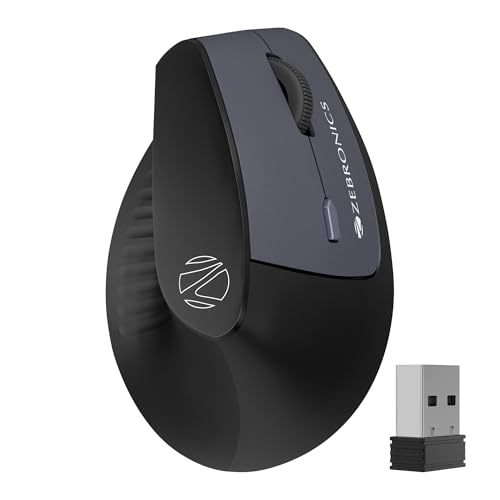
The ZEBRONICS Jaguar V offers a low-cost vertical design with 2.4GHz and Bluetooth connectivity. Dual Bluetooth pairing, six buttons, and a compact shape suit office users who move between devices.
Pros
- Natural vertical grip for long work sessions
- 2.4GHz and Bluetooth dual-mode connectivity
- Dual Bluetooth device support
- Three DPI settings up to 1600 DPI
Cons
- Uses two AAA batteries instead of a rechargeable cell
- Limited top DPI compared with rival models
- Right-hand vertical shape needs an adjustment period
- No stated silent-click feature
The Jaguar V keeps the hand in a more upright position and weighs little enough for regular desk use. Its three DPI levels reach 1600 DPI, which suits documents, web browsing, spreadsheets, and general office work. Six buttons add forward and back controls, reducing repeated use of browser controls.
Connection choice gives this mouse a practical edge. The 2.4GHz nano receiver works with many Windows, Mac, and Linux computers, while Bluetooth offers a cable-free option for compatible devices. Dual Bluetooth support helps users switch between two paired devices without repeated pairing steps.
The two AAA battery design avoids charging cables, though you need spare cells for uninterrupted use. ZEBRONICS has a broad retail and service presence across India, which helps with availability and basic support. Check the seller’s warranty terms and service process before purchase, since support experience can vary by city.
Portronics Toad Ergo 4
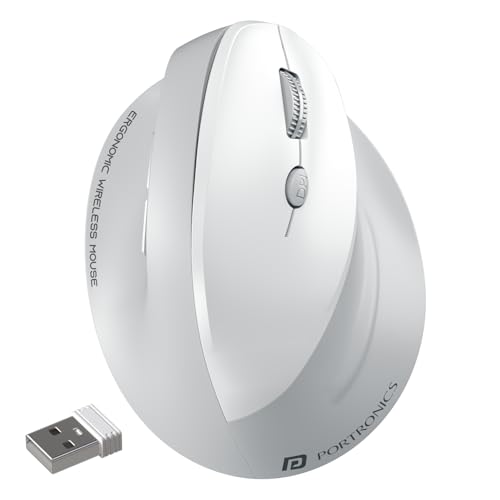
The Portronics Toad Ergo 4 combines a right-hand vertical grip with rechargeable power, four DPI levels, and dual-mode wireless support. Its quiet clicks and multi-device pairing suit shared offices and work-from-home desks.
Pros
- Rechargeable battery with Type-C charging
- DPI settings up to 4000 DPI
- Quiet clicking for office and shared spaces
- Supports Bluetooth and 2.4GHz connections
Cons
- Right-hand design does not suit left-handed users
- White finish needs more frequent cleaning
- Vertical shape takes time to feel natural
- Battery replacement becomes difficult after long-term wear
The Toad Ergo 4 gives you four sensitivity settings from 800 to 4000 DPI. Lower settings work well for spreadsheets and precise selections, while higher settings reduce hand movement across a wide monitor. Six buttons include navigation controls, useful for Chrome, file browsing, office work, and image editing.
A built-in battery and Type-C charging make daily use simpler than a cell-powered mouse. Bluetooth and the USB receiver support two connected devices, with a stated wireless range of up to 10 metres. Quiet clicks are helpful in a shared room, library, or late-night work setup.
Portronics sells accessories through major Indian online and offline channels, and its support network covers common metro and tier-two buying locations. Keep the invoice and verify warranty registration after delivery. The white shell looks clean at first, though Indian dust and regular handling require more wiping than a darker finish.
Acer Ergo Vertical Wireless Mouse
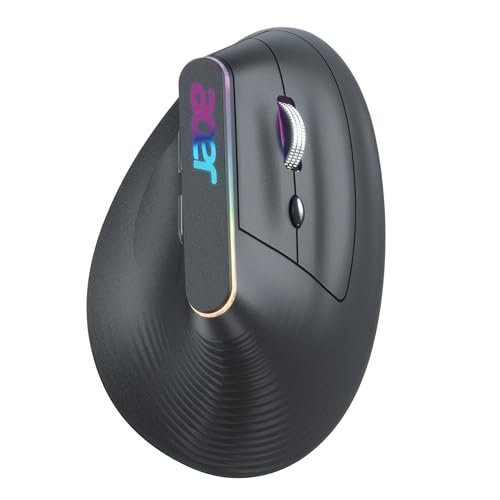
The Acer Ergo Vertical Wireless Mouse adds a rechargeable 500mAh battery, silent buttons, RGB lighting, and four DPI settings. This model suits users who want a quieter work mouse with a more decorative desk setup.
Pros
- Silent buttons rated for up to 3 million clicks
- Rechargeable 500mAh BIS-certified battery
- 2.4GHz and Bluetooth dual-mode connection
- Four DPI levels from 1200 to 3200 DPI
Cons
- RGB lighting may not appeal to office users
- Right-hand form limits hand-position options
- Larger body may feel awkward for small hands
- Brand support depends on local accessory service availability
The Acer model uses a tall grip with a thumb rest and six controls. DPI options from 1200 to 3200 cover routine office work, design tasks, and casual gaming. Silent left and right buttons reduce noise, while the stated 3-million-click rating gives the switches a useful durability target.
The 500mAh rechargeable battery reduces dependence on disposable cells. Bluetooth works well with compatible laptops and tablets, while the USB receiver suits desktop PCs and older laptops. RGB lighting adds a visual touch, though users who prefer a plain office accessory might leave the effect unused.
Acer has a familiar support and service presence in India through its laptop and monitor business. Accessory support still depends on the seller and the local service route, so retain purchase documents. The grey finish hides fingerprints better than white, and regular cleaning helps during humid weather or dusty desk use.
DQST Rechargeable Ergonomic Wireless Mouse

The DQST Rechargeable Ergonomic Wireless Mouse focuses on a simple 2.4GHz connection, a vertical grip, and basic productivity controls. Its rechargeable design suits buyers who want to avoid regular battery purchases.
Pros
- Rechargeable battery with stated use of up to seven days
- Ergonomic matte surface with vertical grip
- Three adjustable DPI settings
- Six-button layout with forward and back controls
Cons
- No Bluetooth connectivity
- Only three DPI levels
- USB receiver needs an available port
- Limited brand service presence in India compared with larger brands
This DQST mouse uses a 2.4GHz receiver with a stated range of up to 10 metres. Plug-and-play setup avoids extra drivers on supported Windows and Mac systems. Three DPI choices keep the controls simple, while forward and back buttons help during web browsing and file navigation.
The matte outer surface gives the hand a less slippery grip during long sessions. The rechargeable battery removes the need for AAA or AA cells, with the supplied information stating up to seven days of use depending on daily hours. Actual battery life will vary with usage and charging habits.
DQST offers a more basic support path than established Indian computer accessory brands. Confirm return coverage, warranty duration, and seller responsiveness before ordering. This mouse suits a fixed desktop or laptop setup, but users who switch between a laptop and tablet should choose a Bluetooth model instead.
Buying Guide
Choose a shape your hand can use
Vertical mice suit right-handed users who prefer a handshake-style grip. Measure your hand from wrist to fingertip and compare the result with the seller’s dimensions when available. A tall mouse with a wide thumb rest feels steadier for large hands, while a bulky body can tire smaller hands. Give yourself several work sessions before judging the shape.
Pick the right connection
A 2.4GHz receiver offers broad compatibility and quick setup on desktop computers. Bluetooth saves a USB port and suits modern laptops and tablets. Dual-mode models offer both options. Check whether your computer has USB-A, Bluetooth, or only USB-C ports. A USB-C adapter adds clutter and might reduce desk convenience.
Check DPI and cursor control
DPI changes cursor speed. Lower settings help with precise spreadsheet work, image edits, and small selections. Higher settings suit wide monitors and fast movement. Three settings cover basic work, while four levels give more control. Sensor quality and the surface beneath the mouse matter as much as the maximum DPI figure.
Think about battery use
Rechargeable models remove regular cell purchases and reduce desk waste. Check charging port type, stated battery capacity, and whether the mouse works during charging. AAA-powered models suit buyers who want quick battery replacement. Indian heat and long charging periods can affect battery life, so avoid leaving a rechargeable mouse plugged in for days.
Count the buttons you will use
Forward and back buttons help with browsers, folders, and research. A DPI button helps users change cursor speed without opening software. Extra controls bring value only when your daily work uses them. Check button placement carefully, since a poorly placed thumb button leads to accidental clicks.
Review software and system support
Plug-and-play receivers work well for basic mouse functions. Advanced remapping often needs brand software, and many budget vertical mice do not provide it. Confirm support for Windows, macOS, Linux, Android, or tablets based on your devices. Mac users should check whether every button works as expected.
Check build quality and cleaning needs
A vertical shell should sit firmly without rocking during a click. Inspect the scroll wheel, thumb rest, receiver storage, and charging port. Matte surfaces reduce slipping but collect dust in grooves. In humid Indian rooms, wipe the mouse with a dry or lightly damp cloth and keep liquid away from switches.
Verify warranty and local support
Keep the invoice, packaging, and serial details until the return period ends. Larger brands such as Acer, ZEBRONICS, and Portronics generally offer easier access to Indian support channels than lesser-known accessory labels. Service terms differ by model and seller, so read the warranty page before purchase. Test every button and both connection modes during the first week.
Feature Importance
| Feature | Importance |
|---|---|
| Vertical ergonomic shape | High |
| Hand size and right-hand fit | High |
| 2.4GHz receiver compatibility | High |
| Bluetooth support | Medium |
| Rechargeable battery | High |
| DPI adjustment | Medium |
| Silent clicking | Medium |
| Forward and back buttons | Medium |
| Build quality and scroll wheel | High |
| Warranty and Indian service access | High |