A good 27-inch 2K monitor changes your daily setup more than most people expect. You get sharper text than Full HD, more room for multitasking, and a better fit for both work and gaming. For many Indian buyers, this screen size and resolution combo hits the sweet spot. Excel sheets look cleaner, timelines feel less cramped, and games look richer without demanding as much from your PC as a 4K panel.
When you pick one, focus on panel type, refresh rate, stand adjustment, colour coverage, ports, and eye-care features. Your use case matters a lot. A gamer will care more about refresh rate, response time, FreeSync, and motion handling. A work-from-home user or editor will care more about colour accuracy, comfort during long hours, and ergonomic adjustment. I also look at service support in India because a monitor is the sort of product you want to keep for years, and a weak service network becomes a headache fast.
In the Indian market, value for money matters more than spec-sheet drama. Power fluctuations, warm rooms, dusty setups, and long daily usage are common here. So I prefer monitors from brands with decent after-sales support, practical features, and balanced performance. The five options below cover gaming, office work, content use, and mixed use without wasting your money on gimmicks.
Acer Nitro VG270U X1

This is the most gaming-focused option in this list. It mixes a sharp 27-inch IPS QHD panel with a 200Hz refresh rate, making it a strong pick for fast shooters, racing games, and users who want smooth motion without giving up image quality.
Pros
- 200Hz refresh rate gives a clear edge in fast games
- IPS panel offers better viewing angles and cleaner colours
- QHD resolution looks sharp on a 27-inch screen
- FreeSync Premium and HDR10 add useful gaming support
Cons
- Stand only offers tilt adjustment
- Built-in speakers are basic
- Colour gamut is good, but not aimed at pro colour work
- A gaming-first design may feel less office-friendly for some desks
The Acer Nitro VG270U X1 is for buyers who want a monitor that feels fast every single day. The 200Hz refresh rate is the first thing you notice if you move from a 60Hz or 75Hz panel. Cursor movement looks smoother, scrolling feels cleaner, and games gain a more direct feel. Pair that with the 0.5ms response figure and FreeSync Premium, and you get a screen built for quick reaction titles where frame handling matters.
Its IPS panel helps the monitor stay balanced. You are not stuck with washed-out colours or narrow viewing angles. The WQHD resolution looks right on a 27-inch size, giving you sharper text and more desktop space for work, editing, or study. DCI-P3 90 percent coverage also helps content look lively. HDR10 support is there too, though you should treat that as a nice extra instead of the main reason to buy.
For Indian users, this model makes sense if your setup does double duty. You work by day and game at night. The slim-frame design looks neat, VESA support helps if you want an arm mount, and the included speakers are fine for alerts or casual videos. Acer has a visible presence in India across laptops, monitors, and service centres, so support is usually easier to find than with smaller brands. The weak spot is ergonomics, since the stand only tilts, so many buyers will want a monitor arm later.
BenQ GW2790Q

The BenQ GW2790Q is a comfort-first 2K monitor made for office work, study, coding, and long daily use. Its 100Hz IPS panel, strong eye-care package, and practical colour modes make it one of the safest all-round picks for non-gaming buyers.
Pros
- Excellent eye-care feature set for long sessions
- 99% sRGB panel suits office and content viewing well
- 100Hz refresh rate makes daily use smoother than 60Hz
- Comes with a 3-year manufacturer warranty
Cons
- Not aimed at serious competitive gaming
- Stand adjustment is limited compared to ergonomic office models
- Response time is modest for fast motion work
- No gaming-focused sync features called out as key selling points
BenQ has built a strong name in India for monitors meant for long work sessions, and the GW2790Q follows that same approach. The 27-inch QHD IPS panel gives you enough room for side-by-side windows, spreadsheets, browser tabs, and writing work. The jump to 100Hz makes a bigger difference than many first-time buyers expect. Everyday movement looks cleaner, and your eyes feel less tired during long hours in front of the screen.
What makes this model stand out is the comfort package. BenQ includes Brightness Intelligence Gen 2, low blue light support, Eyesafe certification, ePaper mode, Coding mode, and M-Book mode. These are not throwaway extras. If you read a lot, code for hours, or sit under changing room light through the day, these modes help make the screen easier to live with. The 99 percent sRGB coverage also keeps colours accurate enough for regular design tasks, presentations, and media use.
This is the sort of monitor I would suggest to a student, remote worker, or anyone building a clean home office setup in India. Dual HDMI plus DisplayPort gives useful flexibility for laptops, desktops, and streaming devices. The bezel-light design looks modern without being loud. BenQ’s service reputation in India is usually seen as dependable in the monitor segment, and the 3-year warranty adds peace of mind. If your main aim is comfort, clarity, and low-stress daily use, this model stays easy to recommend.
MSI PRO MP275Q

The MSI PRO MP275Q is a simple and practical 27-inch 2K monitor for office users who want a sharp IPS panel, 100Hz refresh rate, built-in speakers, and useful eye-care features without paying for extras they may never use.
Pros
- 100Hz IPS panel feels smooth for work and general use
- 100% sRGB coverage is good for regular colour work
- Built-in speakers help in basic office setups
- Anti-glare coating and eye-care tools suit long usage
Cons
- Stand has tilt only, with no height adjustment
- Speakers are useful but weak for media-heavy use
- Not meant for high-speed competitive gaming
- Design is functional more than premium
The MSI PRO MP275Q keeps things straightforward, and that is part of the appeal. You get a 27-inch WQHD IPS panel with 100Hz refresh rate, so the core experience already feels better than a basic office monitor. Text looks sharper, your desktop fits more content, and moving around Windows feels smoother. If you work on documents, dashboards, browser tabs, or online classes every day, that alone makes a visible difference.
MSI also gives this monitor useful details instead of filler. There is TÜV Rheinland eye comfort support, less blue light mode, anti-flicker tech, anti-glare treatment, and the Eye-Q Check tools. The 100 percent sRGB coverage helps for regular photo work, social media content, and presentation design. Built-in speakers are handy in Indian office and study setups where you do not want extra wires and separate desktop speakers cluttering a compact table.
This monitor fits buyers who want a clean, no-nonsense 2K screen for work, classes, or mixed home use. HDMI and DisplayPort cover the basics well, and the VESA mount support helps if you plan to add an arm later. MSI’s support network in India has grown because of its PC parts and gaming products, though the service experience still varies by city. The main compromise is the stand. You only get tilt, so heavy desk users may miss height adjustment after a few weeks.
LG UltraGear 27GS60QC

The LG UltraGear 27GS60QC is a curved QHD gaming monitor for buyers who want strong motion performance and deeper contrast. Its 180Hz refresh rate, 1ms response claim, 1000R curve, and gaming tools make it a solid pick for immersive PC and console play.
Pros
- 180Hz refresh rate is excellent for fast gaming
- 1000R curved screen adds a more focused feel in games
- VA panel offers deeper blacks and strong contrast
- LG gaming features like Black Stabilizer improve usability
Cons
- VA panel may show some motion smearing in certain dark scenes
- Colour consistency is not as strong as a good IPS panel
- Stand adjustment is limited to tilt
- Less suitable for strict colour-accurate creative work
The LG UltraGear 27GS60QC is built for people who want their monitor to feel more immersive the moment they sit down. The 1000R curve pulls the edges closer into your field of view, which works well in racing games, story titles, and long single-player sessions. Add the 180Hz refresh rate and 1ms response spec, and you get a screen that feels quick and responsive in shooters too. For gamers moving up from an older 60Hz or 75Hz display, the difference is easy to notice.
LG has used a VA panel here, and that brings a different flavour from the IPS options in this list. You get stronger contrast and deeper blacks, which helps a lot in darker game scenes and movie watching at night. HDR10 support and sRGB 99 percent coverage help keep visuals rich. The monitor also packs useful gaming tools like AMD FreeSync, Black Stabilizer, Dynamic Action Sync, and preset modes for FPS and RTS play. Those features are practical, not decorative.
For Indian buyers, LG has one big edge beyond the spec sheet. The brand has one of the widest service networks in the country, and that matters when you buy a monitor for long-term use. The anti-glare coating helps in bright rooms where tube lights or window glare hit the screen. The 3-side borderless design also looks clean on a desk. Keep in mind that VA panels are not everyone’s favourite for office-first use, and the stand is basic, but for gaming-led buyers this model makes strong sense.
MSI PRO MP275QPG
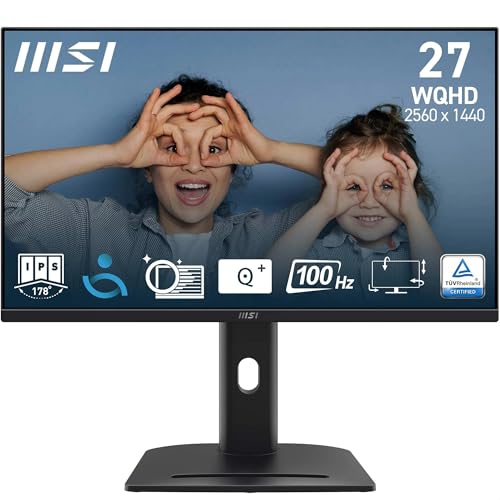
The MSI PRO MP275QPG is the best office-focused ergonomic choice in this list. It takes the sharp 27-inch 2K IPS formula and adds a 4-way adjustable stand, making it far more comfortable for long work sessions, shared desks, and home office use.
Pros
- 4-way ergonomic stand adds major comfort for long hours
- 100Hz QHD IPS panel is ideal for office and study work
- 100% sRGB panel is useful for general creative tasks
- Adaptive Sync and HDMI-CEC add extra flexibility
Cons
- Less gaming-focused than high refresh alternatives
- Design feels plain compared to gaming models
- No mention of built-in speakers in the listed features
- MSI service quality depends more on location than LG or Acer
Among these five, the MSI PRO MP275QPG stands out because of one thing many buyers ignore at first, ergonomics. A 4-way adjustable stand changes your day far more than a flashy spec line. Height, tilt, swivel, and pivot options help you sit better, keep the top of the screen at eye level, and reduce neck strain during long office or study hours. If you spend six to ten hours at your desk, this matters a lot.
The rest of the package is solid too. You get a 27-inch WQHD IPS panel with 100Hz refresh rate, 100 percent sRGB coverage, 300 nits brightness, anti-glare treatment, and TÜV eye-comfort features. So this is not an ergonomic monitor with average image quality. It still gives the sharpness and smoothness most people want in a modern work setup. MSI also adds Display Kit support for extra settings, plus HDMI 2.0b and DisplayPort 1.2a for easy desktop or laptop pairing.
This model fits Indian users who are building a serious work desk at home, especially people in coding, writing, finance, design support, or hybrid office jobs. HDMI-CEC support also helps if you connect a console or media device. Kensington lock support is useful in office spaces and shared environments. MSI’s service reach is decent in larger cities and improving over time, though LG and BenQ still feel more reassuring to some buyers on pure service perception. If comfort matters as much as screen quality, this monitor deserves a close look.
Buying Guide
Pick the right panel for your use
Start with panel type. IPS suits most buyers because you get better viewing angles, stable colours, and a cleaner look for work, movies, and mixed use. VA panels give deeper blacks and stronger contrast, which many gamers and movie fans like, especially in dark rooms. If your desk is also your work desk, IPS is often the safer pick. If gaming and contrast matter more, a VA model like the LG has its own appeal.
Refresh rate matters even outside gaming
Many people still think 100Hz and above is only for gaming. That is not true. A 100Hz monitor makes scrolling, cursor movement, app switching, and window dragging look smoother. If you use your PC for hours daily, you will notice the difference. For office users, 100Hz is a good baseline now. For gaming, 180Hz or 200Hz gives a better edge in fast titles if your graphics card is strong enough.
QHD resolution is a sweet spot at 27 inches
A 27-inch Full HD monitor often looks soft, especially when you sit close. QHD, also called 1440p or 2K, looks much sharper at this size. Text is clearer, spreadsheets fit more columns, and editing timelines feel less cramped. This is one of the best upgrades for anyone moving from an older budget display. Make sure your laptop or desktop supports QHD output through HDMI or DisplayPort before you buy.
Do not ignore stand adjustment
This is where many buyers make a mistake. A great panel with a poor stand becomes tiring after a few weeks. If you sit for long hours, try to get height adjustment at least. Tilt-only stands are fine for casual use, but office workers and students will feel the difference with a better ergonomic stand. If your chosen monitor lacks adjustment, factor in the cost of a VESA monitor arm.
Ports and compatibility need a quick check
Look at the ports on your laptop, desktop, console, or docking setup before placing the order. DisplayPort is often the best way to get the highest refresh rate on PC gaming monitors. HDMI is more common for laptops and consoles. If you switch between work and play on the same monitor, dual HDMI plus one DisplayPort is a practical setup. Audio out also helps if you use wired speakers or headphones.
Eye-care features help in Indian home setups
Long screen time is common now, and many Indian homes deal with mixed lighting through the day. Eye-care features like anti-flicker, low blue light modes, anti-glare coating, ambient brightness adjustment, and reading modes are useful in real life. They do not fix bad sitting posture, but they reduce strain during long office work, classes, and night sessions. BenQ and MSI do well in this area.
Service network matters more than people think
Monitors are long-term purchases, so after-sales support should not be an afterthought. Dead pixels, backlight issues, adapter problems, and panel faults are easier to deal with when the brand has a known service presence in India. LG has broad reach, Acer is widely available, BenQ has a good monitor reputation, and MSI has improved, though support quality depends more on city and service partner. Keep your invoice and check warranty terms on arrival.
Feature Importance
| Feature | Importance |
|---|---|
| Panel type | High |
| Resolution | High |
| Refresh rate | High |
| Stand ergonomics | High |
| Colour accuracy | High |
| Ports and connectivity | High |
| Eye-care features | Medium |
| Built-in speakers | Low |
| HDR support | Medium |
| Warranty and service support | High |