


Quick answer: my top pick here is Zebronics Force. Also in this guide: Zebronics Mercury, Zebronics Robust, Frontech Daisy FT-4401, Zebronics Debonair.
A good PC cabinet does more than hold your parts. It affects airflow, dust control, upgrade space, cable management, and even how easy your build feels on day one. If you are putting together a compact office PC, a home desktop, or an entry gaming rig, the right micro ATX cabinet saves you from heat issues and fitting problems later.
In India, this choice matters even more. Many buyers deal with warm rooms, dust build-up, patchy after-sales support, and tight budgets. I always suggest checking motherboard size support, GPU clearance, fan support, front I/O, drive bays, and PSU placement before you buy. A flashy cabinet looks nice, but practical details make your system easier to live with over time.
The five cabinets below cover simple budget builds, slim office setups, and gaming-focused cases with tempered glass and pre-installed fans. All of them support micro ATX or mini ITX boards, but they suit different users. So pick based on your hardware plan, your room conditions, and how much upgrade headroom you want.
Zebronics Force
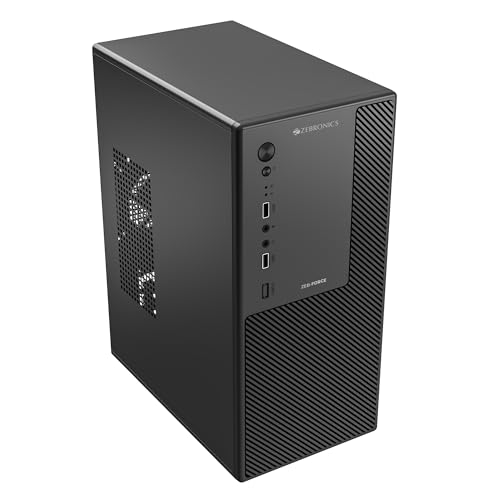
Zebronics Force is a basic micro ATX cabinet for budget desktop builds. It suits office systems, student PCs, and simple home setups where you want a compact case with usable storage support.
Pros
- Supports micro ATX and mini ITX motherboards
- Space for two 3.5-inch HDDs and two 2.5-inch SSDs
- Front USB ports and audio jack are easy to access
- Perforated side panel helps basic ventilation
Cons
- No pre-installed cooling fan mentioned
- Top-mounted PSU design feels dated
- Limited GPU clearance for larger graphics cards
- Not aimed at high-end gaming builds
Zebronics Force keeps things simple. This is the sort of cabinet people buy for a work PC, family desktop, billing machine, or a low-cost study setup. You get support for micro ATX and mini ITX motherboards, along with enough drive space for users who still keep a mix of SSD and HDD storage. That matters in India, where many buyers reuse older drives to save money.
The case supports graphics cards up to 250mm, so it fits entry-level and some mid-size GPUs, but you need to measure before buying. Ventilation comes from the perforated side panel and support for a rear 80mm or 90mm fan. In a hot Indian summer, I would strongly suggest adding that rear fan if your processor runs under load for long hours. Without extra airflow, compact cases like this warm up fast.
Zebronics has broad brand visibility in India and service access is usually easier than many smaller cabinet brands sold online. That gives some peace of mind for first-time builders. The Force is not made for showpiece gaming setups. It is for buyers who want a no-fuss box for daily use, light expansion, and decent storage flexibility.
Zebronics Mercury

Zebronics Mercury is a gaming-style micro ATX chassis with tempered glass, dual chamber layout, and ARGB support. It fits users who want a compact build that still looks modern on a desk.
Pros
- Wraparound tempered glass gives a premium look
- Supports 240mm AIO cooling
- Dual chamber design helps cleaner cable routing
- Includes ARGB fan and motherboard sync support
Cons
- Tempered glass needs more frequent cleaning in dusty rooms
- Compact size limits extreme hardware combinations
- Airflow depends on how you populate fans
- Glass panels add weight and need careful handling
Mercury is clearly made for people who care about looks along with function. The wraparound tempered glass design gives the cabinet a much cleaner and more premium desk presence than plain steel budget cases. If your PC sits in the living room, bedroom, or gaming corner, this sort of design feels more special every day. The dual chamber layout also helps you hide cables and PSU clutter better, so the build ends up looking neater.
Functionally, the cabinet brings useful features for a compact gaming setup. You get support for micro ATX and mini ITX boards, room for a 240mm AIO, a bottom PSU layout, one USB 3.0 port, two USB ports, and ARGB sync support. For Indian users building a mid-range gaming PC, these are practical upgrades over entry-level cabinets. Bottom PSU placement usually helps balance airflow and keeps the internal layout cleaner.
You do need to be realistic about maintenance. Tempered glass cases pick up fingerprints and dust faster, and many Indian homes deal with both. If your room gets dusty, regular cleaning is part of ownership. Zebronics still has the advantage of strong retail presence and familiar service support across India. Mercury makes sense for buyers who want a stylish compact gaming case without stepping into oversized cabinets.
Zebronics Robust

Zebronics Robust is a compact gaming cabinet with three pre-installed LED fans, tempered glass, and better dust filtering than basic budget cases. It is a good fit for users who want airflow and cleaner internals in a smaller chassis.
Pros
- Comes with three pre-installed 120mm fans
- Top magnetic and bottom detachable dust filters included
- Supports CPU coolers up to 165mm height
- Cable management is better than most entry cabinets
Cons
- GPU clearance is limited to 255mm
- White finish needs more cleaning over time
- Supports only micro ATX and mini ITX boards
- Multicolor LED fans are less flexible than full ARGB setups
Among these five, Zebronics Robust feels more balanced for a compact gaming build. You get front and side tempered glass, three included 120mm fans, dust filters on top and bottom, and proper cable management support. Those details matter a lot in India. Dust is a daily issue in many homes, and if a cabinet has no filters, cleaning the inside becomes a regular headache. Here, Zebronics has at least thought about that part.
The cabinet supports graphics cards up to 255mm and CPU coolers up to 165mm. That gives decent room for many mainstream gaming parts, though larger triple-fan GPUs will need a careful fit check. I like that the cooling setup is already usable out of the box. For buyers who do not want to spend extra on fans after the cabinet purchase, this makes the build process easier and more cost-effective.
The white version looks fresh and stands out from the usual black box cabinets, but white surfaces do show dust sooner. If your room is near a road-facing window or under a ceiling fan all day, expect regular wipe-downs. Zebronics service reach again works in its favour. Robust suits gamers and enthusiasts who want stronger airflow, some visual flair, and better day-to-day practicality in a micro ATX size.
Frontech Daisy FT-4401

Frontech Daisy FT-4401 is an ultra-slim micro ATX cabinet built for office desks and tight spaces. Its built-in 500W PSU makes it appealing for basic productivity systems and simple home PCs.
Pros
- Ultra-slim design saves desk space
- Built-in 500W PSU reduces upfront component buying
- Supports micro ATX and mini ITX motherboards
- Front panel includes USB 3.0 and HD audio
Cons
- Slim design limits upgrade flexibility
- Built-in PSU is less ideal for demanding GPUs
- Thermal headroom is lower than standard tower cases
- Aesthetics are plain and office-focused
Frontech Daisy FT-4401 takes a different route from the gaming-style cabinets in this list. It is made for compact practical systems where space is the first concern. If you have a small office table, reception desk, shop counter, or study corner, the slim body makes a big difference. Many Indian buyers do not have room for a bulky tower, so a cabinet like this fits real homes and workplaces better.
The built-in 500W PSU is the main selling point. For a basic PC used for billing, browsing, classes, MS Office work, or media playback, this reduces the number of separate components you need to buy. That is useful if your goal is a straightforward build without chasing premium hardware. You also get USB 3.0, USB 2.0, and HD audio on the front panel, which keeps daily use convenient.
This cabinet is not meant for serious gaming upgrades or heat-heavy parts. Slim cabinets always trade expansion room for convenience. So if you plan to install a large graphics card or a big air cooler later, this is the wrong choice. Frontech is known more in the value segment, and service experience depends more on seller and local availability than with larger mass-market brands. Even so, Daisy works well for simple systems where size and bundled PSU matter more than fancy looks.
Zebronics Debonair

Zebronics Debonair is a compact budget cabinet for entry-level desktop builds. It works well for users who want a simple micro ATX case with decent drive support and basic front connectivity.
Pros
- Supports micro ATX and mini ITX motherboards
- Can hold two HDDs and two SSDs
- Front USB ports and audio jack add convenience
- Perforated side panel helps with basic airflow
Cons
- No included fan listed
- GPU support is limited to 240mm
- Top-mounted PSU reduces modern airflow efficiency
- Best suited to low-power or moderate builds
Debonair follows the same practical budget formula as Force, with a few fitment differences. It supports micro ATX and mini ITX motherboards, offers room for two hard drives and two SSDs, and keeps front I/O simple with USB ports and audio access. For many Indian users building a family PC or office desktop, this is enough. You get the essentials without paying for glass panels, RGB lighting, or features you may never use.
The graphics card clearance here is up to 240mm, so this case is best paired with integrated graphics, low-profile GPU plans, or shorter entry-level cards. There is provision for a rear 80mm or 90mm fan, and I would treat that as a needed add-on rather than an optional extra if your system sees long work sessions. Compact budget cabinets need airflow help, especially in cities where ambient temperatures stay high for months.
Zebronics has a comfort factor in India because spare availability, brand familiarity, and offline market presence are better than many unknown names. Debonair fits buyers who want a low-cost cabinet for normal use and do not need a flashy build. If your focus is daily reliability, compact size, and support for older storage drives, it does the job well.
Buying Guide
Check your motherboard size first
This is the first filter. All five cabinets here support micro ATX and mini ITX boards. If you already own an ATX motherboard, these cases will not work. Before placing your order, confirm the exact board size from the motherboard box or product page. Many first-time builders miss this and end up with a fitting issue on build day.
Think about your build type, office PC or gaming PC
A slim office cabinet and a glass gaming cabinet serve different needs. If you want a billing PC, study desktop, or family system, a compact cabinet like the Frontech Daisy makes more sense. If you plan to add a discrete GPU, better cooling, and RGB parts, cases like the Zebronics Mercury or Robust are more suitable. Buy for your use case, not for photos.
Airflow matters more in Indian conditions
Indian rooms often run warm for long periods, and dust enters fast through windows, doors, and ceiling fans. So fan support, vent placement, and dust filters deserve close attention. A cabinet with pre-installed fans or proper support for extra fans saves trouble later. If your area faces long summers, avoid picking a case with weak ventilation for a performance build.
Measure GPU and cooler clearance carefully
Small cabinets often create the biggest compatibility problems. Check graphics card length, CPU cooler height, and PSU size before you buy. For example, shorter GPU support in budget cabinets can block many modern cards. If you are building now with integrated graphics but plan a GPU later, leave headroom from day one.
Do not ignore front I/O and storage support
Front USB and audio ports matter every day. If you connect pen drives, headphones, keyboard receivers, or phone cables often, easy front access saves effort. Storage support also matters if you reuse older hard drives. Some compact cabinets still do a good job here, while slim designs often need more planning.
PSU placement changes the build experience
Top-mounted PSU designs are common in lower-cost cabinets. They are fine for simple systems, but bottom-mounted PSU layouts usually make cable routing and airflow cleaner. If you want a tidy gaming build, bottom PSU cases feel easier to work with. If your goal is a basic home or office PC, a top-mounted PSU layout is still workable.
Dust filters and easy cleaning help in the long run
This point gets ignored during purchase and then becomes annoying later. If your room gathers dust quickly, a cabinet with top and bottom filters reduces cleaning effort. Tempered glass also needs regular wiping because dust and fingerprints show fast. Pick a case you will be comfortable maintaining every few weeks.
Brand support and local availability still matter
Even a cabinet is easier to buy when the brand has decent presence in India. Missing screws, damaged panels, or front I/O issues are easier to sort out when the seller network and service access are familiar. Zebronics has wider visibility in Indian online and offline markets. Smaller value brands may still be fine, but support quality can vary by city and seller.


