


Quick answer: my top pick here is Archer Tech Lab Astra M300. A compact 75 percent mechanical keyboard with blue switches and triple‑mode connectivity, ideal for gamers and remote workers who want one board for everything. Also in this guide: Ant Esports MK1720 Pro, HP GK400Y Mechanical, Redragon K617 Fizz, EvoFox Katana X2 FS.
A good gaming keyboard changes how you play, type, and even how your desk looks. For Indian users, a solid keyboard helps with long office hours, late‑night ranked matches, and everything in between. You get better key feedback, faster response, plus nicer lighting for those night sessions when the rest of the house sleeps.
While choosing a gaming keyboard in India, you need to think about switch type, size, connection options, lighting, and brand support. Mechanical keyboards feel sharper and last longer, while membrane models stay quieter and cheaper to replace. You also need to think about desk space in small rooms, backup during power cuts with laptops, and long‑term durability in dusty and humid conditions.
This list picks 5 gaming keyboards that offer strong value for Indian buyers, from full‑size options for work and play to compact 60 percent boards for tight setups. I focus on real use, comfort, and how these brands handle support and warranty inside India, instead of only specs on paper.
Archer Tech Lab Astra M300

A compact 75 percent mechanical keyboard with blue switches and triple‑mode connectivity, ideal for gamers and remote workers who want one board for everything.
Pros
- Mechanical blue switches with tactile, clicky feedback
- Triple‑mode connection Bluetooth, 2.4 GHz wireless, and wired USB
- Compact 84‑key layout saves desk space
- RGB lighting with transparent body and software customisation
Cons
- Clicky blue switches are noisy for shared rooms
- Battery needs charging in wireless mode
- Transparent body attracts fingerprints and dust
- Brand service network smaller than big legacy brands
Archer Tech Lab Astra M300 targets users who want a single keyboard for gaming, office work, and multi‑device use. The 75 percent layout keeps the function row and arrows while cutting some extra keys, so your mouse gets more room even on a narrow table. The mechanical blue switches give a crisp and clicky feel that works well for both fast typing and quick in‑game inputs. Rated for more than 20 million presses, the switches should survive long college or office use.
Triple‑mode connectivity is a big plus in Indian homes where you might jump between a work laptop, a personal PC, and sometimes a tablet or console. You get Bluetooth, a 2.4 GHz wireless receiver, and a standard wired USB option. For serious ranked matches, you can plug in the cable for lowest latency. For casual work calls or couch use, Bluetooth or 2.4 GHz works fine. The 2000 mAh battery, along with auto sleep mode, helps stretch usage between charges, useful in places with frequent plug point sharing.
The transparent body and keycaps with 20 RGB effects give the keyboard a strong visual presence on the desk, which many Indian gamers like for streaming setups or Insta‑ready rigs. At the same time, transparent plastic shows dust, so regular cleaning suits Indian city conditions with pollution and dust. Software support for macros and key remapping is handy if you play MMOs, or if you want shortcuts for editing, coding, or design work. Archer Tech Lab is still a smaller brand compared to HP or Logitech, so service centers are fewer, but they provide a standard 6‑month warranty and email support in India, which is reasonable for this price segment.
Ant Esports MK1720 Pro
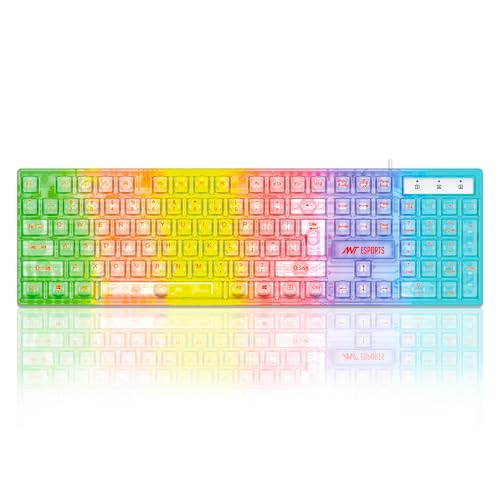
A full‑size 104‑key membrane gaming keyboard with transparent body and rainbow lighting, suitable for budget gamers and office users who want style without mechanical noise.
Pros
- Full‑size 104‑key layout suits work and gaming
- Membrane keys stay quieter than mechanical switches
- Transparent design with rainbow LED lighting
- Plug and play USB connection with wide compatibility
Cons
- Membrane feel is softer and less precise than mechanical
- Fixed rainbow lighting, no per‑key RGB
- Backlight ambience not supported on Mac
- Build uses PVC, so not as premium as metal decks
Ant Esports MK1720 Pro targets users who want a gaming look without paying mechanical keyboard money. The full‑size layout with 104 keys suits those who use number keys for Excel, billing software, or game hotkeys. The membrane keys have a soft and quiet press, useful in Indian homes where you share a room or live in a joint family and do not want loud clicks disturbing others at night.
The transparent PVC top and rainbow backlight create a colourful glow that fits RGB builds and café‑style setups. The lighting is fixed rainbow style rather than full custom RGB, which keeps things simple. There is a note though, the special ambience effect does not work when connected to Mac, so MacBook users get a more basic look. For Windows PC users, plug and play USB means no driver tension. Connect to desktop, laptop, or Linux box and start typing.
Weighing around 390 grams, the keyboard stays light enough to carry between hostel, home, and office. The build claims 10 million keypress life, which is fine for a budget membrane keyboard used in Indian weather where dust and unexpected spills are common. Ant Esports has grown in the Indian gaming market with mousepads, cabinets, and peripherals, so spares and warranty handling usually happen through online support and retailer tie‑ups rather than dedicated service centers in every city. For users on a tight budget who still want a gaming feel and lighting, MK1720 Pro fits well.
HP GK400Y Mechanical

A full‑size mechanical gaming keyboard from HP with RGB backlight, designed for users who want solid typing comfort and a known brand name.
Pros
- Full‑size layout with comfortable spacing
- Mechanical construction with dust and splash resistance
- RGB backlit keys with Light Sync effects
- HP brand support with wide service presence in India
Cons
- Wired only, no Bluetooth or 2.4 GHz
- Heavier than compact options
- Switch type and feel not as clearly specified as enthusiast boards
- RGB customisation more basic than some gaming brands
HP GK400Y Mechanical Keyboard aims at buyers who prefer a trusted brand with better warranty reach across India. The full‑size design with metal panel feels sturdy on the desk and gives enough space between keys for comfortable long sessions. The mechanical mechanism offers more accurate and consistent response than cheap membrane boards, useful if you switch between coding, writing reports, and playing shooters.
HP mentions dust and splash resistance on the metal panel, which suits Indian environments with dust, fan breeze, and the usual tea or coffee near the PC. RGB backlighting with Light Sync lets you choose colour patterns suitable for your setup, and there is an auto sleep mode so the lighting does not waste power when not in use. This matters for people who leave the PC on overnight or in office setups where multiple users share the same keyboard.
The keyboard uses a wired USB connection. So you avoid wireless lag and battery charging, but you lose the flexibility of moving around with a laptop on the sofa. For many Indian users with a fixed desk PC, this is not a problem. What helps is HP’s large service network with service centers in tier 1 and many tier 2 cities. Warranty claims are easier compared to lesser‑known brands, especially if you buy through authorised channels. For users who want reliability, comfort, and RGB without going into hardcore custom mechanical territory, GK400Y is a safe and sensible pick.
Redragon K617 Fizz
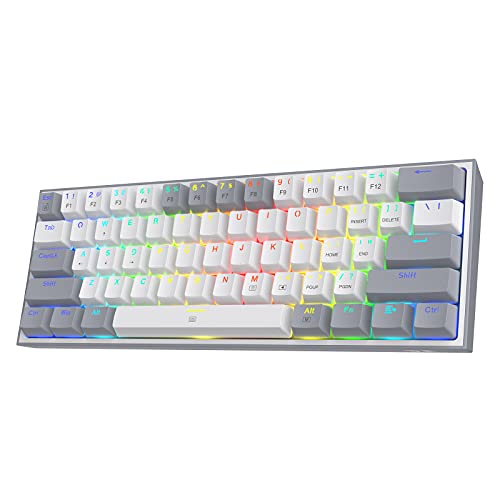
A 60 percent wired mechanical gaming keyboard with linear red switches, ideal for FPS players and users with tight desk space.
Pros
- Compact 60 percent layout saves a lot of space
- Linear red switches feel smooth and fast
- Hot‑swappable sockets support 3 and 5 pin switches
- RGB with up to 20 preset modes and software support
Cons
- No dedicated arrow or function row keys
- Wired only, no wireless option
- Learning curve for new users due to compact layout
- Red switches offer less tactile feedback for typing lovers
Redragon K617 Fizz focuses on FPS gamers and minimal setups. The 60 percent layout removes the number pad, function row, and dedicated navigation keys, which frees a big chunk of desk space. This helps if you game on a small table in a hostel or share a desk with books and a laptop. With more space for your mouse, flick shots in Valorant or CS feel smoother, which many players in Indian cafés and home setups prefer.
The stock linear red switches offer light and smooth keystrokes with low noise compared to clicky blue switches. They suit fast gameplay where you spam keys like WASD, jump, and abilities. For people who type long emails or code, the lack of a tactile bump might need some adjustment, but you gain speed. A big plus here is hot‑swappable sockets that take both 3 pin and 5 pin mechanical switches. That means you can try different switch types later without soldering, which attracts hobbyists and people who like to tune their keyboard once they get into the hobby.
RGB lighting with up to 20 preset modes runs directly from the keyboard. You can adjust brightness and speed on board, no extra software required, which helps in low‑spec office PCs or school machines. If you want deeper control, Redragon software lets you set macros and custom effects. In India, Redragon has a decent presence through online channels and offers service via distributors. Service centers are not as widespread as HP, but for a niche gaming brand they handle replacement fairly well. K617 Fizz works best for gamers who know they want a compact layout and do not need a number pad or dedicated arrows all the time.
EvoFox Katana X2 FS
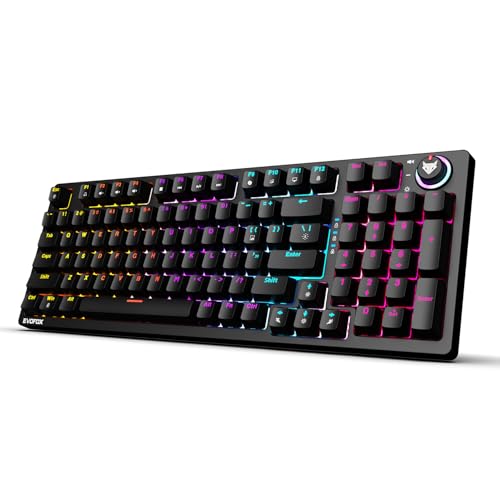
A full‑size mechanical gaming keyboard with hot‑swappable blue switches, volume knob, and function shortcuts, built for Windows gamers who like clicky feedback.
Pros
- Hot‑swappable 3 pin clicky blue switches
- Full‑size layout with dedicated multimedia keys
- Volume and brightness knob for quick control
- All keys anti‑ghosting for accurate inputs
Cons
- Blue switches are loud for shared spaces
- Main focus on Windows features like Copilot and Game Bar
- No wireless connectivity
- Brand service network smaller than traditional PC brands
EvoFox Katana X2 FS brings a full‑feature experience aimed at PC gamers who spend long hours in Windows. The hot‑swappable 3 pin blue switches provide crisp, clicky feedback, which many typists and gamers in India enjoy. Over time, if a switch starts double pressing or you want a different feel, you can pull out the switch and drop in a new one without soldering. This extends the life of the board and lets you upgrade piece by piece instead of throwing the whole keyboard away.
The keyboard includes all keys with full anti‑ghosting, so fast inputs in games like FIFA, racing titles, and MMOs register correctly even if you press many keys together. The multi‑function knob on the top lets you adjust volume or lighting brightness quickly, useful during late‑night use when you need to lower sound or reduce glare without alt‑tabbing. Dedicated keys for Copilot, Xbox Game Bar, and Screenshot target modern Windows 11 features, which helps streamers and content creators who clip highlights often.
Backlighting is described as vivid and dynamic with 11 lighting modes, so you get enough options to match your desk mood without the complexity of full software ecosystems. EvoFox is an Indian gaming brand linked with Amkette, which has been in the accessories space for years. That helps with local support and replacement across major cities, though the network still does not match big global giants. For Indian users who want a clicky mechanical keyboard with knobs, media keys, and easy repair options, Katana X2 FS offers a balanced package for PC gaming and day‑to‑day typing.
Buying Guide
Set a realistic budget for your setup
Before you add a keyboard to cart, think about your full setup. Many Indian buyers have to plan for monitor, mouse, headphones, and even inverter or UPS. Decide how much you want to allocate to the keyboard without affecting those. Mechanical boards cost more than membrane ones but last longer and feel better. For tight budgets, a solid membrane gaming keyboard works fine for casual play. If you game daily or type for work, spending a bit more on a good mechanical model makes sense over time.
Choose the right switch type for your fingers
Switch type decides how the keyboard feels and sounds. Blue switches are clicky and tactile, good for people who like strong feedback but loud for shared rooms or small flats. Red switches feel smoother and lighter, better for fast gaming and quieter use, but some find them less satisfying for long typing. Membrane keys stay soft and silent but less precise. Think about your room situation, flatmates, family, and whether you work at night. For Indian homes with thin walls, quieter switches often cause fewer fights.
Pick the layout based on space and usage
Full‑size keyboards suit office work, coding, and games that use many hotkeys because you get number pad, arrows, and full function row. They need more space, which might be a problem on narrow hostel tables or shared desks. Compact 75 percent and 60 percent layouts free more mouse space, which helps FPS gamers. The tradeoff is extra function layers for arrows and navigation keys. If you use Excel, finance software, or do a lot of data entry, stick to full‑size. If your focus is shooters and you have little space, a smaller layout works better.
Decide between wired and wireless
Wired keyboards provide stable performance without battery tension. They suit desktops and fixed setups. Wireless and Bluetooth models suit people who connect to laptops, tablets, and consoles, and those who like a clean table with fewer cables. In India, where some homes face frequent power cuts and people move between rooms, wireless use with a laptop feels convenient. At the same time, wireless models cost more and need charging. For serious competitive gaming, most players still choose wired for lowest input lag.
Check build quality for Indian conditions
Dust, heat, and humidity in many Indian cities put extra stress on keyboards. Look for stronger frames, preferably with metal top plates for mechanical models, and at least some level of dust resistance. If you eat or drink near your PC, splash resistance reduces risk from chai and cold drink spills. Transparent and glossy plastics look nice under RGB but show scratches and fingerprints faster, so be ready to wipe them often. Keycaps with anti‑fade legends help because cheap printing wears off quickly in sweaty weather.
RGB lighting and customisation needs
RGB looks nice but also has practical benefits during night use or dim rooms. Some keyboards have fixed rainbow effects while others offer per‑key custom settings and software control. If you record videos or stream, more custom lighting helps your setup stand out. For simple home use, a few presets with brightness control are enough. In smaller towns where power saving matters, look for auto sleep features so lights switch off when not in use. That reduces strain on both power bills and components.
Warranty, service, and brand support in India
Before finalising, check how the brand handles after‑sales support. Big names like HP have wide service networks with walk‑in centers in many cities. Gaming‑focused brands often use online ticket systems and pickup‑and‑drop warranty. See the warranty period, usually 6 to 24 months, and keep bill and box safe. On marketplaces, check seller rating and presence of official brand store. In India, claiming warranty through authorised partners saves time compared to unknown importers with no proper channel.
Compatibility and extra features
Most gaming keyboards work on Windows with simple USB plug and play. For Mac and Linux, basic keys work but some lighting effects and software features might not run. If you use hotkeys for volume, media, and screenshots, pick a model with clear legends and simple shortcuts. Features like hot‑swappable switches help tinkerers and increase product life. Knobs for volume or brightness feel helpful during late‑night movies or sudden calls. Check all these against your daily routine before you decide.
More models worth a look
These came up in earlier guides on the same topic and are still on sale.
FRONTECH KB-0008P Dragon Fox
This compact wired gaming keyboard suits casual players who want a small footprint, rainbow lighting, and plug and play setup. Its 35 anti-ghosting keys make it a sensible pick for basic gaming on a PC or laptop. See it on Amazon
ZEBRONICS Optimus Keyboard Mouse Combo
The ZEBRONICS Optimus combo is a value-focused set for buyers who want both keyboard and mouse in one purchase. You get a full-size layout, macro keys, lighting control, and a mouse with adjustable DPI. See it on Amazon
Keyboard Mouse Combo with OTG USB Hub
This wired full-size combo is built for a different kind of buyer, someone who wants keyboard and mouse use on Android phones, tablets, laptops, and desktops. The OTG hub makes it useful for mobile gaming and basic office work. See it on Amazon


