


PCIe riser cables and GPU mount kits look like small PC parts, but they matter a lot when you build a gaming PC, workstation, or mining setup. A bad riser can bring random crashes, display drops, boot issues, or lower link speed. A good one gives you clean installation, stable signal transfer, and better room management inside the cabinet. If you want vertical GPU mounting for looks or extra clearance, or you need risers for multi-GPU mining, choosing the right type saves time and stress.
When you pick one, focus on the job first. A PCIe 4.0 x16 riser for an RTX or RX gaming card is a different product from a mining riser or a PCIe splitter. Check PCIe generation support, cable length, shielding, power delivery method, build quality, and case compatibility. In India, this matters even more because many buyers order these parts online and returns take time. Dust, heat, and long daily usage also put extra pressure on low-quality connectors and cables.
I would also say value for money matters more here than chasing fancy branding alone. Some buyers need a sturdy vertical mount for a premium build. Others need simple risers for a mining frame. The best pick depends on your motherboard slot layout, GPU size, cabinet space, and the kind of system you run every day.
LipiWorld VER012-PRO Riser Card
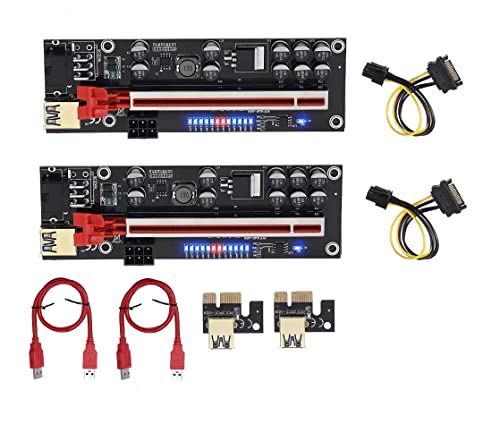
This is a mining-focused PCIe 1x to 16x riser kit built for multi-GPU rigs. It suits users who want a simple, widely compatible riser with separate GPU power input and flexible placement.
Pros
- 10 solid capacitors help stable power delivery
- 6-pin power input reduces load on the motherboard
- Includes 60 cm USB 3.0 cable for flexible rig layout
- Works with Windows, Linux, and Mac systems
Cons
- Not meant for premium gaming GPU vertical mounting
- Brand presence and after-sales support are unclear in India
- Product finish and quality control may vary by batch
- Best used for mining rigs, not for high-bandwidth PCIe 4.0 workloads
The LipiWorld VER012-PRO is built for one job, running GPUs on an open mining rig with fewer placement limits. The 1x to 16x design, along with the USB cable, gives you room to space out cards for airflow. In Indian conditions, where mining frames often run in warm rooms with dust buildup, this spacing helps keep temperatures under control.
Its 10-capacitor design and 6-pin power input are the main reasons people look at this type of riser. The extra capacitors help smooth power delivery, and separate power feed reduces stress on the motherboard slot. For long-hour operation, this matters more than cosmetic design. If your use case is Ethereum-era style GPU rig building or any similar compute setup, this style of riser still makes practical sense.
This is not a polished enthusiast accessory for showcase cabinets. It is a utility part. That means you should buy it only if your target is mining or test-bench use. Since the brand’s service network reputation in India is not widely established, I would treat it as a functional low-frills component and check each unit properly during installation.
Eagolloar PCIe 4.0 x16 Extender Riser Cable 150mm

This PCIe 4.0 x16 riser cable targets gaming and enthusiast PC builds. It is a good fit for vertical GPU mounting where you need modern bandwidth support, a compact 150 mm length, and a right-angle layout.
Pros
- PCIe 4.0 x16 support with backward compatibility
- Works with high-end RTX 30 and RX 6000 series GPUs
- Right-angle EMI-shielded slot helps cleaner installation
- Flexible cable design helps airflow and space management
Cons
- Case compatibility needs careful checking before purchase
- Short 150 mm length will not suit every cabinet layout
- Unknown service support footprint in India
- No bundled mount bracket in the listed package
If you are building a gaming PC and want vertical GPU placement without giving up bandwidth, the Eagolloar PCIe 4.0 x16 extender is the kind of part worth shortlisting. PCIe 4.0 support is the main talking point here. With newer GPUs, riser quality matters because signal issues show up fast in the form of black screens, reduced lane speed, or unstable boot behavior.
The right-angle EMI-shielded slot is useful in tighter cabinets. It helps route the card cleanly and keeps the build neat. I also like the flexible cable approach because many Indian buyers work with cabinets that were not designed around custom riser layouts. A cable that bends without fighting the side panel saves a lot of frustration during assembly.
This riser makes more sense for enthusiasts than budget users. It is for someone who knows their case dimensions, motherboard spacing, and GPU thickness. Since the brand does not have a strong mainstream service network reputation in India, the smart move is to verify seller reliability and test link speed after installation inside BIOS or GPU monitoring software.
NZXT Vertical GPU Mounting Kit AB-RH175-B1

This is a proper vertical GPU mounting kit with a steel bracket and PCIe 4.0 x16 riser cable. It suits premium NZXT case owners who want a clean vertical mount with sturdy support for heavier graphics cards.
Pros
- Sturdy steel bracket helps hold heavy GPUs firmly
- Includes PCIe 4.0 riser cable in the kit
- Designed for clean fitment in NZXT H7 series cases
- Good clearance planning for cooling hardware
Cons
- Best compatibility is limited to selected NZXT cases
- Less useful if you own a different cabinet brand
- More specialized than a generic riser cable
- Premium positioning may not suit every budget-focused build
The NZXT AB-RH175-B1 is the most complete enthusiast option in this list because you get both the bracket and the riser cable. If you have a heavy graphics card, sag becomes a real issue over time. The thick steel bracket helps here. It supports the card properly and gives your build a cleaner vertical presentation without the shaky feel cheaper mounts sometimes have.
The bundled PCIe 4.0 riser is important because many vertical mount kits fail at the cable quality stage, not the bracket stage. NZXT has designed this one for modern GPUs and for proper placement inside its H7 series cases. Clearance for cooling is another strong point. In Indian weather, cramped GPU mounting can push temperatures up fast, so having planned spacing for airflow is a practical plus.
NZXT’s brand reputation in India is stronger than many no-name accessory sellers, especially among premium PC builders. Service reach is still not as wide as mass-market brands in every city, but parts support and seller trust are generally better than random imported riser kits. If your cabinet matches the supported layout, this is one of the safer buys in the list.
Etzin EPL-739PC PCIe 1 to 4 Riser Card

This PCIe splitter card is made for users who want to expand one motherboard slot into four USB-style PCIe riser connections. It is aimed at mining rigs and multi-GPU expansion work, not regular gaming PC builds.
Pros
- Expands one PCIe slot into four USB riser ports
- Useful for mining or GPU expansion setups
- Aluminium heatsink helps cool the controller IC
- No extra driver requirement according to listing
Cons
- Not suitable for normal single-GPU gaming use
- Performance depends heavily on motherboard support and BIOS behavior
- Brand support in India is limited
- Needs careful installation and power planning for stable operation
The Etzin EPL-739PC serves a niche role. If you are building a multi-GPU mining setup and your motherboard slot count is limited, a 1-to-4 PCIe riser card like this becomes useful. It plugs into a PCIe slot and branches out to four external USB-style riser connections. This is a common workaround for expansion-heavy mining frames.
One detail I like is the heatsink on the board. These cards often sit in systems running for long hours, and Indian ambient temperatures are not kind to tiny controller chips. Extra cooling on the IC is a small but sensible touch. The listing also says no extra driver is needed, which helps first-time builders who want a simpler setup.
Still, this is not a plug-and-forget item for everyone. Motherboard BIOS support, lane handling, and system stability matter a lot with this category. You need patience during setup. The brand’s service network reputation in India is limited, so I would put this in the ‘buy only if you know why you need it’ category.
LIAN LI LANCOOL II-1X PCI-E x16 3.0 Riser Cable
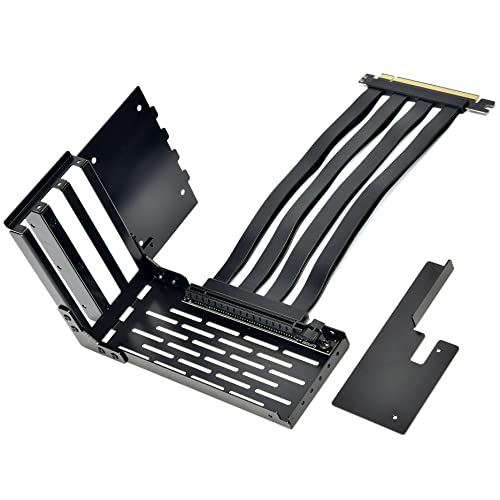
This is a case-specific vertical GPU mounting accessory for the LANCOOL II series. It is a neat option for users who want a cleaner vertical GPU look while keeping room for additional fans and airflow.
Pros
- Made for LANCOOL II series compatibility
- Includes 200 mm PCIe x16 riser cable
- Placement keeps room for two 120 mm fans
- Under-mount layout helps cleaner airflow path
Cons
- PCIe 3.0 riser is less ideal for newer PCIe 4.0 GPUs
- Limited usefulness outside supported LANCOOL II cases
- Not the best pick for buyers who change cases often
- Availability may be inconsistent in India
The LIAN LI LANCOOL II-1X is for a specific audience, people who already own a LANCOOL II series case and want a tidy vertical GPU setup. In that context, this kit makes good sense. It includes the extender cable and bracket arrangement needed for the case, so installation feels more integrated than a generic adapter setup.
One practical advantage is airflow planning. The mounting design still leaves room for two 120 mm fans, and the under-mounted structure keeps the path around the GPU less blocked. In Indian summer conditions, this matters. A vertical GPU mount should not become a heat trap, and LIAN LI has tried to avoid that issue with this layout.
The limitation is clear too. This riser is PCIe 3.0, so buyers with newer high-end PCIe 4.0 cards need to think carefully. Many systems still run fine with PCIe 3.0 risers, but this depends on your GPU, motherboard, and BIOS settings. LIAN LI has a decent reputation among PC builders in India, though accessory stock can be patchy depending on the seller.
Buying Guide
Know your use case first
Start with the main question. Do you need a mining riser, a vertical GPU mount, or a full-bandwidth PCIe 4.0 extender for a gaming PC. These are different products. A mining riser with USB-style connection is meant for spaced-out GPU rigs. A PCIe 4.0 x16 riser is for direct graphics card communication in a desktop case. If you mix these categories, your build will suffer.
Check PCIe generation support
This is one of the first things I would verify. Older PCIe 3.0 risers still work in many systems, but newer GPUs and motherboards often behave better with a proper PCIe 4.0 riser. If your motherboard and GPU both support Gen4, buying a Gen4 riser reduces the chance of link instability, display drop, or BIOS troubleshooting.
Look at case and slot compatibility
Many buyers skip measurements and regret it later. Measure GPU thickness, case width, side panel clearance, radiator position, and motherboard slot placement. Some mounts are built for one case family only. Some cables are too short for your route. Right-angle connectors help in tight builds, but only if the direction suits your layout.
Power delivery matters for mining risers
If you are buying PCIe 1x to 16x mining risers, study the power input. Risers with separate 6-pin input reduce burden on the motherboard. Stable power matters a lot during long-running workloads. Avoid messy cable chains and weak adapters. In Indian homes where voltage quality differs by area, a stable PSU and clean cabling matter even more.
Cable quality and shielding are worth paying for
Signal quality decides whether your GPU runs as expected. Good shielding helps reduce interference. Better connectors reduce chances of random disconnects when the cabinet is moved or cleaned. If your PC runs near Wi-Fi gear, extension boards, or a crowded desk setup, poor cable quality becomes easier to notice.
Thermals and airflow should stay in focus
A vertical GPU setup looks nice, but if the card sits too close to the side glass, temperatures can rise fast. Check whether the mount leaves enough breathing room. In warm Indian climates, this is not a small detail. For mining setups, wider card spacing and open-frame design help reduce heat buildup through the day.
Brand trust and support in India
Accessory brands often have weaker service support than motherboard or GPU brands. Before buying, check seller reviews, replacement policy, and stock consistency. Known brands such as NZXT and LIAN LI often give more confidence for enthusiast builds. Lesser-known options may still work well, but quality checks after delivery become more important.
Feature Importance
| Feature | Importance |
|---|---|
| PCIe generation support | High |
| Signal stability and shielding | High |
| Case compatibility | High |
| GPU weight support | High |
| Cable length | Medium |
| Power input design for mining risers | High |
| Airflow clearance | High |
| Brand service support in India | Medium |
| Ease of installation | Medium |
| Aesthetic design | Low |


