A good graphics card decides how smooth your games feel, how stable your frame rates stay, and how long your PC build feels fresh. For many buyers in India, this part takes the biggest share of the budget, so picking the right model matters more than chasing flashy specs on the box. If you play at 1080p or 1440p, stream on the side, or use editing apps, the GPU often makes the biggest difference in day to day use.
When you compare options, start with VRAM, cooling design, card size, power draw, and the feature set from NVIDIA such as ray tracing, DLSS, and newer video outputs. You should also check your cabinet space, PSU rating, and local after-sales support. In Indian conditions, heat and dust are real issues, so a cooler with solid airflow and a sturdy backplate deserves extra attention.
The current Indian market has a mix of older and newer NVIDIA cards, and this makes buying a little tricky. Some older models still make sense if the card is proven and easy to source, while newer 16GB variants look better for longer use. The five picks below focus on practical value for Indian users, small build compatibility, cooling quality, and service support from brands people can usually find through major online stores and local PC markets.
Gigabyte GeForce RTX 4060 Ti Eagle 8G

This is a sensible pick for gamers who want a known RTX 4060 Ti design with decent cooling, DLSS support, and a no-nonsense feature set. It suits 1080p high refresh gaming and handles 1440p well in many titles.
Pros
- WINDFORCE cooling system handles daily gaming loads well
- Dual BIOS adds flexibility for different fan behavior
- Metal backplate improves rigidity
- Good fit for gamers who want DLSS 3 and ray tracing support
Cons
- 8GB VRAM feels limited for some newer heavy games
- 128-bit memory bus is modest for this segment
- Older generation than the RTX 5060 Ti cards here
- Not the best long-term pick for users focused on high texture settings
Gigabyte’s Eagle version of the RTX 4060 Ti keeps things simple. You get Ada Lovelace architecture, 8GB GDDR6 memory, ray tracing support, and DLSS 3. For esports and story games at 1080p, this card still feels fast. At 1440p, performance stays good in many titles if you use sensible settings and lean on DLSS where needed.
The WINDFORCE cooler is one of the main reasons this model still earns a place. In Indian summers, thermals matter a lot, especially in cabinets with average airflow. The metal backplate helps the card feel less flimsy, and Dual BIOS is useful if you prefer a quieter setup or a more aggressive cooling profile.
For value-focused buyers, the main question is longevity. The 8GB frame buffer is the clear weak point today. Newer games with large textures push memory harder, and that hurts future comfort more than raw GPU speed. Gigabyte has a wide presence in the Indian PC market, and service access is usually easier than with smaller brands, which adds some peace of mind when you are spending serious money on a build.
ASUS Dual GeForce RTX 5060 Ti 16GB OC

This card stands out for its 16GB GDDR7 memory, compact 2.5-slot design, and quiet cooling profile. It is a strong choice for buyers who want a balanced mix of gaming, creator use, and easy fitment in smaller cabinets.
Pros
- 16GB GDDR7 is better for long-term use
- Compact 2.5-slot design works in many builds
- 0dB mode helps during light workloads
- Dual ball fan bearings improve durability
Cons
- Dual-fan cooler has limits in tightly packed hot cabinets
- Factory OC gain is modest in real-world gaming
- Newer generation cards often launch with limited stock
- ASUS premium branding sometimes makes value comparison harder
The ASUS Dual RTX 5060 Ti 16GB OC feels built for buyers who want fewer compromises. The big draw is the 16GB GDDR7 memory pool, which gives more breathing room for heavier game textures, modded titles, and creative workloads. For 1440p gaming, this matters more over time than a tiny clock speed difference. The Blackwell base, DLSS 4 support, and updated outputs keep the card ready for modern monitors and newer game features.
ASUS has kept the body compact enough for many mid-tower and small form factor systems. That is useful in India because a lot of people upgrade an existing PC instead of building from zero. The 2.5-slot layout, Axial-tech fan setup, and 0dB mode make the card easy to live with. During browsing, office work, or light gaming, noise stays low. Under load, airflow still matters, so pair it with a cabinet that has at least decent front intake.
I also like the practical touches here. Dual BIOS gives you a choice between quiet and performance behavior, and dual ball fan bearings tend to hold up better over long use in dusty conditions. ASUS has a strong service reputation in most major Indian cities, and that matters when you want a safer long-term purchase. If your goal is a modern 1440p card with broad compatibility, this one is easy to shortlist.
MSI GeForce RTX 5060 Ti Shadow 2X OC Plus

MSI’s Shadow 2X OC Plus offers a clean balance of thermal design, performance, and software control. It suits gamers and creators who want a straightforward 16GB RTX 5060 Ti without paying extra for flashy styling.
Pros
- 16GB GDDR7 memory suits newer games well
- STORMFORCE cooling is designed for stable airflow
- Zero Frozr keeps noise low at low temperatures
- MSI Center gives easy tuning and monitoring
Cons
- Design is plain compared to premium gaming variants
- Dual-fan layout is less ideal than larger coolers for long heavy loads
- Large 4K claims depend heavily on settings and DLSS use
- Stock and pricing swing quickly in India for fresh launches
The MSI Shadow 2X OC Plus goes for substance over show. You get the RTX 5060 Ti GPU, 16GB GDDR7 memory, PCIe Gen 5 support, and boost clocks up to 2602 MHz, with a little more headroom through MSI Center. For most Indian gamers, the sweet spot here is 1440p. The card should feel comfortable in competitive games and in demanding single-player titles with settings tuned smartly.
Cooling is where MSI has put in useful effort. The STORMFORCE dual-fan setup, textured blades, heat pipes, and nickel-plated copper baseplate aim for stable thermals without turning the PC into a noise box. Zero Frozr also helps during lighter use by stopping the fans when load is low. In Indian weather, this kind of thermal behavior is worth more than RGB in my view.
This card also makes sense for buyers who edit videos, handle large photo projects, or use GPU-heavy tools from time to time. The 16GB memory gives more room than older 8GB cards, and the display output selection is modern enough for fast 4K screens and creator monitors. MSI has built a solid reputation in the Indian DIY PC space, and service support is generally considered dependable in bigger markets, which adds trust to the package.
ZOTAC Gaming GeForce RTX 5060 Ti Twin Edge OC
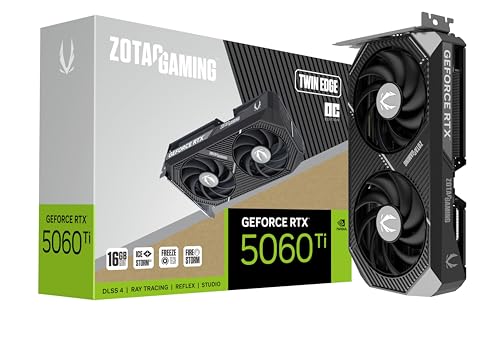
If you want a compact RTX 5060 Ti with 16GB memory and one of the most attractive warranty terms in this list, this ZOTAC card deserves attention. It is especially appealing for small form factor builds and long ownership plans.
Pros
- Compact dual-slot style is great for smaller cabinets
- 16GB GDDR7 improves long-term usability
- Factory overclock adds a small extra push
- Five-year warranty is a major plus
Cons
- Smaller cooler has less thermal headroom than bigger triple-fan cards
- Noise levels depend a lot on cabinet airflow
- Compact design leaves less room for aggressive cooling under sustained loads
- Brand preference in offline markets is not as broad as ASUS or MSI
The ZOTAC Twin Edge OC is one of the easiest cards here to recommend for compact builds. Its short length and SFF-ready design make installation less stressful in tighter cabinets, and that alone solves a big problem for many upgraders. You still get the newer Blackwell base, DLSS 4 support, 4608 CUDA cores, and 16GB GDDR7 memory, so the compact body does not mean a weak feature set.
For Indian users building in smaller rooms or using PCs without central AC all day, thermals need a realistic look. A compact dual-fan card will work best with a cabinet that has proper intake and exhaust fans. If your airflow is sorted, this ZOTAC model should serve well for 1440p gaming and mixed work use. If your case is cramped and hot, a larger cooler would run with less strain.
The big attraction is warranty. ZOTAC’s five-year coverage stands out in a market where buyers often hold on to a GPU for several years. That long cover matters when GPU prices stretch your budget and you want more peace of mind. ZOTAC’s service image in India is decent among PC enthusiasts, and the longer warranty often becomes the deciding point for people who care more about ownership safety than brand flash.
Gigabyte GeForce RTX 5060 Ti AERO OC 16G

This AERO OC variant targets buyers who want a newer 16GB RTX 5060 Ti with Gigabyte’s familiar cooling approach and a cleaner white-themed style. It fits gamers, creators, and aesthetic-focused builders who still care about practical performance.
Pros
- 16GB GDDR7 is a big plus for future use
- PCIe 5.0 support keeps the card current
- WINDFORCE cooling is a trusted design line
- AERO styling suits white and creator-themed builds
Cons
- Feature list is less detailed than some rivals
- Aesthetic focus will not matter to every buyer
- Cabinet compatibility still needs checking despite mainstream sizing
- Twin-fan and compact-oriented cards need decent case airflow in hot climates
The Gigabyte RTX 5060 Ti AERO OC 16G is for buyers who want a fresh-generation card without going into bulky enthusiast models. The key part is simple. You get the RTX 5060 Ti GPU, 16GB GDDR7 memory, DLSS 4 support, and PCIe 5.0. For 1440p gaming, that package looks far better prepared for future titles than older 8GB options.
The AERO line also has a cleaner visual style than many gaming cards. If you are building a white setup or a workstation-like PC, this model looks easier to match with modern parts. Still, the appeal is not only cosmetic. Gigabyte’s WINDFORCE cooling line has a known track record in the Indian market, and for most users that matters more than loud design elements or extra RGB.
This card also makes sense for people who split time between games and productivity. More VRAM helps in workloads such as video editing, 3D previews, and AI-assisted tools which keep growing in demand. Gigabyte’s broad presence across Indian online and offline PC sellers helps with availability, and service reach is usually acceptable in major cities. If you want a newer 16GB model from a familiar brand, the AERO OC is a clean option.
Buying Guide
Set your target use first
Before you compare brands, decide what your GPU will do most of the time. A card for esports at 1080p needs a different mindset than a card for 1440p AAA gaming, streaming, editing, or 3D work. If you keep a graphics card for four to five years, lean toward newer 16GB options because modern games are using more VRAM.
VRAM matters more than many buyers think
For this category, memory capacity is one of the first things I would check. An 8GB card still works for many games, especially at 1080p, but newer titles with high texture packs are starting to pressure that limit. A 16GB card gives more room for future games, creator apps, and AI-based workloads. If your budget allows only one major upgrade for years, more VRAM is the safer path.
Check cabinet space and card thickness
Many Indian buyers upgrade inside an older cabinet. That is where surprises happen. Measure GPU length, note the slot thickness, and check front radiator or drive cage clearance. Also see whether your motherboard layout leaves enough breathing room near the card. Compact cards like Twin Edge models fit more easily, but smaller size often means you should pay more attention to airflow.
Cooling quality is not optional in Indian conditions
A graphics card that runs fine in a cool demo room may behave differently in Indian summer heat. Look for a proven cooler design, metal backplate, decent heatsink mass, and fan stop support if you care about noise at idle. Keep dust filters clean and use at least basic intake and exhaust fans. Good cabinet airflow often improves GPU experience more than a minor factory overclock.
Do not ignore PSU quality and power connectors
A new GPU is only as stable as the power supply behind it. Check the PSU wattage, the quality of the unit, and the required PCIe connectors before ordering. If your system uses an older low-tier PSU, budget for replacement first. Random crashes, black screens, and coil noise complaints often start with poor power delivery rather than a bad graphics card.
Look at software features and display outputs
DLSS support, ray tracing generation, HDMI 2.1b, and DisplayPort 2.1b matter if you use a high refresh monitor or plan a monitor upgrade soon. Creator users should also think about encoder support and multi-display setup. A card with modern ports gives more flexibility for 1440p high refresh gaming, fast 4K displays, and newer TVs.
Warranty and after-sales support deserve real weight
A GPU is one of the costliest parts in a gaming PC. In India, service support changes by city and seller, so check warranty length and the brand’s service reputation before you buy. ZOTAC stands out here with long warranty coverage, while ASUS, MSI, and Gigabyte usually have stronger visibility through large retailers and service partners in many cities. Buy from a reliable seller and keep invoice copies safely.
Feature Importance
| Feature | Importance |
|---|---|
| VRAM capacity | High |
| Cooling performance | High |
| Cabinet compatibility | High |
| PSU compatibility | High |
| 1440p gaming performance | High |
| Ray tracing and DLSS support | High |
| Warranty length | Medium |
| Brand service network in India | High |
| Noise levels | Medium |
| Aesthetics and RGB | Low |