An ergonomic keyboard helps reduce wrist bending during long typing sessions. A split layout, curved key rows, thumb keys, or a soft wrist rest gives your hands a more natural working position. This matters if you spend hours coding, writing, answering emails, or gaming at a desk.
The right choice depends on your typing habits. Check the layout, switch type, key travel, connectivity, portability, software support, and the space available on your desk. Indian buyers should also check replacement parts, import-related delivery issues, warranty terms, and support before choosing a niche mechanical model.
This list covers five different needs. The Perixx suits office users who want a full-size wired keyboard. The Grifiti set adds wrist support to compatible split boards. YMDK and YIVU target keyboard enthusiasts who enjoy custom layouts. The ANT WK150 suits students and professionals who need a compact wireless option for phones, tablets, and laptops.
Perixx PERIBOARD-512B

The PERIBOARD-512B is a full-size wired ergonomic keyboard with a one-piece split layout, curved key rows, palm rest, and seven multimedia hotkeys. Its familiar Windows layout suits office work and long typing sessions.
Pros
- Full-size layout with dedicated navigation and number-pad keys
- Split design and curved rows reduce wrist bending
- Tactile membrane feel with 4.2 mm key travel
- Six-foot USB-A cable and plug-and-play Windows setup
Cons
- Large body needs a wide desk
- US layout may take time to adjust for some Indian users
- Wired connection offers no tablet or phone flexibility
- Key feel is louder and firmer than a typical low-profile office keyboard
Perixx takes a familiar full-size keyboard and changes the hand position without forcing you to learn a compact layout. The left and right key zones sit at a wider angle, while the stepped rows guide your fingers through a curved typing path. A built-in palm rest gives your hands a place to settle during long work sessions.
The membrane switches offer a tactile response with audible feedback, and Perixx rates the keyboard for up to 20 million keystrokes. Seven multimedia hotkeys help with common Windows controls. The long USB-A lead suits desks where the computer sits below or beside the work surface, and setup needs no extra software.
Indian office users get a practical choice here because the board keeps a number pad and standard navigation keys. The large shell needs proper desk space, and warm, dusty rooms call for regular cleaning around the key gaps. Perixx lists a 12-month limited warranty through its website. Buyers should confirm local seller handling and return terms before ordering, since niche keyboard support in India often depends on the seller.
Grifiti Fat Wrist Pad

The Grifiti Fat Wrist Pad is a two-piece wrist-rest set made for Ergodox and Ergodox Infinity boards. Thick neoprene, a washable nylon top, and a non-skid base make the set useful when your keyboard already has a split design.
Pros
- Two mirror-image pads fit Ergodox-style layouts
- Thick 0.75-inch neoprene provides soft wrist support
- Washable nylon surface is easier to maintain
- Non-skid base helps keep each pad in place
Cons
- Not a complete keyboard
- Fit depends on the width and angle of your keyboard
- Soft foam loses some firmness over long use
- Product support and replacement availability in India need seller confirmation
This set targets a specific problem with split keyboards. Many ergonomic boards leave a separate space under each hand, so a normal long wrist rest does not fit well. Grifiti supplies two mirror-image pads, each measuring about 6.5 by 4.2 by 0.75 inches, giving both hands independent support.
The squishy neoprene layer feels softer than a hard wooden or plastic rest. A nylon cloth surface gives a smoother contact point and washes with mild soap and water. The non-skid underside helps during typing, though desk dust and sweat in Indian summer conditions will still require periodic cleaning.
The set makes sense for an Ergodox or similar board, but buyers should measure the keyboard before ordering. Grifiti does not provide the same India service footprint as large computer accessory brands, so warranty terms, return windows, and replacement options deserve a check on the product page. For a compatible setup, the pads offer a simple comfort upgrade without changing switches or key mapping.
YMDK Split Corne V4.1
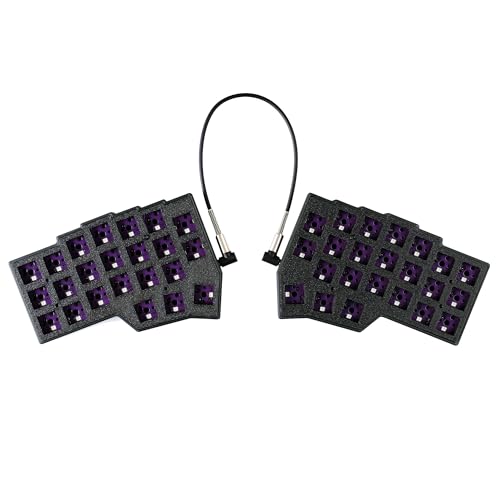
The YMDK Split Corne V4.1 is a 46-key custom keyboard kit with hot-swap PCBs, RGB lighting, and QMK/Vial programming. The compact split format suits users who prefer layers, thumb keys, and a small desk footprint.
Pros
- Compact 40% split layout leaves more room for mouse movement
- Hot-swap PCB supports compatible switches without soldering
- QMK and Vial support gives extensive key remapping
- RGB lighting and two-piece PLA case included
Cons
- Switches and keycaps are sold separately
- 46-key layout needs layers for numbers, symbols, and navigation
- Small kit format suits enthusiasts more than first-time buyers
- Niche parts and service support in India require careful seller checks
The Corne V4.1 takes the split keyboard idea in a compact direction. Each half uses a small column-based layout, with layers handling functions normally found on a full-size board. This design reduces reach for many commands and leaves extra desk space, but your first week with the board will involve learning shortcuts and layer changes.
The package includes two bottom PLA cases, two top plates, two hot-swap PCBs, a USB-A to USB-C cable, and a PCB connection data cable. The board does not include switches or keycaps, so your final typing feel depends on the parts you choose. Vial gives you a visual way to remap keys, while QMK offers deeper control for users who enjoy firmware work.
This kit suits programmers, keyboard hobbyists, and users who value custom layouts over quick setup. PLA keeps the case light, though direct heat and rough handling deserve attention in a hot Indian room or during travel. YMDK products often use specialist seller channels rather than a broad India service network. Check import duties, return handling, spare PCB access, and assembly guidance before placing an order.
YIVU 40% Orthogonal Split

The YIVU 40% Orthogonal Split is a wired mechanical keyboard with a 3×5 column layout, three thumb keys per side, hot-swap sockets, RGB lighting, and QMK/Vial remapping. Its adjustable two-piece design targets serious typists and software users.
Pros
- Orthogonal split layout keeps columns straight under the fingers
- Hot-swap sockets accept 3-pin and 5-pin mechanical switches
- Fully programmable keys with QMK and Vial support
- Adjustable spacing, tilt, and rotation between the two halves
Cons
- 40% layout requires regular use of layers
- TRS link cable is not hot-swappable
- Both USB ports must not connect to the computer at the same time
- Specialist format and support add setup work for new users
YIVU gives each hand a 3×5 key grid and three thumb keys. The thumb cluster moves frequent layer and command controls closer to the hand, while adjustable spacing and rotation let you set the two halves around your shoulders. This layout suits users who type for hours and are willing to change old muscle memory.
The board ships with pre-lubricated linear switches rated at a light 40 g actuation force, along with hot-swap support for 3-pin and 5-pin switches. QMK and Vial let you assign layers, shortcuts, media controls, and macros. RGB offers 45 preset modes with colour, brightness, and speed controls, useful in a dim room but less relevant if you prefer a distraction-free desk.
The 1.5 m USB-C cable connects the board to the computer, while the 11-inch TRS cable links both halves. Users must connect the TRS cable before powering the keyboard and must avoid plugging both USB ports into the computer. YIVU does not have the broad service network associated with mainstream Indian peripheral brands, so keep the seller’s return policy and spare-part route in mind. The board fits enthusiasts who value setup freedom more than instant familiarity.
ANT WK150
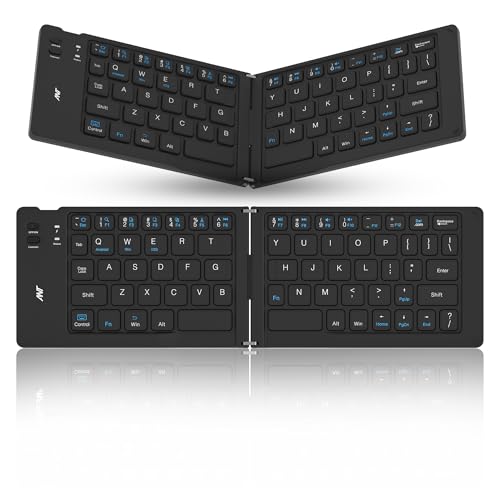
The ANT WK150 is a foldable Bluetooth split keyboard with a rechargeable battery and support for Windows, Android, iOS, and iPad. Its small folded body suits travel, mobile writing, and occasional laptop work.
Pros
- Foldable design fits easily in a backpack
- Bluetooth 3.0 works with several major operating systems
- Rechargeable battery with battery and connection indicators
- One-year Pan India warranty listed for technical and electronic issues
Cons
- Compact layout feels less natural than a full-size ergonomic board
- Bluetooth 3.0 is older than current wireless standards
- Small keys and limited spacing suit short sessions better than all-day typing
- Physical damage and wear are excluded from the listed warranty
The WK150 focuses on portability rather than a full desktop typing experience. The two sides fold into a compact body, making the keyboard useful for students, travelling professionals, and anyone who writes on a tablet or phone. The slight split angle gives your hands more room than a flat mini keyboard, though the compact keys still need an adjustment period.
Bluetooth 3.0 keeps power use modest and connects the keyboard with Windows, Android, iOS, and iPad devices. A rechargeable battery removes the need for disposable cells, while the status indicators help you check connection and battery condition. The design suits email, notes, coding edits, and document work away from your main desk.
For Indian buyers, the listed one-year Pan India warranty is a useful point because portable accessories face more handling, dust, and travel wear. The warranty covers technical and electronic faults, not physical damage from use. ANT does not have the same service visibility as large laptop accessory brands, so retain the invoice and confirm the service contact after delivery. Choose this model for mobility, not for a deep mechanical typing feel.
Buying Guide
Set a sensible budget
Ergonomic keyboards cover a wide range of designs. A full-size wired board usually gives more keys and a simpler setup. Custom split boards add cost through separate switches, keycaps, cables, and sometimes firmware work. A wrist rest costs less than replacing a keyboard, but only helps if your current board already fits your hand position. Set aside money for accessories and replacement parts when comparing specialist models.
Choose the right layout
Full-size boards suit office workers who use a number pad and familiar navigation keys. Tenkeyless boards save desk space. A 40% or 46-key board needs layers for numbers, function keys, arrows, and symbols. Orthogonal layouts keep key columns straight, while staggered layouts feel familiar to most users. Think about the software you use each day before choosing a compact split model.
Check switch and key details
Membrane keys offer quiet, simple office use with little setup. Mechanical switches give clearer feedback and easier replacement. Linear switches feel smooth, while tactile switches provide a bump before actuation. Check key travel, actuation force, keycap profile, and switch socket type. A hot-swap board is easier to maintain because compatible switches replace without soldering.
Confirm device compatibility
Wired models need the correct USB connector and enough cable length for your desk. Bluetooth models need a compatible device profile and a reliable pairing process. Check operating system support before ordering. QMK and Vial boards often require a browser or desktop utility for remapping, and some functions work best on Windows or Linux. Phone and tablet use needs extra attention because shortcut support varies by operating system.
Think about desk position and climate
A split board works best when both halves sit at a shoulder-friendly width. Keep wrists level and let your elbows rest close to your body. Indian heat, dust, and humidity make cleaning important. Use a soft brush or air blower around switches, keep drinks away, and store a travel keyboard folded only after the surface is dry. Avoid direct sunlight on PLA cases and soft wrist-rest foam.
Review warranty and service
Check whether support comes from the brand, the marketplace seller, or an overseas distributor. Perixx lists a 12-month limited warranty, and ANT lists a one-year Pan India warranty for technical and electronic faults. The Grifiti, YMDK, and YIVU listings need closer checks for return windows, spare parts, and repair handling. Save the invoice, box, cables, and firmware details until the return period ends.
Plan for the learning period
A split or compact layout changes muscle memory. Spend a few sessions on letters, numbers, symbols, and shortcuts before judging comfort. Vial or QMK boards reward gradual remapping. Start with familiar layers, then move frequent commands to thumb keys. If wrist pain continues, adjust chair height, keyboard angle, and typing force instead of relying on the keyboard alone.
Feature Importance
| Feature | Importance |
|---|---|
| Natural split or angled layout | High |
| Correct key count for your work | High |
| Switch feel and key travel | High |
| Operating system compatibility | High |
| Hot-swap support | Medium |
| QMK or Vial remapping | Medium |
| Cable or Bluetooth reliability | High |
| Wrist-rest support | Medium |
| Dust and moisture handling | Medium |
| Warranty and spare-part access in India | High |