


A monitor calibrator helps your screen show more dependable colour for Photo editing, video work, design, printing, gaming, and online shopping. Factory screen settings often look bright or vivid rather than accurate. Room lighting, screen age, panel type, and display brightness also change how your eyes judge colour.
Indian buyers should check support for Windows and Mac, USB connection type, OLED and mini-LED compatibility, calibration speed, software controls, and repeat calibration needs. A basic device suits occasional editing, while video teams and photographers working across several screens need advanced targets and monitor matching. The listed products sit from ₹18,990 to ₹36,990, so choosing by workflow gives better value than buying the costliest unit by default.
Datacolor Spyder (2024)
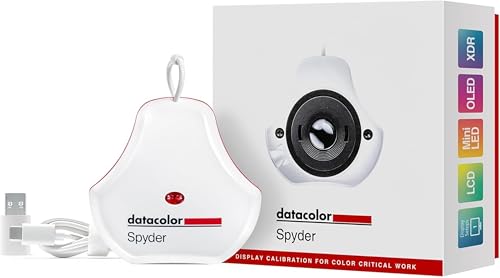
The 2024 Datacolor Spyder suits photographers, designers, and content creators who want quick monitor calibration with support for OLED, mini-LED, and Apple Liquid Retina XDR screens.
Pros
- Works with OLED, mini-LED, and Apple Liquid Retina XDR displays
- Around 90-second calibration process
- DevicePreview Beta simulates how photos look on other devices
- Ambient light sensing supports room-based display adjustments
Cons
- Advanced video targets are not listed among its supplied features
- DevicePreview is marked as a beta feature
- Professional controls are less extensive than SpyderPro
- USB connection details should be checked before purchase
Datacolor Spyder (2024) targets the common problem of editing on a screen whose colours look right only in one room. Its software offers a preset path for new users, while adjustable calibration settings give experienced editors more control. The ambient light sensor checks room brightness and helps set a suitable screen level.
OLED, mini-LED, and Apple Liquid Retina XDR support makes this model useful for newer laptops and desktop displays. DevicePreview Beta adds a practical check for social media posts and client previews by simulating output on other devices. The roughly 90-second process also suits creators who calibrate before each editing session.
Datacolor products have broad online availability in India, while local service options depend on the seller and distributor. Keep the invoice, confirm software support for your operating system, and buy from a seller with a clear replacement policy. For a mixed photo and content workflow, this model offers a sensible middle point between simple calibration and advanced studio controls.
Datacolor Spyder X2 Elite
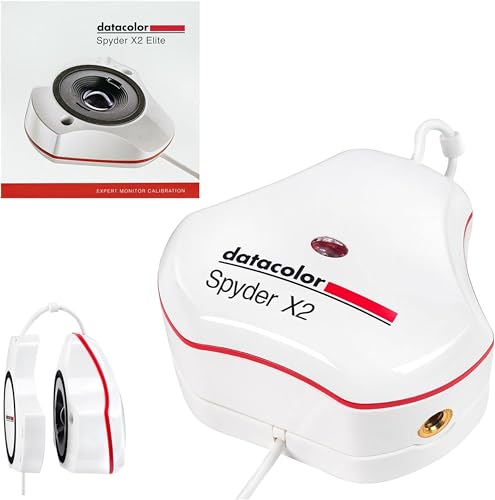
Spyder X2 Elite is aimed at photographers, video editors, and digital designers who need detailed calibration controls, cinema targets, soft proofing, and multi-display matching.
Pros
- Includes Rec. 709 and Rec. 2020 video targets
- Offers unlimited calibration settings and advanced display analysis
- Studio Match supports multiple monitor calibration
- Native USB-C connection with USB-A adaptor included
Cons
- Costs more than simpler calibration tools
- Advanced menus may feel excessive for casual users
- USB-A adaptor adds another small part to carry
- No ambient light feature appears in the supplied feature list
Spyder X2 Elite gives serious creators control over the parts of calibration that basic models leave preset. Rec. 709 and Rec. 2020 targets help video editors prepare work for common delivery standards. Soft proofing and display mapping also help when print output or screen-to-screen consistency matters.
The Studio Match function suits a workstation with two or more displays. A photographer working on a laptop beside an external monitor gets a better chance of seeing similar tones across both panels. Native USB-C fits current Mac and Windows systems, while the supplied USB-A adaptor supports older ports.
Datacolor has a sizeable presence through Indian online retail channels, but buyers should verify regional warranty handling before payment. This model makes sense for paid photo and video work where a wrong shadow tone or skin tone creates rework. For occasional editing, its deeper controls may add cost without adding much daily benefit.
Calibrite Display 123

Calibrite Display 123 keeps calibration simple for first-time users, photographers, gamers, and home users who want more dependable screen colour without a long setup.
Pros
- Simple three-step connection and calibration flow
- Works with Windows and Mac systems
- Uses X-Rite colour science
- USB-C connection included
Cons
- Limited control choices compared with professional models
- Supplied features do not mention OLED or mini-LED support
- No multi-monitor matching feature is listed
- Monthly recalibration needs regular user attention
Calibrite Display 123 follows a short process: connect the device, choose Native or Photo brightness, and let the software create a display profile. A before-and-after view helps new users see the change without learning colour management terms first. The same approach also suits people who want dependable colour for gaming, clothing purchases, or home decor decisions.
X-Rite colour science gives the device a known technical base, while Windows and Mac support covers most home and creative systems. Monthly recalibration is a practical routine in Indian homes, where dust, heat, changing room light, and long screen hours affect viewing conditions over time.
Calibrite products are available through Indian online sellers, though service and replacement access vary by distributor. Check the seller’s warranty terms and software download process. Display 123 is a good pick for a user who values an easy first calibration and does not need cinema targets, soft proofing, or multi-screen controls.
Datacolor SpyderExpress

SpyderExpress is an entry-level Datacolor calibrator for students, new photographers, designers, and creators who want a fast starting point with an upgrade path.
Pros
- Around 90-second calibration process
- Supports standard laptop and desktop monitors
- Compatible with MacBook M4 mini-LED displays
- Software upgrade path avoids a new hardware purchase
Cons
- OLED and wider mini-LED support needs a software upgrade
- Fewer controls than Spyder, Spyder X2 Elite, and SpyderPro
- Entry-level software may not suit studio video work
- Future upgrade costs need checking before purchase
SpyderExpress focuses on the first step toward dependable colour. The setup guides a new user through calibration and produces an edit-ready result in about 90 seconds. That short routine suits students and creators who often postpone calibration because the process feels technical or slow.
Support for the MacBook M4 mini-LED display gives newer Apple laptop owners a useful starting point. Standard laptop and desktop monitor support covers common home and office setups. The software upgrade path also lets a growing creator add selected Spyder features later instead of replacing the sensor.
Datacolor’s Indian availability is stronger through online channels than through a clearly visible local service network, so check warranty registration and seller replacement terms. SpyderExpress suits budget-conscious buyers who want a trusted entry point. Users working with OLED panels or advanced video standards should calculate the future software upgrade before choosing this model.
Datacolor SpyderPro

SpyderPro is the most capable option in this group for professional photo and video work, high-brightness displays, and studios running multiple monitors.
Pros
- Supports high-brightness, OLED, mini-LED, and Apple Liquid Retina XDR screens
- Includes Rec. 709 and Rec. 2020 video targets
- StudioMatch calibrates multiple computers and displays
- DevicePreview Beta checks probable device-to-device colour changes
Cons
- Highest listed cost in the group
- Advanced controls may overwhelm a first-time user
- DevicePreview is still a beta feature
- Workspace setup takes more time when several displays need matching
SpyderPro suits users whose income depends on consistent colour. It covers newer high-brightness, OLED, mini-LED, and Apple Liquid Retina XDR displays, then adds Rec. 709 and Rec. 2020 targets for video delivery. Preset calibration keeps the first session approachable, while custom controls support a more exact studio workflow.
StudioMatch is the main reason to choose this model over a simpler unit. A photographer with a laptop, reference monitor, and editing display gets one process for bringing screens closer together. DevicePreview Beta adds a useful client-facing check when a photo needs to look acceptable across phones, tablets, and computers.
Datacolor has broad brand recognition and online availability in India, but professional users should confirm local warranty support, firmware handling, and replacement timelines with the seller. SpyderPro earns its place when multiple monitors, high-end panels, or video delivery standards matter. A single casual display does not need all of its controls.
Buying Guide
Set a sensible budget
The supplied models range from ₹18,990 to ₹36,990. SpyderExpress and Display 123 suit first-time buyers, while Spyder X2 Elite and SpyderPro serve paid photo, design, and video work. Leave room for a monitor hood, a stable USB connection, and possible software upgrades. A low purchase cost loses value if your workflow later needs OLED support or cinema targets.
Match the device to your screen
Check panel type before ordering. Standard IPS and LED monitors have broad support across this group, while OLED, mini-LED, high-brightness panels, and Apple Liquid Retina XDR displays need a model with stated compatibility. MacBook M4 owners should check the software version and model support before calibration.
Choose controls for your work
Photo editing often needs dependable brightness, white point, and profile creation. Video work adds Rec. 709 or Rec. 2020 targets. Print work benefits from soft proofing and a repeatable viewing setup. Multiple monitors need Studio Match or a similar matching feature. Casual users should prefer a guided process over menus they will never use.
Check room light and screen brightness
Indian homes and offices often shift from bright daylight to tube light or warm indoor light. Keep the monitor away from direct sunlight, set a stable brightness, and avoid editing beside a strong window. An ambient light sensor helps when room conditions change, but a consistent workspace still gives better results.
Plan a calibration routine
Calibrate before important editing and repeat the process about once a month. Recalibration also helps after a monitor moves, a major brightness change, or a new display profile. Let the screen warm up first, disable night modes, and turn off automatic colour filters during the process.
Check computer and USB compatibility
Spyder X2 Elite lists native USB-C and includes a USB-A adaptor. Display 123 lists USB-C. The other models need a port and software check before purchase. Confirm support for your Windows or Mac version, then download software only from the brand’s official source or the seller’s verified instructions.
Review warranty and seller support
Colour calibrators contain sensors and depend on software, so invoice storage matters. Check warranty duration, replacement terms, registration steps, and Indian support contact details. Datacolor and Calibrite products have online availability in India, while hands-on service access varies by distributor. A seller with clear return handling is safer than an unknown import listing.
Feature Importance
| Feature | Importance |
|---|---|
| Monitor panel compatibility | High |
| Windows and Mac support | High |
| Calibration accuracy | High |
| Calibration speed | Medium |
| USB-C or USB-A support | High |
| Ambient light measurement | Medium |
| Video targets | High for video editors |
| Soft proofing | Medium for print work |
| Multiple monitor matching | High for studios |
| Software upgrade path | Medium |


