If you use an NVMe SSD in your desktop, laptop, or PS5, heat is a real issue. Fast SSDs push high speeds, but when temperatures rise, many drives slow down to protect themselves. This is called thermal throttling. In daily use, you might feel it during game installs, file transfers, video editing, or long work sessions. A good M.2 SSD heatsink helps the drive stay cooler and more stable.
When you choose an SSD heatsink, focus on fit first. You need the right size, usually M.2 2280, and enough clearance inside your laptop, motherboard area, or PS5 slot. After that, check the material, thermal pad quality, mounting method, and whether the design is slim or heavy-duty. Some buyers need a low-profile model for laptops, while others want a taller unit with heat pipes for desktops.
In India, this matters even more because room temperatures stay high for long periods in many cities. If your PC sits in a warm room without strong airflow, your SSD temperature climbs faster. I always tell buyers to think about value for money, local availability, and simple installation before buying. A fancy cooler is useless if it does not fit your setup.
Etzin M.2 SSD Heatsink

This is a simple aluminum heatsink for M.2 2280 SSDs. It suits buyers who want a compact cooling fix for a desktop or laptop without dealing with a bulky design.
Pros
- Slim form factor suits tighter spaces
- Aluminum body helps spread heat better than a bare SSD
- Includes silicone thermal pads and accessories
- Works with standard M.2 2280 SSDs
Cons
- Basic design without heat pipe or display
- Brand presence in India is limited
- Cooling gains depend a lot on airflow inside the system
- Product details are less detailed than bigger accessory brands
The Etzin M.2 SSD Heatsink keeps things straightforward. You get an aluminum alloy body, a thermal pad setup, and support for common 2280 SSDs. If your SSD runs warm during long downloads, backups, or gaming sessions, this type of heatsink gives the controller chip a better path to shed heat. That matters because the SSD controller is often the first part to get too hot.
For laptop and compact desktop users, the slim shape is the main reason to look at this model. Many large heatsinks simply do not fit under laptop covers or near GPU slots. This one aims to stay compact while still giving more surface area than the SSD label alone. In Indian homes where dust, warm rooms, and limited airflow are common, even a basic passive cooler like this helps keep temperatures in a safer zone.
Etzin does not have the kind of service network in India you get from major PC component brands. So I would treat this as a practical accessory purchase, not a brand-led one. If you want a no-fuss heatsink for a standard build and your case or laptop has limited space, this one makes sense.
ZORBES M.2 2280 SSD Heatsink

This ZORBES model is a more serious cooling option with a double-sided design and heat pipe. It suits desktop users, PS5 owners, and anyone using a warmer PCIe NVMe drive.
Pros
- Heat pipe and double-sided structure improve heat transfer
- Supports many popular M.2 2280 SSD models
- Adjustable mounting hardware helps with fit
- Useful for desktops and PS5 setups
Cons
- Not ideal for all laptops due to height needs
- Best suited for single-sided 2280 modules
- Unknown long-term support compared to established brands
- Cooling results vary based on room temperature and case airflow
Among these options, this ZORBES heatsink feels closer to a performance-oriented cooler. The double-sided design gives more contact area, and the added heat pipe helps move heat away faster than a plain flat slab design. If you use a Gen4 SSD for gaming, large project files, or frequent transfers, that extra cooling headroom is useful.
The product listing mentions a 10 degree to 30 degree drop, though real-world results depend on airflow, SSD model, and ambient heat. In India, summer room temperatures change everything. In an air-conditioned room, you may see better results. In a non-AC room with a compact cabinet, expect more modest gains. Even then, keeping your SSD away from peak heat helps with sustained performance.
Installation is one of its stronger points. ZORBES includes clips and adjustable screws, so you get more flexibility than simple adhesive-only designs. The catch is clearance. This cooler asks for more space, so you need to check your motherboard shroud, PS5 bay, or side panel gap first. ZORBES is still a smaller accessory seller in India, so after-sales support will likely depend on the marketplace seller more than a large nationwide service setup.
Tobo TD-1228PC

The Tobo TD-1228PC is a thin aluminum heatsink made with laptop use in mind. Its low-profile build makes it a sensible choice for buyers who need basic SSD cooling in tight internal layouts.
Pros
- Low-profile size suits many laptop installations
- Aluminum alloy body is light and durable
- Grooved surface increases heat dissipation area
- Simple design keeps installation easy
Cons
- Cooling capacity is lower than taller heatsinks with heat pipes
- No premium mounting system
- Product listing has some confusing text
- Brand service presence in India is limited
The TD-1228PC is one of those parts where the shape matters more than the branding. Its 70 x 22 x 3 mm size is useful for thinner systems where every millimetre counts. Many laptop users do not need an advanced cooler with screws and pipes. They need something flat, light, and easy to place over a hot NVMe drive. This model fits that need well.
The grooved aluminum body helps increase the outer surface area, which improves passive cooling. No passive heatsink performs miracles inside a poorly ventilated laptop, but even a modest drop in SSD temperature helps reduce throttling during longer sessions. If you use your laptop for coding, office work, media editing, or game installs, this type of heatsink makes the SSD behave more consistently under load.
Tobo is not a mainstream PC cooling brand in India, so support expectations should stay realistic. Still, for buyers who want a slim laptop-friendly add-on and do not have space for anything bulky, this model feels practical. I would choose it when fit is the top priority.
Tobo TD-1037PC
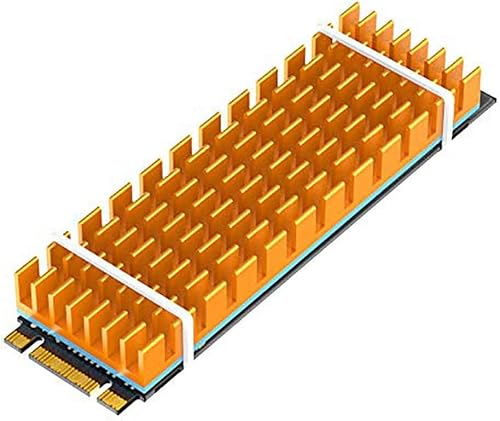
This Tobo heatsink is another compact 2280 option, with a thermal adhesive approach and a standard slim aluminum body. It works for users who want easy installation across laptops and desktops.
Pros
- Compact 70 x 22 x 3 mm shape fits many systems
- Thermal conductive pad setup is easy to work with
- Supports common NGFF PCIe NVMe M.2 SSDs
- Suitable for both laptop and desktop use
Cons
- Basic passive design has limited cooling ceiling
- Does not offer the stronger thermal hardware of premium models
- Brand support in India is not widely known
- Buyers must check internal clearance before sticking it in place
The TD-1037PC takes the same low-profile route but adds a simple thermal conductive adhesive style installation. For many buyers, that is the easiest path. You place the thermal interface, seat the heatsink, and you are done. There is less hardware to manage, which is helpful if you are opening a laptop for the first time.
Its groove design aims to spread and release heat faster than a plain flat plate. On fast NVMe drives, this matters during heavier activity like cloning a drive, extracting large files, or moving game folders. The cooling effect mentioned in the listing sounds optimistic, though some reduction is realistic in a system with decent airflow. In Indian conditions, where cabinets often sit near walls and airflow gets ignored, every bit of thermal help counts.
Tobo’s service network in India is limited from what most buyers expect from large PC brands. So your buying confidence should come from the product type, fit, and seller reliability. If you need a simple, slim, no-nonsense SSD heatsink for regular use, the TD-1037PC is easy to consider.
ZORBES M.2 Heatsink with Display

This is the most feature-rich option here, built for hotter PCIe 4.0 and PCIe 5.0 NVMe SSDs. The digital temperature display adds real-time monitoring for desktop users who want stronger cooling and better visibility.
Pros
- Copper heat pipe and aluminum fin array suit high-heat SSDs
- Digital temperature display is useful for monitoring
- Built for PCIe 4.0 and PCIe 5.0 NVMe drives
- Good choice for desktops running sustained heavy workloads
Cons
- Large size will not suit most laptops
- Temperature display needs a 5V ARGB header
- Likely overkill for basic SSD use
- Brand support is still smaller than major cooling brands in India
If you run a high-speed Gen4 or Gen5 NVMe SSD, this ZORBES cooler stands out because it is built like a small desktop thermal module rather than a simple metal strip. The dense aluminum fins and copper heat pipe give it more heat handling ability, which matters when modern drives stay under load for long periods. Tasks like 4K video editing, large asset transfers, heavy game patching, and scratch disk work push SSD temperatures up fast.
The digital temperature display is the extra touch here. I like this feature because it gives instant feedback instead of guesswork. If your SSD is heating up inside a tight desktop case, you see it. If your airflow upgrade helped, you see that too. Do note the display requirement for a 5V ARGB header, so this cooler makes more sense for custom PC builders than casual laptop users.
For Indian users with gaming desktops or workstations, this model is the strongest fit when cooling matters more than compactness. It is not a small accessory you forget about after installation. You need space, compatible hardware, and a proper layout around the M.2 slot. ZORBES is still a niche accessory seller here, so after-sales backup is not at the level of larger component brands, but as a cooling-focused pick, this one has the most ambition in the list.
Buying Guide
1. Check the M.2 size first
Most heatsinks in this list target M.2 2280 SSDs, which is the common size for consumer NVMe drives. Before buying, confirm your SSD length and your slot area. A heatsink made for 2280 will not fit properly on shorter or longer drives. If you use a laptop, check the service manual or open the panel and measure the free space around the SSD.
2. Low-profile or heavy-duty, pick by device type
For laptops and mini PCs, slim heatsinks are the safe choice. A thick model with fins or a heat pipe often will not fit once you close the panel. For desktops and PS5 setups, you have more room, so stronger coolers make sense. If your SSD sits under a motherboard shield, measure clearance before ordering.
3. Thermal pads matter more than many buyers think
The pad is the bridge between the SSD and the heatsink. A poor pad or a badly placed one cuts cooling performance fast. Look for a pad that covers the controller properly and makes firm contact without bending the SSD. If your drive has chips only on one side, a single-sided setup is often easier to manage.
4. Understand your usage pattern
If you use your system for browsing, Office work, or light media use, a basic aluminum heatsink is enough in most cases. If you copy huge files, edit video, run VMs, or play large modern games, your SSD spends more time under load. In those cases, a better cooler with more mass or a heat pipe gives better results.
5. Indian weather changes thermal behaviour
This part gets ignored too often. A system in Delhi, Chennai, Nagpur, or Hyderabad during peak summer faces a harder cooling job than a benchmark setup in a cold room. If your PC room is warm and dusty, choose a heatsink with a stronger design and keep cabinet airflow clean. In a laptop, even a slim heatsink helps if the machine regularly runs hot.
6. Look at installation method and service access
Some heatsinks use clips and screws, while others rely on thermal pads and simple mounting. If you open your SSD area often, a reusable clip design feels better. If you want quick setup, slim adhesive-style models are easier. Also think about future SSD upgrades. A complicated cooler is annoying if you swap drives often.
7. Check brand trust and seller quality
Many SSD heatsinks on Indian marketplaces come from smaller accessory brands. That is not always a problem, but you should read the listing carefully and check what is included in the box. See if thermal pads, screws, clips, or bands are part of the package. Since service networks are often limited, seller ratings and return support matter a lot.
8. Do not ignore surrounding airflow
A heatsink helps, but air movement still matters. In a desktop, front intake fans and a clean path around the motherboard improve SSD cooling. In a laptop, blocked vents, dusty fans, and soft surfaces like bedsheets make temperatures worse. If the system has no airflow, even the best passive heatsink has limits.
Feature Importance
| Feature | Importance |
|---|---|
| M.2 2280 compatibility | High |
| Height clearance | High |
| Thermal pad quality | High |
| Cooling design type | High |
| Laptop or desktop suitability | High |
| Ease of installation | Medium |
| Build material | Medium |
| Weight and form factor | Medium |
| Temperature monitoring feature | Low |
| Brand service network in India | Medium |