


A desktop PC often runs short of USB ports after you add an external SSD, printer, webcam, game controller, Wi-Fi adapter, or phone cable. A PCIe USB expansion card adds more ports inside the cabinet and suits users who want a cleaner fix than a chain of external hubs. USB 3.0 support also gives compatible storage devices a much higher transfer rate than USB 2.0.
Before choosing a card, check the available PCIe slot, port type, operating system support, power connector, and cabinet space. A card with a SATA power input suits several bus-powered devices, while a simple two-port model works well for lighter use. Indian buyers should also check seller support, driver access, return terms, and delivery availability for their pin code. The options below cover basic upgrades, seven-port setups, USB-C needs, and compact PCs.
Millennium Technology 4-Port USB 3.0 PCIe Card

This entry-level card adds four USB-A ports through a PCIe slot and uses the VIA VL805 chipset. The SATA power input helps provide steadier power for connected accessories.
Pros
- Four USB 3.0 Type-A ports
- VIA VL805 chipset
- Fits PCIe x1, x4, x8, and x16 slots
- Backward support for USB 2.0 and USB 1.1 devices
Cons
- Requires a SATA power connection from the PC power supply
- Older Windows versions need closer driver attention
- No USB-C port
- Brand service presence in India is limited compared with established PC accessory makers
Millennium Technology keeps this card simple. You get four USB-A ports, a VIA VL805 controller, and support for a PCIe x1 connection. The wider x4, x8, and x16 slot compatibility helps when the motherboard has no free short slot but has a longer PCIe slot available. USB 3.0 supports transfer rates up to 5Gbps under suitable conditions, though storage device speed, file size, and shared system bandwidth affect real results.
The SATA power lead deserves attention during installation. Connect the cable before testing several external drives or other power-hungry accessories. The card supports Windows 7, Vista, and XP, while Windows 8 and 10 use the supplied driver support listed for the product. Newer operating systems should be checked before purchase because the listing gives limited detail for them.
This model fits a home desktop, an office PC, or an older tower with too few rear ports. Millennium Technology has a less visible service network in India, so seller communication, return coverage, and driver availability matter more than they would with a large local brand. The low-cost design suits basic connectivity needs, provided your cabinet has room and a spare SATA power plug.
PCI-E to USB 3.0 7-Port Expansion Card
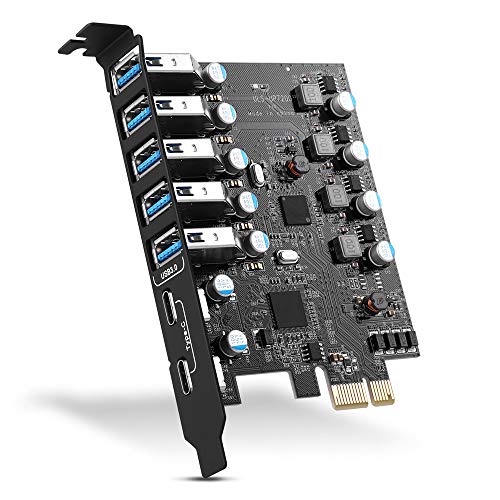
This seven-port card offers two USB-C ports and five USB-A ports, giving desktops a broad mix of connections. Windows 10 and newer listed Mac systems receive simpler driver support.
Pros
- Seven USB 3.0 ports in one card
- Includes two USB-C and five USB-A ports
- Fits PCIe x1, x4, x8, and x16 slots
- Two-year product care and listed 24/7 support
Cons
- Higher purchase cost than four-port cards
- Older Windows versions need driver installation
- Shared bandwidth affects simultaneous transfers
- Requires an open full-size desktop expansion slot and internal installation
This card suits a desktop used with several modern accessories. Two USB-C ports handle newer cables and devices, while five USB-A ports cover keyboards, mice, printers, cameras, and older storage products. The stated USB 3.0 ceiling reaches 5Gbps, with backward support for USB 2.0 and USB 1.1 hardware. Seven sockets reduce the need for front-panel adapters or loose external hubs.
Installation follows the usual PCIe routine. Shut down the PC, disconnect mains power, fit the card, secure the bracket, and install the driver where required. Windows 10 and listed Mac OS versions above 10.8.2 do not need manual driver installation according to the product information. Windows XP, Vista, Windows 7, and Server editions need the supplied driver, so keep the CD or obtain a compatible file before beginning.
The included screws, manual, and driver disc add useful convenience for first-time installation. The seller lists two years of product care and round-the-clock support, which gives Indian buyers a clearer support route than many anonymous expansion cards. Still, support depends on seller responsiveness and stock handling. Check cabinet clearance and motherboard slot access before ordering, especially in compact office desktops.
foxaa 4-Port USB 3.0 PCIe Card

The foxaa card adds four USB-A ports with a VIA VL805 controller and a SATA power input. Plug-and-play support for most modern operating systems keeps installation short.
Pros
- Four USB 3.0 Type-A ports
- VIA VL805 chipset
- SATA input for extra power delivery
- Supports Windows and Linux systems
Cons
- No USB-C connection
- Needs a free SATA power lead
- Listed PCIe compliance follows the older 2.0 standard
- foxaa has a limited visible service network in India
foxaa targets users who need four extra USB-A connections without paying for a seven-port board. The card uses a VIA VL805 chipset and follows PCI Express Base Specification 2.0. USB 3.0 devices receive support for transfer rates up to 5Gbps, while USB 2.0 and USB 1.1 accessories continue to work. This setup fits external hard drives, printers, card readers, controllers, and common office peripherals.
The SATA power connector helps the card handle several attached devices with fewer power limitations from the motherboard slot. A spare cable from the power supply is essential, so inspect the inside of your cabinet first. Most modern operating systems should recognise the card without a separate driver. Older or unusual Linux builds still deserve a compatibility check before purchase.
For an Indian home user, this card offers a practical middle path between a basic hub and a larger seven-port adapter. foxaa does not have the broad service visibility of major PC component brands, so the seller’s return policy and response quality deserve a check. The simple hardware design also means fewer setup decisions, which helps users upgrading an older tower at home or in a small office.
MZHOU 7-Port USB 3.0 PCIe Card

MZHOU provides seven USB 3.0 ports with four dedicated channels, UASP support, and an aluminium heatsink. The feature set suits storage-heavy desktops and workstations.
Pros
- Seven USB 3.0 ports
- UASP support with four dedicated channels
- Aluminium heatsink and over-current protection
- Supports Windows 10, Windows 11, Linux, and listed older systems
Cons
- USB ports share the host card connection
- No USB-C port
- Needs cabinet space and a free PCIe slot
- MZHOU support in India mainly depends on the seller and importer
MZHOU focuses on users who connect several high-speed devices at once. Seven USB-A ports provide room for external drives, printers, cameras, controllers, and input devices. UASP support helps compatible storage devices handle queued commands with less processor overhead. The four-channel design is intended to keep several connections more responsive than a basic internal hub, though the host PCIe link and each device still set practical limits.
Long transfers place more heat inside a desktop cabinet, especially in Indian summers or rooms with weak airflow. MZHOU includes an aluminium heatsink and over-current protection to support steadier operation during extended use. Good cabinet airflow still matters. Keep the card away from blocked vents, and avoid bending USB cables against the rear bracket.
Windows 11 and Windows 10 receive driver-free support according to the listing, with support also stated for Windows 8, 7, XP, Vista, and Linux. Older systems might need drivers. The card fits a gaming PC, workstation, or server needing many rear USB ports. MZHOU has less established after-sales visibility in India than large component brands, so confirm seller warranty handling before placing the order. Its higher feature count suits storage and peripheral-heavy setups better than a basic keyboard-and-mouse upgrade.
LinksTek PCIE-U302A 2-Port USB 3.0 Card
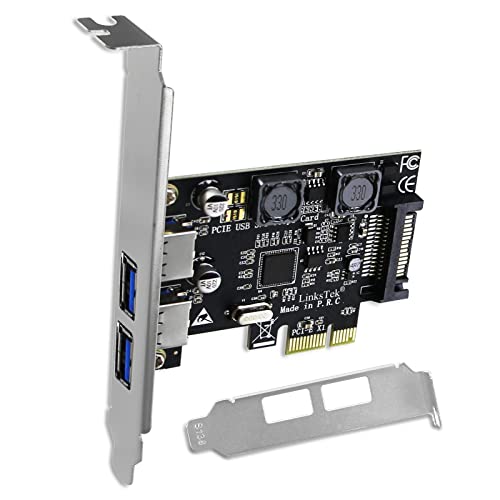
The LinksTek PCIE-U302A adds two USB-A ports through an ASMedia ASM1042 controller. Smart power distribution, two bracket sizes, and broad Windows support make the card useful for standard and slim desktops.
Pros
- ASMedia ASM1042 controller
- Two USB 3.0 Type-A ports with shared 5Gbps bandwidth
- Smart power distribution with up to 5V/2A per port under stated conditions
- Includes full-height and low-profile brackets
Cons
- Only two USB ports
- Older Windows versions need drivers
- Some older motherboards need SATA power from the PSU
- LinksTek after-sales access in India is more limited than local mainstream brands
The LinksTek PCIE-U302A takes a different approach from the larger cards in this list. Two ports leave more host bandwidth per socket for a focused setup, such as an external NVMe enclosure, USB dock, KVM switch, or VR accessory. The ASMedia ASM1042 controller provides a stated 5Gbps total bandwidth, while USB 2.0 and USB 1.1 devices continue to receive backward support.
Its Smart Power Distribution system draws power from the motherboard on newer boards when sufficient power is available. Each port receives up to 5V/2A, or 10W, under the stated product conditions. Older motherboards might need the SATA connector from the power supply. This dual-mode design helps the card fit both recent builds and ageing office towers, but users should inspect the motherboard manual before attaching high-draw devices.
LinksTek supplies both a full-height bracket and a low-profile bracket, a useful detail for slim Indian office PCs and small workstations. Windows 11, 10, 8.1, and 8 receive plug-and-play support, while older Windows versions need drivers. LinksTek has a smaller service footprint in India, so check seller stock, warranty terms, and replacement handling. Choose this card when two reliable high-speed ports matter more than a large port count.
Buying Guide
Start with your desktop’s free slot
Open the cabinet specification or motherboard manual and look for an unused PCIe slot. These cards use a PCIe x1 interface, with wider x4, x8, and x16 slots often supporting the same card. Check nearby graphics card clearance before ordering. Slim PCs need a low-profile bracket, while standard towers usually use a full-height bracket.
Choose the port count for your routine
Count the devices you use at the same time. Two ports suit an external SSD and a USB dock. Four ports work well for a home office or older desktop. Seven ports help users with several drives, cameras, controllers, and printers. A larger count does not give every port a separate full-speed connection, because the card shares its host link.
Check USB type before purchase
USB-A remains common for keyboards, printers, hard drives, and flash drives. USB-C ports help with newer phones, cameras, docks, and storage enclosures, but a USB-C socket on an expansion card does not automatically provide Thunderbolt, video output, or laptop-style charging. Read the device requirements before choosing a port layout.
Look at power requirements
A SATA power input helps supply connected devices when the motherboard slot alone does not provide enough power. Cards with this connector need a spare SATA lead from the PC power supply. LinksTek offers a motherboard-powered mode under stated conditions, with SATA support for older boards. Avoid placing several high-draw drives on a card without checking its power design.
Match the operating system
Windows 10 and Windows 11 usually provide the easiest setup for the listed models, though each listing has its own support details. Older Windows editions often require a driver. Linux support appears on the foxaa and MZHOU listings, while the seven-port model lists Mac OS support above version 10.8.2. Keep a driver copy before removing the existing card or reinstalling Windows.
Set realistic speed expectations
USB 3.0 uses a 5Gbps link under suitable conditions. Large files move faster with an SSD than with a mechanical hard drive. Several devices transfer data through the card’s shared PCIe connection, so simultaneous copying lowers the speed available to each device. UASP support helps compatible storage products, but the enclosure and operating system also need UASP support.
Consider heat, cabinet airflow, and daily use
Indian rooms often see higher indoor temperatures during summer. An aluminium heatsink and over-current protection help on cards such as the MZHOU model, but airflow still matters. Keep dust away from the rear vents, use firm cable connections, and avoid blocking the card with a long graphics card or a tightly packed drive cage.
Check warranty and local support
Anonymous or lesser-known expansion cards often rely on marketplace sellers for replacement help. Check the seller rating, return window, warranty wording, and driver availability. The seven-port PCIe card lists two years of product care and 24/7 support. LinksTek has clearer technical details, while its Indian service access is smaller than mainstream local accessory brands. Keep the invoice and package until the card works with your main devices.
Feature Importance
| Feature | Importance |
|---|---|
| Available PCIe slot and cabinet clearance | High |
| Required USB port type | High |
| Number of ports | High |
| SATA power input | High |
| Operating system and driver support | High |
| Shared PCIe bandwidth | Medium |
| USB 3.0 5Gbps support | High |
| UASP support for storage | Medium |
| Heatsink and over-current protection | Medium |
| Warranty and seller support in India | High |


