A good stream controller saves time every single day. If you stream on YouTube or Twitch, edit videos, handle meetings, or run repeat tasks on your PC, these small keypads make work faster and cleaner. One tap for scene change, one tap for mute, one tap for apps, macros, or folders. After using keyboard shortcuts for everything, many users feel a dedicated controller makes the desk setup far more practical.
When you pick a stream deck controller, look at the number of keys, software support, plugin library, ease of setup, build quality, cable type, and how well the device fits your workflow. A 6-key model works for simple scenes and audio controls. A 15-key or 32-key model suits creators who juggle OBS, Discord, Spotify, lights, editing tools, and office apps in the same session.
In India, budget matters, but support and availability matter too. Imported creator gear sometimes looks good on paper and then becomes a headache if software updates are weak or service is slow. That is why Elgato models still get a lot of attention here, while newer brands like Fifine are pulling buyers who want more value. I have kept practical Indian use in mind, including long desk sessions, mixed work and gaming use, and the need for gear that feels worth the money.
Elgato Stream Deck XL

This is the big one for serious creators and power users. With 32 LCD keys, it suits heavy OBS workflows, editing shortcuts, smart home controls, and daily office automation without constant folder switching.
Pros
- 32 LCD keys give wide control at a glance
- Mature Stream Deck software with deep plugin support
- Good for streaming, editing, music, and productivity
- Non-slip stand helps during long desk sessions
Cons
- Takes more desk space than smaller models
- Overkill for basic users with simple needs
- Higher learning curve if you are new to macros
- USB 3.0 connection limits placement flexibility on some desks
The Stream Deck XL is built for people who hate breaking flow. With 32 keys in front of you, your main actions stay visible without digging through pages all the time. For streamers, this means scene switches, sound effects, chat tools, mic controls, and recording commands in one place. For editors and working professionals, it means timeline shortcuts, app launchers, copy-paste actions, and routine commands ready on tap.
Elgato’s software is still one of the biggest reasons to buy this model. The interface is clean, drag-and-drop setup is easy, and the plugin ecosystem is much stronger than many smaller brands. You can set single actions, chains of actions, folders, icons, and profile-based controls for different apps. Once you build your layout properly, daily work feels faster and less messy.
For Indian buyers, the XL makes the most sense if content creation is part of your income or your work routine is full of repeat actions. The hardware feels dependable, and Elgato as a brand has a strong reputation among creators, though official service reach in India is not as broad as mass-market PC brands. Even so, software stability and long-term user trust are strong points here, which matters a lot for imported creator gear.
Fifine AmpliGame D6
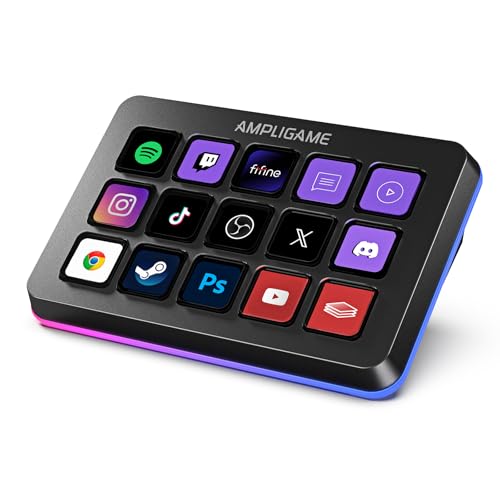
The AmpliGame D6 is a value-focused stream controller with 15 macro keys and extra RGB flair. It fits buyers who want visual key control for OBS, YouTube, Streamlabs, and daily shortcuts without spending for the Elgato name.
Pros
- 15 customizable LCD macro keys
- Works with streaming and productivity software
- RGB ring adds setup appeal for gaming desks
- Useful folder setup for multi-tasking
Cons
- Software ecosystem is not as proven as Elgato’s
- Long-term plugin support is less certain
- Brand service confidence in India is still growing
- RGB styling may not appeal to office users
Fifine has tried to make this controller practical and fun at the same time. You get 15 customizable keys, visual feedback on the buttons, and software support aimed at streamers who use OBS, Streamlabs, Twitch, and YouTube. For a beginner or mid-level creator, this covers the basics well. Scene changes, media controls, app launching, and simple workflow commands feel much easier once mapped properly.
One thing many users will like is the visual approach. You see the assigned icons right on the keys, so you do not need to remember every shortcut in your head. The RGB ring gives the device a more gamer-style look, which some stream setups will love and some office users will ignore. The main question is software maturity. Elgato still has the stronger track record, but Fifine gives enough core function to stay in the race.
In India, this model makes sense for buyers who want a stream controller for practical use and do not want to spend too much for the category leader. Fifine’s name is more familiar in budget audio gear, and its support reputation here is decent but still not in the same trust bracket as larger mainstream PC brands. If your needs are straightforward and you care about value first, the D6 stands out.
Elgato Stream Deck Mini

The Stream Deck Mini is a compact entry point for creators who want core macro control in a tiny footprint. Its 6 LCD keys are few, but folders and multi-actions make it more capable than it first appears.
Pros
- Compact size suits small desks and laptop setups
- Same trusted Elgato software platform
- Multi-actions add more depth than key count suggests
- Easy starting point for new streamers
Cons
- Only 6 physical keys on the surface
- Frequent folder switching for bigger workflows
- Less comfortable for advanced multi-app control
- Older design feels basic beside newer models
The Stream Deck Mini is the model I would pick for a first-time buyer who wants to test the category without filling the desk. It handles the core job well. You can switch scenes, mute the mic, launch apps, start recordings, and trigger grouped actions from the same small panel. If your workflow is simple, 6 keys are enough. If not, folders help, though they also add extra taps.
Its best feature is not the hardware count, it is access to Elgato’s software platform. You still get profiles, icons, multi-actions, and plugin support, which gives the Mini a lot more use than a cheap generic macro pad. For many Indian users with compact desks, hostel setups, or work-from-home laptop stations, the small size is a real plus.
Service and warranty confidence matter when you buy creator gear in India. Elgato does not have the same offline service spread as major keyboard or laptop brands, but among stream controllers, it still carries better trust due to software reliability and a long creator-focused track record. If you want a known brand and only need the basics, the Mini still holds value.
Elgato Stream Deck

The standard 15-key Stream Deck hits the sweet spot for most buyers. It gives enough keys for serious streaming or productivity work, while staying easier to place and manage than the XL.
Pros
- 15 keys suit most creators and office users
- Strong plugin library and app support
- Detachable USB-C adds convenience
- Custom faceplate option adds personalization
Cons
- Costs more than basic entry-level options
- 15 keys may still feel limited for heavy users
- White finish may need more frequent cleaning
- Best features depend on spending time in setup
If you ask me for one balanced pick in this category, the regular 15-key Stream Deck is hard to ignore. It gives a clear jump over the Mini because you have enough room for stream scenes, audio controls, shortcuts, and a few folders without feeling cramped. At the same time, it does not dominate the desk like the XL. This balance is why many creators stick with this size for years.
The detachable USB-C cable is a useful touch for cable management, and the removable faceplate adds some room for setup styling. More importantly, the software side stays excellent. OBS integration, Twitch actions, YouTube tools, Spotify control, and workflow commands for office apps are all easier to build here than on many lesser-known alternatives. Once your profiles are tuned, daily use feels smooth and direct.
For Indian users, this model works well if your setup has mixed duties. Maybe you stream on weekends, edit clips at night, and use the same PC for meetings or design work in the day. This Stream Deck handles such mixed use well. Elgato’s service network in India is still limited compared with mainstream peripheral brands, but the product’s long-standing software support gives buyers some peace of mind.
Elgato Stream Deck Neo

The Stream Deck Neo is a newer, simpler productivity-first controller with 8 customizable keys. It suits buyers who want Stream Deck software benefits for work, study, music, and light streaming in a neat compact form.
Pros
- Clean compact design for home and office desks
- 8 keys suit daily shortcuts better than 6-key models
- Easy drag-and-drop setup in Stream Deck app
- Good fit for productivity and casual creator use
Cons
- Less suitable for advanced streaming setups
- Fewer keys than the 15-key standard model
- Category is still niche for non-creators
- Limited surface control for users with many macros
The Stream Deck Neo feels like Elgato looked beyond streamers and thought about everyday PC users. The 8-key layout gives a little more breathing room than the Mini, and the design blends into work desks better than flashy gaming gear. If your main needs are app launch shortcuts, meeting controls, task automation, music control, and a few creator actions, the Neo makes a lot of sense.
What makes it attractive is ease of use. You drag and drop actions in the software, assign icons, and build a routine around your real workflow. Students, remote workers, editors, and casual streamers all get something useful here. The keys are limited for big production setups, so this is not the first pick for someone running a complex OBS scene stack with lots of plugins.
In India, the Neo fits a growing crowd of buyers who want to save time during work, not only during livestreams. It is compact, clean, and easier to recommend to non-streamers than older niche models. Brand support follows the same Elgato pattern, not huge offline reach, but solid software trust and good recognition among creator tools.
Buying Guide
1. Decide your main use first
Before you buy, ask yourself one simple question. Will you use this controller for livestreaming, office work, editing, or a mix of all three? A streamer who handles OBS scenes, audio cues, and chat tools needs more keys than someone who only wants mute, camera, screenshots, and app launch shortcuts. Your use decides the right model faster than any spec sheet.
2. Key count matters more than most buyers think
A 6-key or 8-key model looks enough in the beginning, but once you start using folders, profile switching, and grouped actions, you may feel short on space. For light use, smaller models are fine and save desk area. For regular streaming or editing, 15 keys feel safer. For advanced workflows with many controls visible at once, 32 keys save time and reduce extra taps.
3. Software quality is the real backbone
The hardware is only half the story. A stream controller is useful when the software is stable, easy to set up, and rich in plugins. Look for drag-and-drop setup, app profiles, multi-actions, icon support, and regular updates. Elgato leads here. Other brands may offer good hardware value, but weak software can spoil the whole experience after a few weeks.
4. Check app and plugin compatibility
Make a list of the apps you use daily. OBS Studio, Streamlabs, Twitch, YouTube, Discord, Zoom, Spotify, Adobe apps, DaVinci Resolve, and smart light controls are common examples. Do not assume every controller works equally well with every app. Good plugin support saves manual setup time and keeps your workflow cleaner.
5. Desk space, cable setup, and ergonomics
This category looks small online, but desk placement changes daily comfort. If you use a laptop stand, external keyboard, mic arm, and audio interface, space runs out fast. A Mini or Neo suits tighter desks. A 15-key model fits most setups well. The XL needs proper room. Also look at stand angle, cable direction, and whether the device slips during quick taps.
6. Build quality and long-session use
These devices get pressed hundreds of times every week. Key feel, stand stability, screen clarity, and body strength all matter over time. For Indian conditions, dust handling and easy cleaning also matter, especially if your desk is near a window or fan. A white body may look great but will need more frequent cleaning than black models.
7. Warranty, service, and brand trust in India
Imported creator gear often has limited offline service in India. So brand trust becomes a bigger factor. Elgato has a strong name, mature software, and a long user base, which helps when you need community support or setup guides. Newer or budget brands may give better upfront value, but check return policy, seller reputation, and software update history before ordering.
8. Think beyond streaming
Many buyers assume a stream deck is only for YouTubers. That is not true. You can use one for video calls, editing shortcuts, coding routines, Photoshop tools, music playback, home automation, and office tasks. If you treat it as a daily productivity device, the value becomes easier to justify. This matters a lot in India, where one device often needs to do more than one job.
Feature Importance
| Feature | Importance |
|---|---|
| Software stability | High |
| Plugin support | High |
| Number of keys | High |
| App compatibility | High |
| Build quality | Medium |
| Desk footprint | Medium |
| USB cable type | Medium |
| RGB lighting | Low |
| Custom icon support | Medium |
| Brand service reputation in India | High |