


A USB-C hub turns one crowded laptop port into a practical workstation. You get display output, USB accessories, memory-card access, wired internet, and charging from one compact unit. This helps laptop users who work with monitors, cameras, external drives, keyboards, or projectors.
Indian buyers should check the laptop’s USB-C functions before ordering. A port with DisplayPort Alt Mode is needed for HDMI video, while charging requires USB Power Delivery support. Also check HDMI refresh rate, Ethernet speed, USB transfer rate, card-slot layout, cable length, heat control, warranty, and after-sales support. Prices change across sales, so compare the current deal with the features you will use every day.
Portronics Mport 8
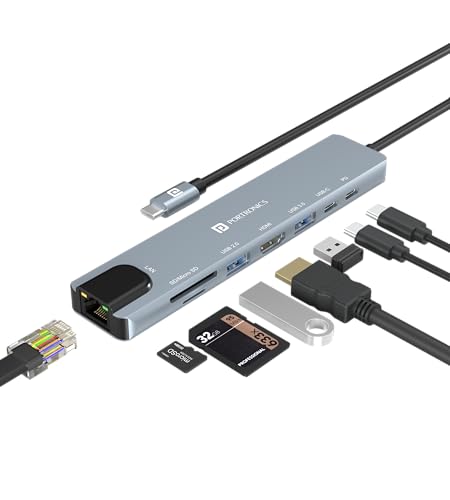
The Portronics Mport 8 suits users who need a broad set of ports in one compact hub. HDMI, Ethernet, USB ports, SD and microSD slots, and PD charging cover most home and office setups.
Pros
- 8 useful ports in one unit
- 4K output at 30 Hz
- SD and microSD card slots
- Metal body with PD charging support
Cons
- Ethernet speed stops at 100 Mbps
- HDMI output runs at 30 Hz
- Only one USB 3.0 port is provided
- Laptop USB-C port needs video support for HDMI use
Portronics Mport 8 offers a sensible port mix for students, office workers, and creators. The USB 3.0 port suits external storage, while the USB 2.0 port works well with a mouse, keyboard, printer, or receiver. Separate SD and microSD slots save time when moving camera or phone files.
The 4K output is suitable for presentations and sharp desktop work, though 30 Hz feels less fluid than 60 Hz during fast scrolling. The 100 Mbps Ethernet port helps in places with weak Wi-Fi, but it does not suit buyers with a faster wired broadband plan. Portronics has a broad presence in Indian online retail and service channels, which makes basic support and replacement requests easier than with an unknown import brand. Keep the hub on a ventilated surface during long transfers, especially in hot rooms.
Honeywell 7-in-1 TypeC Docking Station
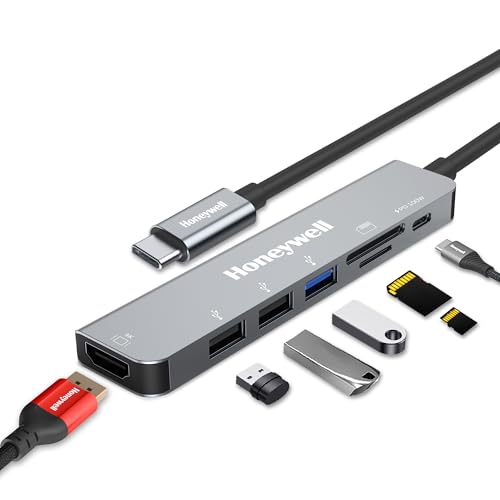
Honeywell’s 7-in-1 dock suits buyers who value a long warranty and 100W PD input. The dock combines HDMI, USB ports, card readers, and charging for laptops and other Type-C devices.
Pros
- Three-year manufacturer warranty
- 100W PD charging input
- 4K HDMI output at 30 Hz
- SD and microSD card readers
Cons
- No Ethernet port
- Two USB ports use USB 2.0 speeds
- Actual laptop charging depends on the laptop and charger
- Video output needs USB-C DisplayPort Alt Mode
This Honeywell dock focuses on charging and everyday connectivity rather than wired networking. Its USB 3.0 port handles faster storage, while the two USB 2.0 ports suit low-speed accessories. SD and microSD slots help photographers, students, and phone users move files without a separate reader.
The 100W PD input gives the dock plenty of charging headroom, though the laptop receives less after power is used by the dock and connected devices. Fast Role Swap PD 3.0 adds protection during power changes. A three-year manufacturer warranty is a strong point for Indian buyers, where long-term support often matters as much as port count. Honeywell has a known consumer brand presence, but check seller details and warranty registration after delivery.
Portronics Mport 52

Portronics Mport 52 is a value-focused 7-in-1 USB-C hub for users who want fast data transfer, HDMI output, card readers, and basic charging support without a large dock.
Pros
- USB-C data support up to 10 Gbps
- 4K HDMI output at 30 Hz
- 60W PD charging support
- SD and microSD card slots
Cons
- No Ethernet port
- PD input is lower than some larger docks
- HDMI output is limited to 30 Hz
- Only two USB-A ports are available
Mport 52 makes sense for a laptop bag because the port selection covers common daily tasks. Its USB-C data port and USB 3.0 connection suit external SSDs and fast flash drives. The two USB-A ports give room for a keyboard, mouse, game controller, or pen drive, while the card readers help with camera and phone storage.
The 10 Gbps claim applies to suitable host hardware and connected storage, so results vary between laptops and drives. The 60W PD input works for many thin laptops and tablets, but heavier laptops need their original charger and higher power support. Portronics has wide availability across Indian e-commerce and retail stores, which helps with service access. In warm Indian conditions, avoid covering the metal body during large file transfers.
MICROWARE USB-C Dual HDMI Docking Station

This dual HDMI adapter targets Windows users who want two external displays from one USB-C port. It also offers USB 3.0 connectivity and PD pass-through charging in a small body.
Pros
- Two HDMI outputs for multi-monitor work
- Single-screen output up to 4K at 30 Hz
- PD pass-through charging up to 87W
- Plug-and-play setup on supported systems
Cons
- Dual-screen output drops to 1080p
- Mac and iPad setups mirror displays instead of extending independently
- No card reader or Ethernet port
- USB-C port needs DisplayPort Alt Mode or Thunderbolt 3
MICROWARE’s adapter is the specialist option in this group. Windows users with a supported USB-C port get a practical two-monitor setup for spreadsheets, coding, trading dashboards, or customer support work. One HDMI connection supports 4K at 30 Hz, while two connected screens use 1080p output. The USB 3.0 port keeps a mouse or keyboard available beside the display connections.
Mac users need extra care before purchase. The supplied specification states mirrored output on Mac OS and iPad OS rather than two separate extended screens. The adapter also does not convert HDMI into USB-C video, so check the direction of every connection. Service information for MICROWARE is less established than for larger Indian accessory brands, so retain the invoice and confirm seller warranty terms. A short cable path and a cool desk position help reduce connection issues during long work sessions.
Amazon Basics USB Type-C Hub Dock
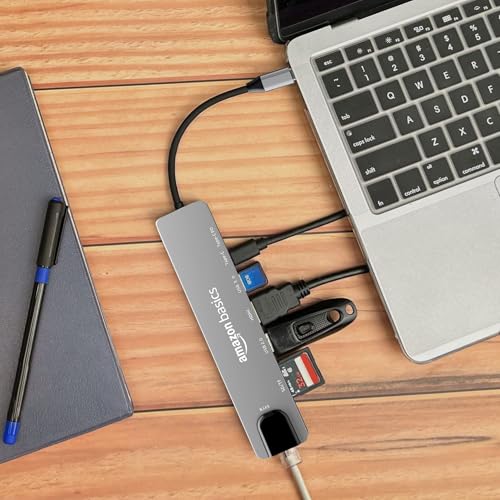
The Amazon Basics USB Type-C Hub Dock offers a familiar 8-in-1 layout with HDMI, 100 Mbps Ethernet, card readers, USB connectivity, and PD charging for Mac and Windows users.
Pros
- Eight-in-one port layout
- 4K HDMI output at 30 Hz
- 100 Mbps Ethernet port
- Two Type-C PD ports listed in the specification
Cons
- Ethernet is limited to 100 Mbps
- HDMI output runs at 30 Hz
- USB-A port selection is limited
- Video and charging depend on host-device support
This Amazon Basics dock fits users who prefer a simple hub from a widely recognised retail brand. HDMI handles an external monitor or projector, Ethernet provides a wired link for offices and homes, and the SD and TF slots cover common memory-card formats. USB 3.0 suits storage, while slower accessories fit the USB 2.0 connection.
Amazon’s retail support makes order tracking and return handling familiar for many Indian customers. Product support still depends on the listing, seller, and warranty terms, so save the invoice and inspect the connector after unboxing. The aluminium body suits regular travel, but do not place the hub on a soft surface during charging and file transfers. Buyers with fast broadband should remember the 100 Mbps network ceiling.
Buying Guide
Set a practical budget
Start with the ports you will use each week. A basic hub suits a mouse, keyboard, pen drive, and one monitor. A larger dock makes sense for Ethernet, memory cards, charging, and several accessories. Avoid paying for dual-monitor support when one screen handles your work.
Check the USB-C port first
USB-C describes the connector shape, not the full feature set. HDMI requires DisplayPort Alt Mode or Thunderbolt support on the host device. Charging requires USB Power Delivery support. Read the laptop manual or manufacturer specification before ordering.
Match video needs
A single 4K monitor at 30 Hz works for documents, presentations, and film playback. Fast scrolling and gaming feel better at 60 Hz, so these hubs suit office use more than high-refresh work. Dual HDMI models need extra care because two-screen output often uses 1080p.
Choose the right data ports
USB 3.0 suits external hard drives, flash drives, and SSDs. USB 2.0 works well for keyboards, mice, printers, and wireless receivers. A stated 10 Gbps rate depends on the laptop, cable, drive, and file type. SD and microSD readers save desk space for photographers and content creators.
Think about networking
A 100 Mbps Ethernet port helps with stable video calls and basic broadband plans. Users with faster fibre connections should look for a gigabit port, which these selected models do not provide. Wired networking also helps in offices with crowded Wi-Fi or thick walls.
Check charging limits
PD input figures describe power entering the hub, not the exact power reaching the laptop. The charger, cable, laptop limit, and connected accessories affect the final result. Use a certified charger and keep the hub ventilated during charging and file transfers.
Build, cable, and Indian conditions
An aluminium or metal body handles daily travel better than thin plastic, but the fixed USB-C cable still needs care. Indian heat, dust, voltage variation, and crowded workspaces place extra stress on small electronics. Keep the hub dry, avoid sharp cable bends, and unplug unused accessories during thunderstorms.
Warranty and after-sales support
Check the warranty period, seller name, replacement process, and invoice rules before checkout. Honeywell lists a three-year manufacturer warranty. Portronics and Amazon Basics have stronger retail visibility in India. For lesser-known brands, confirm support details on the product page and retain packaging until every port works.
Feature Importance
| Feature | Importance |
|---|---|
| Host USB-C video support | High |
| USB Power Delivery support | High |
| HDMI resolution and refresh rate | High |
| USB data speed | High |
| Port selection | High |
| Ethernet speed | Medium |
| SD and microSD readers | Medium |
| Build quality and heat control | High |
| Warranty and service access | High |
| Cable length and portability | Medium |


