If you are building a new Intel PC in India, the motherboard decides how smooth the whole build feels. Your processor, RAM, SSD, graphics card, cooling, and future upgrade path all depend on this one part. A good B760M board makes sense for many buyers because it gives a practical mix of features, stable daily use, and better value than many higher-end chipsets.
When I shortlist a motherboard for Indian buyers, I look at socket support, RAM type, VRM cooling, M.2 slots, network options, rear I/O, and after-sales support. These points matter even more in our market where parts availability changes fast, room temperatures stay high for long months, and many people want a board that works well for years without adding too much to the total build cost.
The five boards below cover different needs. Some suit gamers who want Wi-Fi and DDR5. Some fit office or study builds where DDR4 still saves money. A few focus on better expansion, while others keep the platform simple. The right pick depends on whether your build is for gaming, work, editing, or a balanced family PC.
MSI B760M Gaming WiFi

This is the feature-rich option in this list for users who want a compact Intel board with DDR5, Wi-Fi 6E, 2.5G LAN, and dual Gen4 M.2 slots. It suits gaming builds and premium mid-range PCs where wireless connectivity and faster storage matter from day one.
Pros
- Supports Intel 12th, 13th, and 14th Gen processors
- DDR5 support with high memory overclock headroom
- Built-in Wi-Fi 6E, Bluetooth 5.3, and 2.5G LAN
- Two PCIe Gen4 M.2 slots with cooling on the primary slot
Cons
- Only two DIMM slots, so memory expansion is less flexible
- Micro-ATX layout gives less room than larger ATX boards
- May feel excessive for a simple office build
- Feature set is strong, but many buyers will not use everything
MSI B760M Gaming WiFi feels made for buyers who want a clean, modern Intel build without stepping into expensive enthusiast boards. You get support for 12th, 13th, and 14th Gen Intel processors on LGA 1700, along with DDR5 memory support and a PCIe 4.0 x16 slot for a current graphics card. For a compact gaming setup, this mix works well. The board also gets proper cooling touches like thermal pads on the VRM area, a chipset heatsink, and MSI’s Shield Frozr on the main M.2 slot, which helps during long gaming sessions in warmer Indian rooms.
Storage and networking are the big reasons many users will lean toward this model. Two Gen4 M.2 slots give you enough room for a fast OS drive and another SSD for games or project files. On the network side, Wi-Fi 6E, Bluetooth 5.3, and 2.5G LAN make the board more future-ready than entry boards with only basic wired networking. If your router sits in another room, this matters a lot in Indian flats where cabling is often a headache.
I also like that this board feels balanced instead of flashy for no reason. MSI usually has decent service reach in India through major cities and common online-offline channels, which gives some peace of mind if you ever need BIOS help or an RMA. The only real compromise is the 2-slot DDR5 memory design. For many gamers, 2 x 16GB is enough, but heavy upgrade planners should think once before buying. For most users building a strong mATX Intel system today, this board lands in a sweet spot.
MSI PRO B760M-E DDR4

This board is a sensible pick for buyers who want to reuse DDR4 RAM or build an Intel system on a tighter budget. It keeps the basics right with PCIe 4.0 graphics support, one Gen4 M.2 slot, and broad CPU compatibility.
Pros
- Supports Intel 12th, 13th, and 14th Gen processors
- DDR4 platform helps reduce total build cost
- PCIe 4.0 x16 slot with Steel Armor
- Simple layout for office, study, and budget home builds
Cons
- Only one M.2 slot
- No built-in Wi-Fi
- 1GbE LAN feels basic today
- Limited expansion compared to richer B760 boards
MSI PRO B760M-E DDR4 is the sort of motherboard I would suggest to someone building a practical PC with no drama. If you already own decent DDR4 sticks, this board becomes even more attractive because you save money without giving up the newer B760 platform. It supports Intel 12th, 13th, and 14th Gen CPUs, so you still get a wide processor choice for office work, classes, coding, or light gaming.
The board stays simple, and that is both its strength and its weakness. You get two DDR4 slots, one PCIe 4.0 x16 slot for a graphics card, and one Gen4 M.2 slot for a fast NVMe SSD. Rear I/O includes HDMI and VGA, which is useful in Indian shops and offices where older monitors still show up often. There is also 1GbE LAN and 7.1 audio. Nothing fancy here, but the essentials are in place for a clean, affordable build.
For Indian buyers, this board makes sense in homes where reliability and low total spend matter more than premium extras. MSI’s support presence is usually easier to find than many smaller brands, especially in tier 1 and tier 2 cities. Keep in mind that there is no onboard Wi-Fi, and storage expansion is limited. Still, if your plan is a neat DDR4 Intel machine for daily use, this board does its job without wasting your money on features you may never touch.
GIGABYTE B760M H DDR4

The GIGABYTE B760M H DDR4 targets users who want a no-nonsense B760 board with dual M.2 slots and DDR4 memory support. It is a strong fit for balanced home and work PCs where storage flexibility matters more than built-in wireless features.
Pros
- Dual PCIe 4.0 M.2 slots are useful at this level
- Supports DDR4 memory for lower platform cost
- PCIe 4.0 x16 slot for modern GPUs
- RAID support on SATA storage adds flexibility
Cons
- No built-in Wi-Fi
- 1GbE LAN only
- RAM speed support is more modest than DDR5 boards
- Feature list is plain compared to gaming-focused models
GIGABYTE B760M H DDR4 takes a practical route. It supports Intel LGA 1700 processors and keeps the platform affordable with DDR4 memory. What stands out here is the presence of dual M.2 PCIe 4.0 slots. That is useful for buyers who know they will add more storage later for games, editing files, or family data. Many budget boards cut down in this area, so this point gives the board extra value.
The rest of the board follows a clean and direct formula. There is a PCIe 4.0 x16 slot for your graphics card, dual-channel DDR4 support, SATA ports with RAID support, and 1GbE wired networking. This setup fits a wide range of Indian users, from a student making a first desktop to a home office user who wants faster SSD access and easy maintenance. If your system stays near the router, the missing Wi-Fi will not hurt much.
GIGABYTE has decent brand recall in India and service access is usually manageable through bigger cities, system integrators, and online channels. I would call this board a smart middle path. It is less fancy than gaming boards and less stripped down than some entry options. If you want solid storage options, stable day-to-day use, and the cost savings of DDR4, this model deserves serious attention.
ASUS B760M-AYW WiFi
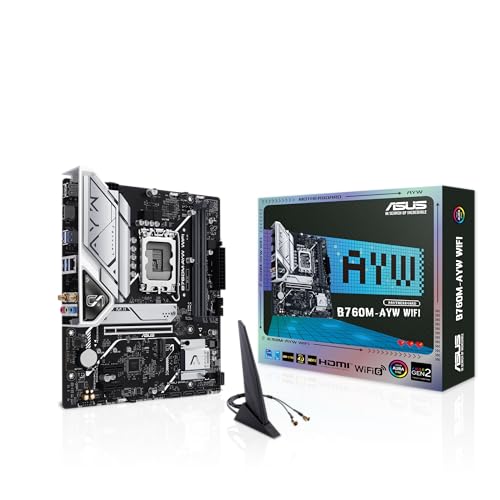
This ASUS board suits buyers who want DDR5, Wi-Fi 6, 2.5Gb Ethernet, and dual Gen4 M.2 slots in a compact mATX layout. It feels right for gaming and productivity systems where network speed and brand trust both matter.
Pros
- DDR5 support with modern platform features
- Built-in Wi-Fi 6 and 2.5Gb Ethernet
- Two PCIe 4.0 M.2 slots
- Good cooling design with VRM, M.2, and PCH heatsinks
Cons
- Less ideal for buyers trying to reuse DDR4 memory
- Micro-ATX form factor limits expansion compared to ATX boards
- Feature set may be more than basic users need
- RGB support is not important for every build
ASUS B760M-AYW WiFi looks like a smart pick for users who want a fresh Intel build with modern connectivity already onboard. You get LGA 1700 support for Intel processors, DDR5 memory, PCIe 4.0, two M.2 slots, Wi-Fi 6, and 2.5Gb Ethernet. For many buyers, this means fewer compromises during the build stage. You do not need to add a separate Wi-Fi card, and you still get faster wired networking if you have a suitable router or broadband setup.
Cooling matters a lot on Indian desktops because many rooms stay warm for long periods, especially in summer or in setups with poor airflow. ASUS includes a VRM heatsink, M.2 heatsink, PCH heatsink, and Fan Xpert 2+ support. These are useful touches for users who run long gaming sessions, work on large files, or keep the system on all day. The board also includes front USB 3.2 Gen 1 support and Aura Sync headers for users who care about a cleaner RGB setup.
ASUS has one of the stronger service reputations in India, and that matters more than most people admit. BIOS support, accessory availability, and local repair handling often feel easier with a brand that has wide presence. This board is not meant for the cheapest build. It is for the buyer who wants a newer DDR5 platform, good connectivity, and the comfort of a familiar brand with broad service reach.
MSI PRO B760M-E

The MSI PRO B760M-E is a basic DDR5 B760 board for buyers who want newer memory support without jumping to a higher-end motherboard. It works best for straightforward productivity or entry gaming builds where four RAM slots are more useful than premium extras.
Pros
- DDR5 support with four DIMM slots
- Supports Intel 12th, 13th, and listed 14th Gen positioning in the product line
- PCIe 4.0 x16 slot with Steel Armor
- Simple and clean layout for mainstream builds
Cons
- Only one Gen4 M.2 slot
- No built-in Wi-Fi
- 1GbE LAN is basic
- Rear connectivity is functional, not rich
MSI PRO B760M-E sits in an interesting place. Unlike many budget-leaning boards that give you only two RAM slots, this one offers four DDR5 DIMM slots. For buyers who plan to start with 16GB or 32GB and expand later, that alone makes the board easier to live with over time. It also keeps the door open for a current Intel platform without forcing you toward a gaming-styled model loaded with extras you may not care about.
Its feature set stays modest. You get a PCIe 4.0 x16 slot, one Gen4 M.2 connector, 1GbE LAN, HDMI, VGA, and MSI’s Audio Boost setup. This sort of board fits a family PC, a coding system, office work, online classes, or a budget gaming build with a mid-range graphics card. If your usage is focused and clean, the board does enough. If you want lots of storage expansion or built-in wireless networking, you will hit limits faster.
For Indian buyers, this board has a practical appeal because DDR5 is becoming easier to find, and four RAM slots give some breathing room for future upgrades. MSI’s service network in India is fairly familiar to PC builders, especially in bigger markets and online build communities. I would call this a utility-first board. It is less about style and more about keeping your build current while staying simple.
Buying Guide
1. Pick DDR4 or DDR5 first
This is the first filter. If you already own DDR4 RAM or want the lowest total build cost, a DDR4 B760M board makes more sense. If you are starting fresh and want a newer platform for a longer upgrade path, DDR5 is the better direction. Do not mix these up. A DDR4 board only works with DDR4, and a DDR5 board only works with DDR5.
2. Check CPU support and BIOS readiness
All these boards sit on Intel’s LGA 1700 platform, but you still need to verify support for your exact processor generation. Many B760 boards support 12th and 13th Gen, and several also support 14th Gen. Before buying, check the seller page and the brand support page for CPU support details and BIOS version notes. This matters a lot if you are pairing the board with a newer chip.
3. Look at VRM cooling if your room runs hot
Indian climate is not kind to weak cooling. If you use an i5 or i7 for gaming, editing, or long work sessions, heatsinks around the VRM area help maintain steady performance. Better thermal pads, chipset heatsinks, and M.2 heatsinks are not marketing fluff in our conditions. They reduce stress during long usage hours.
4. Count your M.2 and SATA storage needs
Many buyers regret this later. One fast SSD feels enough on day one, then Windows, games, footage, and backup files fill it fast. If you know you will add another NVMe SSD later, buy a board with dual M.2 slots from the start. If you still use SATA SSDs or hard drives for media storage, check the SATA port count too.
5. Decide if onboard Wi-Fi matters in your home
In many Indian flats and rented spaces, the router is not near the desktop. Pulling a LAN cable across rooms is annoying. If you know wired internet is difficult, a board with built-in Wi-Fi saves time and money. If your PC sits next to the router, wired LAN is still the cleaner option for stable gaming and large downloads.
6. RAM slots affect future upgrades
Two RAM slots are fine for many users who plan a fixed setup like 16GB or 32GB from day one. Four RAM slots give more freedom later. If you expect your needs to grow, for example editing, virtual machines, heavy multitasking, or a family PC used by multiple people over time, four slots are easier to live with.
7. Rear I/O and display outputs still matter
Do not ignore USB ports, audio ports, HDMI, VGA, and front USB header support. A board with both HDMI and VGA still helps in India where older monitors remain common in homes, tuition centers, and offices. Also check the number of USB ports if you use a webcam, keyboard, mouse, printer, Wi-Fi dongle, and external drives together.
8. Brand support in India should affect your choice
A motherboard is not a part you want to replace often. Buy from a brand with known service handling in India and from a seller with clear warranty terms. ASUS, MSI, and GIGABYTE all have visible presence in the market, but service speed still varies by city. If your city has a nearby service partner, that brand gets extra value in real life.
Feature Importance
| Feature | Importance |
|---|---|
| CPU compatibility | High |
| DDR4 or DDR5 support | High |
| VRM cooling | High |
| M.2 slot count | High |
| LAN and Wi-Fi options | High |
| RAM slot count | Medium |
| Rear USB connectivity | Medium |
| PCIe x16 support | Medium |
| Brand service in India | High |
| RGB lighting support | Low |