


A good PC cooling fan does more than move air. It keeps your CPU, GPU, VRM area, and storage running at safer temperatures, especially during long gaming sessions, video editing, or summer use in Indian cities where room temperatures stay high for months. If your cabinet airflow is weak, even strong internal parts start throttling, and your whole setup feels slower and louder.
When you pick a cooling fan, look at size first, mainly 120mm or 140mm. Then check airflow, static pressure, PWM control, bearing type, noise level, and build quality. Some fans suit open airflow cases, while others work better on radiators, heatsinks, or restrictive front panels. I also pay attention to cable quality and included accessories because installation becomes easier in compact Indian PC builds.
For Indian buyers, value for money matters a lot. Availability, after-sales support, and long-term reliability matter too, because imported PC parts are not always easy to replace quickly. The five fans below cover different needs, from silent premium setups to heavy-duty cooling and practical budget-focused builds.
Noctua NF-A14 5V PWM
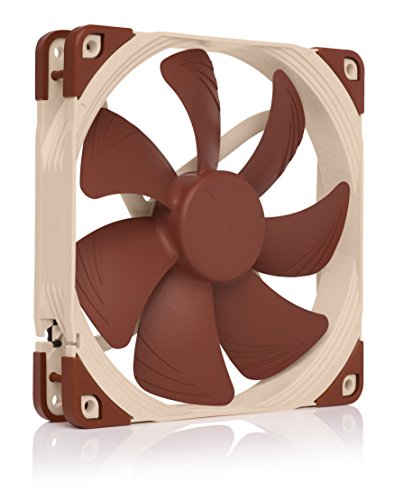
This is a 140mm USB-friendly fan made for low-voltage projects, router cooling, DIY airflow setups, and special use cases where a standard 12V PC fan will not work. It suits buyers who want quiet operation with trusted Noctua engineering.
Pros
- Works on 5V power and includes a USB adaptor cable
- PWM speed control helps keep noise under check
- Strong build quality with anti-vibration accessories in the box
- Known Noctua reliability with a very long rated lifespan
Cons
- Not meant for standard 12V motherboard fan use
- Lower top-end cooling than industrial models
- Brown-beige colour will not suit every build theme
- A niche choice for specific setups rather than regular PC cabinets
The Noctua NF-A14 5V PWM fills a rare gap in the market. Most buyers look at 12V cabinet fans, but this model is made for 5V applications. That makes a big difference if you want to cool a media box, networking gear, USB-powered cabinet, external enclosure, or a custom electronics project. The included USB power adaptor opens up flexible usage, and that is useful in Indian homes where people often repurpose one fan across many devices instead of buying separate cooling gear for each one.
Performance is tuned around quiet airflow rather than brute force. You get Noctua’s A-series blade design, Flow Acceleration Channels, and an acoustically refined frame. In simple terms, the fan stays civil even when it ramps up. If your goal is to reduce heat near a Wi-Fi router, set-top box, console area, or compact workstation, this fan makes more sense than a loud generic option. PWM control also helps when paired with compatible 5V headers in modding or DIY setups.
Noctua has a strong name among PC enthusiasts in India, even though the brand is more common in premium circles than in mass retail shops. Service usually depends on the seller and distributor route, but the brand’s record for durability is one reason many buyers still trust it. If you need a specialist 5V fan and want something dependable, this model is one of the safest picks.
Noctua NF-A14 industrialPPC-3000 PWM

This 140mm industrial fan is built for buyers who need maximum airflow and high-speed cooling in demanding systems. It suits overclocked desktops, dense workstations, and custom cooling jobs where raw thermal performance matters more than silence.
Pros
- Very high 3000 RPM ceiling for aggressive cooling
- SSO2 bearing design is known for long service life
- Industrial-grade material improves durability
- PWM control gives better speed management than fixed-speed fans
Cons
- Noise levels will be high at full speed
- Overkill for normal office or light gaming PCs
- Industrial styling is plain and utilitarian
- Premium segment product with limited appeal for budget builds
The NF-A14 industrialPPC-3000 PWM is for a different kind of buyer. This is not the fan you pick for a quiet family PC in the bedroom. This is the fan you buy when your case has hot-running parts, poor ambient temperatures, or a workload that pushes the system for hours. In Indian summer conditions, especially in rooms without air conditioning, a high-speed fan like this helps keep airflow moving where lower-speed models start struggling.
Its 3000 RPM capability puts cooling first. For restrictive cases, radiator mounts, server-style airflow paths, or heavily loaded workstations, this fan brings the kind of force many regular 140mm fans do not. The SSO2 bearing and fibre-glass reinforced polyamide frame also matter. They improve long-term stability and wear resistance, so the fan is better suited to dust, heat, and long daily run times than many basic sleeve-bearing options.
Noctua’s service experience in India is not as broad as mass-market brands with local service counters in every city, but the brand has earned trust through reliability and low failure rates. Enthusiasts, modders, and professional users often buy Noctua because they want to install once and forget about it. If your system needs serious cooling and you are ready to accept higher noise under load, this fan earns its place.
Noctua NF-A14 industrialPPC-2000 PWM

This fan balances industrial strength with more practical acoustics than the 3000 RPM version. It is a strong option for high-airflow cases, radiators, and work PCs that need durable cooling without going too extreme.
Pros
- Good balance between cooling strength and manageable noise
- IP52 rating adds extra protection against dust and moisture
- Three-phase motor design helps reduce vibration
- High durability with Noctua’s industrial-grade construction
Cons
- Still louder than mainstream silent fans under load
- Industrial design will not appeal to RGB-focused builders
- Pricier than entry-level 140mm fans
- A bit excessive for low-power systems
Among high-performance 140mm fans, this one hits a sensible middle point. The NF-A14 industrialPPC-2000 PWM gives you a clear step up over typical retail cabinet fans, but it stops short of the brute-force character of the 3000 RPM version. For many Indian users building a gaming PC or editing machine, that balance makes more sense. You get strong airflow and pressure, but daily usage stays easier on the ears.
The extra details on this model are worth noting. The three-phase motor design helps the fan run smoother, and Noctua’s second-generation SSO2 bearing improves durability over long periods. The IP52 protection rating is another practical advantage in dusty Indian environments where cabinet cleaning does not happen every week. If your PC sits near a window, in a workshop, or in a room with constant dust buildup, these things matter more than spec sheet bragging rights.
Brand reputation is a big reason to consider this fan. Noctua is known for quality control, and that gives peace of mind if you are building an expensive system. Direct service visibility in India is not as widespread as some local gaming brands, but replacement rates tend to be low because the fans are built well from the start. For buyers who want a serious 140mm fan without jumping to the loudest option in the room, this model is a smart fit.
TAG Windforce 140

The TAG Windforce 140 is a practical 140mm PWM fan aimed at gamers and mainstream builders who want high airflow, daisy-chain support, and decent noise control in a more approachable package.
Pros
- Strong rated airflow of 89.2 CFM
- 1800 RPM speed is useful for gaming cabinets
- Two ball bearing design helps durability
- PWM and daisy-chain support improve cable management
Cons
- Brand track record is not as proven as Noctua
- Acoustics may feel rougher than premium fans
- Accessories and finish are simpler than premium options
- Long-term consistency is less established
The TAG Windforce 140 looks like the kind of fan many Indian PC builders search for after checking premium models and stepping back at the last minute. It offers useful numbers on paper, a healthy airflow rating, PWM control, and daisy-chain support, all of which make life easier in a mid-tower gaming cabinet. If your case supports 140mm mounts at the front or top, this fan has enough speed to improve intake and exhaust performance in a visible way.
Its two ball bearing design is good news for buyers worried about heat and long gaming hours. Ball bearings usually handle tougher conditions better than basic sleeve bearings, and that matters in hot cities where a PC runs through summer afternoons and power backup sessions. The rated noise level is still reasonable for the performance target, though premium fans usually sound smoother when both are pushed hard.
TAG does not carry the same long-standing cooling reputation in India as Noctua, so buyer confidence will depend more on seller reliability and recent user feedback. Still, for a value-focused build, the spec mix makes sense. If you want solid airflow, standard 4-pin PWM control, and easy multi-fan installation without stepping into the enthusiast premium tier, the Windforce 140 is worth a look.
Noctua NF-A12x25 PWM

This is one of the most respected 120mm PWM fans for mixed use. It works well as a case fan, CPU cooler fan, or radiator fan, and suits buyers who want top-tier engineering with low noise and excellent all-round performance.
Pros
- Excellent balance of airflow, pressure, and acoustics
- Works well on cases, heatsinks, and radiators
- Premium materials and tight build tolerances
- Comes with useful accessories including y-cable and gasket
Cons
- 120mm size moves less air than strong 140mm fans in open case use
- Premium styling is divisive
- Costs more than mainstream 120mm options
- Best value appears in performance-focused builds, not basic PCs
The NF-A12x25 PWM has earned its reputation because it performs well in places where many fans become one-dimensional. Some are good only for open-air case airflow. Others work only on dense radiators. This fan handles both jobs well. Its carefully controlled blade clearance, Sterrox LCP material, and refined frame design help it maintain pressure and airflow without turning harsh or buzzy. For Indian users building compact systems or CPU air coolers with 120mm support, this flexibility matters a lot.
This fan is also easier to recommend for daily use than the industrialPPC models. You still get strong cooling, but the sound profile stays more refined. On a gaming PC, editing setup, or home office machine that runs for long hours, that makes the system feel better to live with. The included accessories also add real value. The y-cable, anti-vibration mounts, extension cable, and radiator gasket reduce the need for extra purchases during installation.
Noctua’s support presence in India is more enthusiast-channel than retail-chain style, but the brand’s service image is helped by low failure rates and steady product quality. Buyers who spend once on a fan like this usually keep using it across multiple upgrades. If you need a premium 120mm fan for a CPU cooler, radiator, or compact cabinet, this is one of the safest choices on the market.
Buying Guide
Pick the right fan size first
Start with compatibility. Your case, cooler, or radiator decides whether you need 120mm or 140mm. A 140mm fan often pushes more air at lower speed, which helps with lower noise in larger cabinets. A 120mm fan fits more places and is common on tower coolers and radiators. Check thickness too. Most are 25mm, but cramped builds need a quick measurement before purchase.
Airflow vs static pressure matters
For open mesh cabinets and rear exhaust positions, airflow-focused fans work well. For front panels with tight vents, dust filters, CPU heatsinks, or liquid-cooling radiators, static pressure matters more. If you choose the wrong type, temperatures stay higher even when the fan spins fast. Mixed-use fans are a good choice if you want one model for different mounts.
Choose PWM if your motherboard supports it
A 4-pin PWM fan gives better speed control than a fixed-speed fan or a basic 3-pin option. Your system raises speed when temperatures go up and slows the fan during light work. This helps with both cooling and noise. For Indian users who often use a PC for gaming at night and work during the day, this type of control is useful.
Bearing type affects lifespan
Sleeve bearings are common in budget fans, but ball bearings and premium bearing designs usually last longer. In hot and dusty conditions, better bearings are worth paying for. If your PC stays on for many hours every day, focus on fans with a strong lifespan rating and a stable bearing design.
Noise is more than the dB number
Do not compare fans only by one quoted noise figure. The sound character matters too. A smoother fan at a slightly higher rating may feel less annoying than a rough-sounding fan with a lower number on paper. If your PC sits near your bed or work desk, check whether the fan is known for motor hum, bearing chatter, or turbulence noise.
Think about Indian dust and room temperature
Indian conditions are harder on cooling than many buyers expect. Dust filters get clogged fast, room temperatures rise sharply in summer, and some systems run through inverter backup or long work hours. A fan with stronger pressure, better sealing, or higher durability makes more sense if your environment is harsh. Clean your filters and blades regularly, or even the best fan will lose efficiency.
Check accessories and cable options
Small extras save time and money. Extension cables, anti-vibration mounts, radiator gaskets, splitter cables, and daisy-chain support make installation cleaner. If your motherboard has limited headers, a y-cable or daisy-chain setup is useful. If your case is large, short cables create frustration fast.
Feature Importance
| Feature | Importance |
|---|---|
| Correct size compatibility | High |
| PWM speed control | High |
| Airflow rating | High |
| Static pressure performance | High |
| Bearing type | High |
| Noise profile | Medium |
| Build material quality | Medium |
| Dust and moisture resistance | Medium |
| Included accessories | Medium |
| Brand support in India | High |