A good gaming keyboard changes how your setup feels every single day. You notice the speed during a tense match, the comfort during long work hours, and the sound every time your fingers hit the keys. For many buyers in India, the keyboard is not only for gaming. It also handles college work, office tasks, late-night chats, and weekend sessions with friends. That is why switch type, layout, build quality, and service support matter much more than flashy lights alone.
When you pick a budget gaming keyboard, you need to think about your room size, desk space, typing style, and how much noise your family will tolerate. Red switches suit people who want smooth keypresses. Compact layouts save space for mouse movement, which FPS players often prefer. A knob for volume control sounds small on paper, but in daily use I find it surprisingly useful. Wireless support also matters if you switch between a laptop, tablet, or work PC.
The Indian market now has many value-focused options from brands like EvoFox, Acer, Kreo, Zebronics, and EVM. Some give you hot-swap support, some focus on compact design, and some try to offer wireless freedom. The tricky part is knowing what to ignore and what deserves your money. The five keyboards below stand out for practical use, features, and day-to-day value for Indian buyers.
EvoFox Katana X2 FS
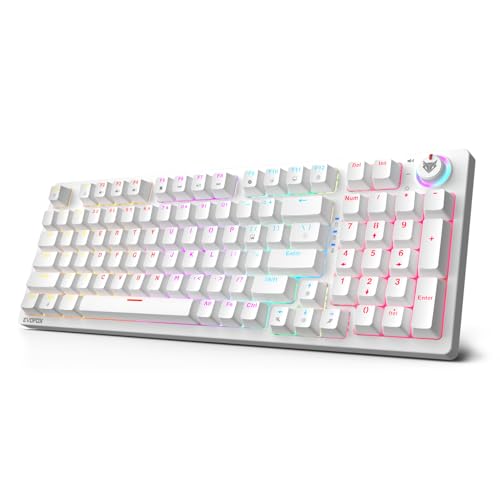
The EvoFox Katana X2 FS is a compact wired mechanical keyboard with silent red switches, hot-swap support, and a handy control knob. It suits gamers and regular users who want a cleaner desk setup without losing useful shortcut features.
Pros
- 3-pin hot-swappable switch support
- Silent linear red switches feel smooth
- Dedicated multifunction knob for quick control
- All keys anti-ghosting for gaming use
Cons
- Wired-only usage limits flexibility
- 3-pin hot-swap support is less open than 5-pin
- White body needs more frequent cleaning
- Brand service reach is smaller than big legacy brands
The Katana X2 FS gets a lot right for buyers who want an entry mechanical keyboard without dealing with too many compromises. The silent red switches keep keypresses smooth and light, which works well for fast games and long typing sessions. If you play at night or share your room, the softer switch sound helps. The backlighting adds some personality, and the brightness control through the knob feels practical instead of gimmicky.
What I like here is the mix of gamer and everyday features. Dedicated shortcut access for screenshot, Game Bar, and Copilot makes this keyboard feel tuned for current Windows use. Anti-ghosting support also helps in fast multiplayer games where missed inputs feel instantly annoying. The hot-swap support gives you room to replace switches later, which is a big plus for buyers who want to learn the hobby slowly rather than spend big from day one.
For Indian users, EvoFox has built a decent value image by targeting affordable gaming accessories. Its service network is not as wide as the largest national electronics brands, so support experience will vary by city. Even so, the feature list feels well judged for someone buying a first mechanical keyboard for home gaming, study use, and mixed entertainment.
Acer Nitro G
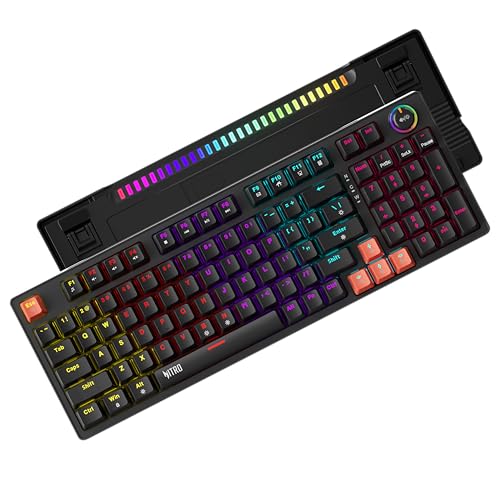
The Acer Nitro G is a 98 percent mechanical keyboard aimed at users who want near full-size function in a tighter frame. Its gasket structure, red switches, and multifunction knob give it a more premium feel than many budget-focused boards.
Pros
- 98 percent layout balances compact size and utility
- Gasket structure improves typing feel
- Red linear switches rated for long life
- Control knob adds daily convenience
Cons
- Larger footprint than 65 percent or 61 key options
- Wired design is less tidy for minimalist setups
- Mixed RGB styling will not suit every desk theme
- Acer keyboard line is newer than specialist keyboard brands
This keyboard is a smart pick for users who find 60 percent and 65 percent layouts too cramped. You still get a compact body compared with a full-size board, yet the 96-key arrangement keeps many important functions close at hand. For office work, editing, spreadsheets, and games, this layout often feels easier to live with. The multifunction knob is another plus because quick volume changes are something most of us use every day.
The gasket-mounted design is the more interesting part. In use, this sort of structure usually gives a softer bottom-out feel and cuts some harshness from keypresses. Combined with red linear switches, the Nitro G aims for a smoother typing experience than the typical budget mechanical keyboard. Double-shot keycaps and a reinforced cable also make the package feel built for longer use in a warm Indian environment where cheaper plastics sometimes age badly.
Acer has strong brand recognition in India, especially in laptops and monitors, and that works in this keyboard’s favour. Its service network is wider than many newer gaming accessory brands, which gives some peace of mind if you prefer buying from a familiar name. For users who want a practical all-rounder with a little extra comfort, the Nitro G makes a strong case.
Kreo Hive 65
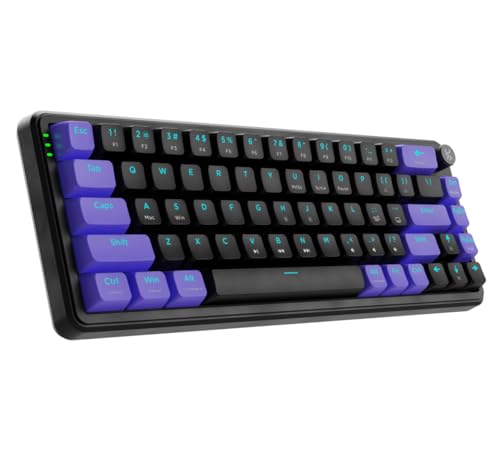
The Kreo Hive 65 is a compact wired mechanical keyboard with pre-lubed linear switches, 5-pin hot-swap support, and a metal volume knob. It is ideal for enthusiasts who want a smaller board with room for future switch upgrades.
Pros
- 5-pin hot-swap support offers better mod potential
- Pre-lubed switches improve stock feel
- Gasket mount and foam layers help sound control
- Detachable USB-C cable is easier to manage
Cons
- 65 percent layout needs adjustment for some users
- No wireless mode
- ABS keycaps are less premium than PBT
- Compact layout is less suited for heavy number entry
The Hive 65 feels like a keyboard built for buyers who have watched custom keyboard videos and want a taste of that experience without spending too much. The 65 percent layout saves desk space but still keeps arrow keys, which many gamers and coders miss on smaller 60 percent boards. The metal knob adds function and gives the board a slightly more polished identity on the desk.
Kreo has also paid attention to the out-of-box typing feel. Pre-lubed linear switches, a gasket-mounted structure, and two layers of foam all aim to cut scratchiness and reduce hollow sound. In plain use, this usually means a softer and cleaner typing note than many low-cost mechanical keyboards. The 5-pin hot-swap support is a major plus because it opens the door to a wider switch market later, something hobby users in India often look for once they get comfortable with keyboard mods.
For Indian buyers, the appeal is simple. You get enthusiast-style features in a format that fits small desks, hostel rooms, and compact workstations. Kreo has grown fast in the gaming accessory space, though its service network is still more limited than old-school mass brands. If you want a tighter layout with stronger upgrade freedom, the Hive 65 is one of the most interesting picks here.
Zebronics Max Ninja 61

The Zebronics Max Ninja 61 is a tiny wired mechanical keyboard for users who want a no-fuss compact board with red switches and basic gaming features. It makes sense for tight desks, hostel setups, and users trying a 61-key layout for the first time.
Pros
- Very compact 61-key design saves desk space
- Silent linear red switches suit shared rooms
- Double-shot keycaps improve durability
- Zebronics has wide retail visibility in India
Cons
- 61-key layout has a steep learning curve
- Only 26-key anti-ghosting, not full-key
- No knob or advanced enthusiast features
- Limited function access compared with larger layouts
The Max Ninja 61 keeps things simple. You get a small footprint, linear red switches, and LED lighting without too much extra clutter. For FPS players, the compact width leaves more room for broad mouse movement, which many people prefer. If your desk is small or you use a laptop stand beside the keyboard, this size makes daily setup much easier.
This keyboard is also one of those products where expectations matter. It is not trying to be a custom keyboard or a feature-heavy premium unit. Instead, it focuses on the basics that matter to many first-time buyers, such as switch feel, durable keycaps, and enough anti-ghosting for common gaming use. The red switches should feel light and smooth, while the 17 lighting modes add some room customization for late-night gaming sessions.
Zebronics has one big advantage in India, its reach. The brand is visible in online stores, local computer markets, and many electronics shops. Service and spare access tend to feel easier in comparison with smaller niche names. If you want a starter mechanical keyboard and you are ready to adjust to a 61-key layout, the Max Ninja 61 is a practical low-fuss option.
KARNAGE by EVM Visage

The KARNAGE by EVM Visage is an 84-key wireless gaming keyboard with triple-mode connectivity, a volume knob, and a built-in display. It suits users who want one keyboard for gaming, work, and multi-device use across Windows and Mac.
Pros
- Triple-mode wireless and wired connectivity
- Works with Windows and Mac
- Volume knob and status display add convenience
- Two-year warranty is reassuring
Cons
- Semi-mechanical keys lack true mechanical feel
- 19-key anti-ghosting is limited for serious gamers
- Wireless battery care adds one more thing to manage
- Brand recall is lower than bigger keyboard names
The Visage takes a different route from the other keyboards in this list. Instead of chasing pure mechanical switch appeal, it focuses on flexibility. Triple-mode support means you can connect to a desktop over 2.4GHz, keep Bluetooth paired with a laptop or tablet, and still switch to USB-C when you want a direct wired link. For people working from home, studying, and gaming on different devices, this setup feels far more useful than a standard wired board.
The 84-key layout strikes a middle ground between compact size and function. You save desk space, yet the keyboard still feels easier to adapt to than a 61-key option. The volume knob is great for daily use, and the built-in display adds a small layer of convenience for status checks. Since this is a semi-mechanical board, the feel will not match a true mechanical keyboard from the other entries here, but some users will prefer the quieter and softer style for shared rooms.
For Indian homes, wireless convenience matters more than many reviews admit. Fewer cables help in smaller rooms, and multi-device support is useful if one keyboard has to serve a family PC, personal laptop, or tablet. EVM’s service image is not as established in keyboards as big mainstream brands, though the included two-year warranty does add confidence. If freedom from wires matters more to you than pure switch feel, the Visage deserves a look.
Buying Guide
Choose the right layout first
Layout changes your daily experience more than RGB or marketing terms. A 61-key keyboard saves the most space, but you lose direct access to many keys. A 65 percent board keeps arrow keys, which many people need. An 84-key or 98 percent board feels easier for work, editing, and mixed use. If you play FPS games and use a low mouse sensitivity, a smaller layout often feels better because your mouse gets more room.
Switch type matters more than lighting
Most keyboards in this list use red linear switches or a similar smooth key style. These suit gaming because the press feels fast and light. They also create less sharp noise than clicky blue switches. If your keyboard will sit in a shared bedroom, hostel, or office corner, a quieter linear switch is the safer pick. Semi-mechanical keyboards look similar but feel different, so check this before you buy.
Wired or wireless, think about your setup
A wired keyboard gives stable performance and no charging stress. For a desktop gaming setup, many buyers still prefer wired. Wireless makes more sense if your desk is small, you move around often, or you switch between devices. Bluetooth is useful for laptops and tablets. A 2.4GHz dongle is usually better for low-latency use. If you play competitive games often, wired or 2.4GHz is the safer route.
Hot-swap support is worth paying attention to
If a keyboard has hot-swap sockets, you get the option to replace switches later without soldering. This helps if one switch fails or if you want a different typing feel after a few months. Also check whether the board supports 3-pin or 5-pin switches. A 5-pin hot-swap board usually gives you better upgrade options in India because more enthusiast switches fit easily.
Build quality affects long-term value
Double-shot keycaps, a solid frame, good stabilizers, and a decent cable all matter in long-term use. In Indian conditions, dust, heat, and humidity put stress on accessories. A weaker keyboard starts showing shine, rattling, or loose connectors early. Detachable USB-C cables are easier to replace. A gasket structure or foam layers also improve feel and reduce harsh sound during long sessions.
Check anti-ghosting based on your gaming style
If you play story games, casual titles, or mostly type, partial anti-ghosting is usually fine. If you play fast multiplayer games and use many key combinations, full anti-ghosting is better. This feature decides whether your rapid inputs register properly. Buyers often ignore this and focus only on lights, then feel the issue later in actual matches.
Service support in India still matters a lot
A keyboard looks simple, but support matters if keys chatter, LEDs fail, or a port becomes loose. Larger brands often have better reach in metros and tier-2 cities. Smaller gaming brands sometimes offer good value but weaker local support. Before buying, check whether service happens through pickup, local centers, or seller replacement. A longer warranty helps, though response quality matters more than paperwork alone.
Feature Importance
| Feature | Importance |
|---|---|
| Layout size | High |
| Switch type | High |
| Anti-ghosting | High |
| Build quality | High |
| Hot-swap support | Medium |
| Wired or wireless connectivity | High |
| Keycap quality | Medium |
| Backlighting and RGB | Low |
| Volume knob or media controls | Medium |
| Warranty and service network | High |