A good gaming cabinet does more than hold your PC parts. It affects airflow, dust control, cable management, upgrade room, and even how easy your build feels on day one. In India, this matters more than many buyers think. Hot summers, dusty rooms, and long gaming sessions put extra pressure on your system, so the cabinet you pick has a direct effect on temperatures and long term reliability.
When you choose a cabinet, focus on motherboard support, GPU clearance, CPU cooler height, fan setup, front panel ports, and filter quality. Side panel material also matters. Tempered glass looks better and feels sturdier than acrylic, but acrylic often helps keep cost low. I also suggest checking whether the brand has a decent service presence in India, because small issues like missing screws, fan faults, or broken panels are easier to sort out when support is reachable.
For Indian buyers shopping in the budget segment, value for money is the main thing. You want a case that looks good, cools well, and does not create problems during assembly. The five options below fit different needs, from compact mATX builds to full ATX entry gaming setups.
Circle Miniator M1

The Circle Miniator M1 is a compact mid-tower style cabinet for Micro-ATX and Mini-ITX builds. It stands out with tempered glass panels and three pre-installed ARGB fans, which make it a smart pick for a neat budget gaming setup.
Pros
- Compact size suits small desks and tight rooms
- Tempered glass front and side add a cleaner premium look
- Three pre-installed ARGB fans help airflow out of the box
- Supports CPU coolers up to 165mm, which is useful for many air coolers
Cons
- Limited to M-ATX and ITX motherboards
- Storage support is modest for users with many drives
- GPU clearance is lower than larger ATX cabinets
- Top fan mounts are optional, not pre-filled
The Miniator M1 makes sense if you want a cabinet that does not eat up desk space. Its compact body fits Indian homes where the PC often sits beside a study table or in a bedroom corner. Even with the smaller footprint, you still get front and side tempered glass, which gives the system a cleaner display look than many entry cabinets in this class.
Cooling is a strong point for a budget-focused small build. You get two 120mm ARGB fans at the front and one 120mm ARGB fan at the rear, so your setup starts with usable airflow from day one. For Indian weather, this matters. If your room gets warm in April, May, and June, a cabinet with ready airflow saves you from quick heat buildup. Cable routing also looks thought out for a compact case, so your build has a better chance of staying tidy.
This cabinet is best for users building around Micro-ATX or Mini-ITX boards with a mid-range graphics card. The 290mm GPU support and 165mm CPU cooler clearance give decent flexibility, though you should still measure your parts before buying. Circle as a brand is familiar in the Indian budget PC market, with fair availability through online stores and local sellers. Service reputation is not at the level of top global cabinet brands, but spare access and seller presence are usually better than unknown labels.
Ant Value VM41

The Ant Value VM41 is an entry gaming cabinet for buyers who want ATX support and multiple pre-installed fans without spending too much. Its four-fan setup and wider motherboard compatibility make it a practical choice for first-time builders.
Pros
- Supports ATX, M-ATX, and ITX motherboards
- Comes with three front fans and one rear fan pre-installed
- Offers seven expansion slots for standard ATX builds
- Useful front I/O with USB 3.0, USB ports, audio, and mic
Cons
- Specification listing appears inconsistent on GPU and cooler clearance
- Rainbow fans are less flexible than ARGB fans
- Storage layout is basic
- Design is functional more than premium
The VM41 is for people who want fewer compatibility headaches. If you are building a full ATX gaming PC on a budget, this case gives you more room than compact mATX options. That extra room helps during assembly, especially for first-time builders who do not want to struggle with PSU cables, front panel connectors, and long graphics cards in a cramped shell.
The included fan setup is a big reason to consider this model. Three front fans and one rear fan create the airflow pattern most budget gaming PCs need. In dusty Indian cities, good airflow alone is not enough, but a case with multiple stock fans saves money and effort from the start. The front I/O is also practical for daily use, with USB 3.0 and audio ports placed where you reach them easily.
Ant Esports and Ant Value products are widely sold across India, and that availability helps. If you need replacement accessories or seller support, you are more likely to find help than with a lesser-known import-only cabinet. One thing to watch closely is the listed hardware clearance, since the marketplace details look mixed. Before finalizing, check your GPU length and CPU cooler height against seller-confirmed dimensions. If your parts fit, the VM41 offers strong everyday value.
Zebronics ZIUM

The Zebronics ZIUM is a compact gaming cabinet aimed at budget builders who want a simple look, front LED styling, and easy availability in India. It is best suited for basic gaming or office-plus-gaming systems using Micro-ATX or Mini-ITX hardware.
Pros
- Compact design works well for smaller rooms and desks
- Good availability through online and offline Indian retail
- USB 3.0 support on the top panel is useful
- Cable management support helps cleaner assembly
Cons
- Only one rear 80mm fan included
- Acrylic side panel is less premium than tempered glass
- Limited internal room compared to larger cabinets
- CPU cooler and GPU space are modest for newer high-end parts
The ZIUM follows a simple budget formula. Keep the size manageable, add some visual flair through the LED strip and transparent side panel, and make the cabinet easy to buy from almost anywhere in India. For a lot of buyers, that approach works. If your build uses a mainstream CPU, a modest air cooler, and a shorter graphics card, this cabinet covers the basics without making things complicated.
Its compact shell makes it a decent fit for student rooms, home study setups, and shared family spaces where a huge PC tower looks out of place. The top panel gives you USB 3.0 and USB 2.0 connectivity, which is handy for pen drives, keyboards, and occasional external storage use. The cable management support also helps more than you would expect in this segment, since a messy interior hurts airflow and looks bad through the side panel.
The weak area is cooling. A single rear 80mm fan is not ideal for a hotter Indian environment, especially if you game for long hours. This means the ZIUM is better for entry-level builds than for heat-heavy systems. Zebronics has one clear advantage though, its reach. The brand is available in many Indian cities and local markets, and service access is easier than with many low-cost cabinet names. That makes the ZIUM a safer buy for people who value easy purchase and basic support.
Frontech War Machine FT-4349

The Frontech War Machine FT-4349 targets budget gamers who want tempered glass, ARGB-style visual appeal, and a four-fan setup in an ATX-compatible cabinet. It is a style-first option with practical airflow features for daily gaming use.
Pros
- Four pre-installed 120mm fans give good starting airflow
- Tempered glass side panel improves overall look
- Washable dust filters help in dusty Indian rooms
- Supports ATX and mATX builds
Cons
- Detailed clearance information is limited in the listing
- Front I/O selection is basic for some users
- Brand perception is more value-focused than enthusiast-focused
- Stock fan quality may not match more expensive cabinets
The War Machine FT-4349 is the kind of cabinet many budget gamers look for first. It has tempered glass, multiple RGB fans, and a body that suits standard ATX hardware. If your goal is to build a gaming PC that looks lively from the first boot, this cabinet gives you that visual effect without needing extra fan purchases right away.
For Indian conditions, the washable dust filters are one of the better parts of the package. Dust enters fast in many homes, especially if your cabinet sits on the floor near a window or under a desk. Being able to remove and clean filters without much effort helps keep the system healthier over time. The included fans also make the case more usable for summer conditions, where weak airflow often becomes the biggest issue in budget builds.
Frontech has long been present in the Indian accessories market, mostly in value products. Its service network and product reach are decent in many places, though expectations should stay practical. This is not an enthusiast cabinet for heavy water-cooling plans or oversized parts. It is for the buyer who wants solid everyday function, decent cooling, and a gaming look that feels worth the money.
Frontech Clone FT-4388
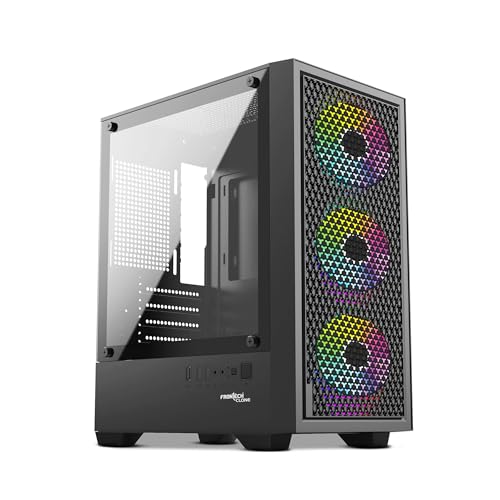
The Frontech Clone FT-4388 is a roomy budget cabinet for users who want broad motherboard support, a tempered glass side panel, and multiple LED fans. It suits entry and mid-range gaming builds where airflow and looks both matter.
Pros
- Supports ATX, Micro-ATX, and Mini-ITX motherboards
- Tempered glass side panel adds a cleaner finish
- Washable dust filter is useful for easier maintenance
- Good internal space for many mainstream GPU and cooler combinations
Cons
- Product listing has mixed fan details, which needs seller confirmation
- USB port naming in the listing looks inconsistent
- No premium extras like Type-C or advanced controller support
- Build quality is likely functional rather than thick and heavy
The Clone FT-4388 tries to cover the broadest possible buyer base. If you are not fully sure whether your build will use ATX or mATX, this cabinet removes that worry. It also gives enough room for mainstream gaming components, including a graphics card up to 290mm and CPU cooler support up to 155mm. For many budget and mid-range PC builds in India, that is a workable range.
The visual side is straightforward. Tempered glass on the side panel lets your parts show properly, and the bundled LED fan setup gives the cabinet a gaming feel from the start. Venting and liquid cooling support are mentioned, which suggests the case is built with airflow in mind. In Indian weather, that extra focus helps if your system spends long hours gaming, editing, or downloading in a warm room.
Like the War Machine, this Frontech model benefits from the brand’s local familiarity. You will find Frontech products in many online listings and offline stores, and that matters when you need a quick replacement or basic support. The main thing to be careful about is the product description itself, because some details look inconsistent across the listing. If you confirm the fan count and port layout with the seller, the FT-4388 becomes a sensible buy for users who want size, style, and simple maintenance.
Buying Guide
Pick the right motherboard size first
Start with your motherboard. If you have an ATX board, you need a cabinet with ATX support. If your build uses Micro-ATX or Mini-ITX, you get more case options and often a smaller footprint. Many buyers in India pick a cabinet first because of looks, then realize their board does not fit. Avoid that mistake. Check the supported form factors before anything else.
Check GPU length and CPU cooler height
This step saves you from the worst compatibility issue. Modern graphics cards are getting longer and thicker. Air coolers also vary a lot in height. Match your exact GPU length and CPU cooler height against the cabinet specs. Keep a small margin instead of buying right at the limit. This matters even more if front fans or a radiator sit close to the GPU area.
Airflow matters more than RGB
Many budget cabinets look great in photos but move less air than they should. For Indian summers, airflow should come before lighting. Look for at least one front intake and one rear exhaust fan, though three front fans and one rear fan is a better starting point for a gaming PC. If the cabinet includes dust filters, that is even better for homes where dust builds up fast.
Side panel material changes the experience
Tempered glass looks better, feels stronger, and resists scratches better than acrylic. Acrylic is lighter and cheaper, but it scratches more easily during cleaning. If your cabinet will stay visible in your room, tempered glass is worth preferring. If the budget is tight and the system is basic, acrylic is still fine as long as the airflow is decent.
Front I/O ports affect daily use
Do not ignore the top or front panel. A USB 3.0 port is useful for fast pen drives and external storage. Audio ports should be easy to reach if you switch between speakers and a headset. Some low-cost cabinets still offer older or limited port layouts, so think about how you use your PC every day before choosing.
Dust protection is a big deal in India
A cabinet with washable dust filters saves effort over time. Dust buildup blocks airflow, raises temperatures, and makes fans noisier. This is common in many Indian homes, especially near roads, construction areas, or rooms with open windows. If you clean your filters once in a while, your PC stays healthier and performs more consistently.
Service and spare availability should not be ignored
Budget cabinets sometimes face issues like weak stock fans, missing screws, damaged glass during shipping, or front panel defects. A brand with decent availability in India makes these problems easier to handle. Before buying, check whether the seller is reliable and whether the brand has a visible support path. This matters more than people think in the entry segment.
Feature Importance
| Feature | Importance |
|---|---|
| Motherboard compatibility | High |
| GPU clearance | High |
| CPU cooler height support | High |
| Pre-installed fans | High |
| Dust filters | High |
| Front I/O ports | Medium |
| Tempered glass or acrylic panel | Medium |
| Cable management space | Medium |
| Storage drive mounts | Medium |
| RGB or ARGB lighting | Low |