A good gaming laptop matters more in India than many people think. For a lot of buyers, one machine handles gaming, college work, office tasks, editing, and late-night streaming. That means you need more than raw FPS. You need decent thermals for Indian summers, a screen that feels smooth, enough RAM for newer games, and a brand with service support you can reach without drama.
When I look at gaming laptops for Indian buyers, I pay attention to the processor, GPU wattage, display refresh rate, upgrade options, cooling, weight, and port selection. Battery life also matters, even on gaming machines, because many people carry these systems to class or work. After-sales support is a big deal too. A great spec sheet feels less useful when parts or service take too long.
The five models below cover a smart mix of performance and value for money for the Indian market. Some focus on stronger graphics, some on tougher build quality, and some on better storage or portability. If you want a laptop for esports, story-driven AAA games, study, and daily use, this list gives you a practical starting point.
Acer Nitro V 15 ANV15-42

This model stands out for pairing a Ryzen 7 7445HS with an RTX 4050 and a 165Hz display. For buyers who want stronger gaming headroom and modern features, this is one of the most balanced picks here.
Pros
- RTX 4050 graphics offer better gaming performance than RTX 3050 options
- 165Hz IPS display feels smoother for fast shooters and esports
- Ryzen 7 processor handles gaming, multitasking, and editing well
- DDR5 memory and Gen4 SSD platform feel current and fast
Cons
- 512GB storage fills up fast with large modern games
- Chassis design is more functional than premium
- Battery backup will be average under mixed heavy use
- Service experience depends a lot on city and local Acer center
The Acer Nitro V 15 ANV15-42 is the performance-first choice in this list. The Ryzen 7 7445HS gives you strong multi-core performance for gaming, streaming, and heavier workloads, while the RTX 4050 brings a clear step up over RTX 3050 laptops. If you play titles like Cyberpunk 2077, Forza Horizon 5, Apex Legends, or newer AAA games, this GPU gives you more breathing room for higher settings and frame generation support where available.
The 15.6-inch Full HD IPS panel with 165Hz refresh rate is another strong point. For competitive gaming, the higher refresh rate makes motion look cleaner and input feel sharper. Acer also includes a practical port layout and a backlit keyboard with a dedicated NitroSense key, which helps when you want quick access to thermal and performance settings. The AI noise reduction on the microphones is useful for classes, Discord, or team chat.
For Indian users, this laptop makes sense because it balances gaming value with everyday use. The 2.1 kg weight is manageable for a gaming machine, so carrying it between home and college is possible. Acer’s service network in India is reasonably visible in many cities, though the experience varies by location, so checking your nearest support center before buying is a smart move. If your main target is stronger gaming performance without moving to much pricier machines, this one earns its place.
ASUS TUF Gaming F16 FX607VJB

The ASUS TUF Gaming F16 is a sensible pick if you want a bigger 16-inch screen, a 16:10 aspect ratio, and a durable TUF-series design. It suits buyers who split time between gaming, study, and productivity work.
Pros
- 16-inch 16:10 display gives more screen space for work and games
- TUF build line has a solid reputation for daily rough use
- RTX 3050 6GB is better positioned than older 4GB variants
- Office 2024 and Microsoft 365 Basic add practical extra value
Cons
- RTX 3050 is still a mid-range GPU for newer AAA games
- 65W graphics setup is decent but not class-leading
- DDR4 memory feels less future-facing than DDR5 options
- Heavier than standard thin-and-light laptops
The ASUS TUF Gaming F16 stands out because of its display format and overall usability. The 16-inch FHD+ panel with a 16:10 ratio gives you extra vertical room, which feels good in day-to-day work, browsing, coding, and even strategy games. A 144Hz refresh rate keeps gameplay smooth, and the 300-nit brightness is more comfortable for indoor use than dimmer budget panels. If you want one laptop for gaming and college assignments, this screen shape adds real everyday comfort.
Inside, the Intel Core 5 210H and RTX 3050 6GB combo is built for solid 1080p gaming. Esports games will run well, and many story-heavy titles will stay enjoyable with sensible graphics settings. ASUS also adds the practical stuff many Indian buyers care about, such as Office 2024, one-zone RGB keyboard lighting, and a known TUF design language that usually handles regular travel and desk movement better than fragile-looking alternatives.
In India, ASUS has built a strong identity in the gaming segment, and the TUF line is often shortlisted for good reason. Service support is fairly widespread in major cities and towns, and spare part access tends to be better than what niche brands offer. This laptop is for the buyer who wants a tough, flexible machine with a larger display and no strange compromises in the basics.
ASUS TUF A15 FA506NCG
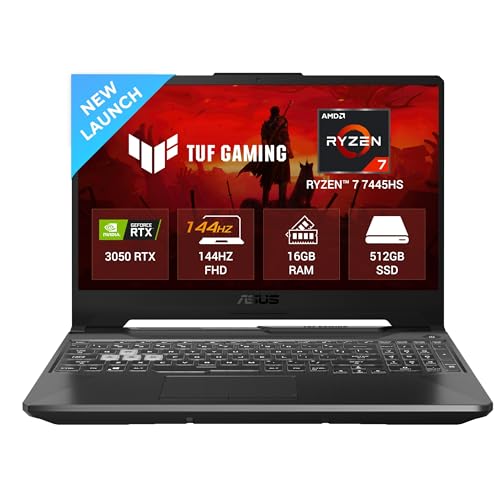
The TUF A15 targets buyers who want a Ryzen 7 processor, DDR5 memory support, and familiar TUF durability in a classic 15.6-inch format. It is a practical fit for gaming, classes, and regular daily work.
Pros
- Ryzen 7 7445HS delivers strong CPU performance
- DDR5 RAM support and upgrade path up to 64GB add flexibility
- TUF series build is known for durability-focused design
- Good port selection with USB-C, HDMI 2.1, and RJ45
Cons
- RTX 3050 4GB is the weakest GPU configuration in this list
- 250-nit display brightness is modest
- 48Wh battery is on the smaller side for this category
- Color coverage is average, so creators may want more
The ASUS TUF A15 FA506NCG gets a lot right for people who care about processor strength and long-term upgrade room. The Ryzen 7 7445HS is a capable chip for gaming, multitasking, coding, and rendering work, and the DDR5 memory platform gives this laptop a fresher base than many older mid-range models. With support for memory upgrades up to 64GB, this system has room to grow if your workload changes later.
Gaming performance depends more on the RTX 3050 4GB here, so this machine makes the most sense for esports titles and older or moderately demanding AAA games at balanced settings. The 144Hz display helps in fast games, and the anti-glare coating is useful in brighter rooms, something Indian users will appreciate in homes with strong daylight. ASUS also includes useful connectivity, including RJ45 LAN and USB-C with DisplayPort, which helps if you want an external monitor setup later.
What makes this laptop attractive is the familiar TUF formula. You get a body that feels built for regular use, a layout that works well for students and gamers, and a brand with a decent service footprint in India. I would place this model in the practical category. It is not the flashiest option here, but for buyers who care about CPU muscle, ports, and future RAM upgrades, it holds value.
MSI Thin 15 B13UC

The MSI Thin 15 is the lightest gaming-focused option in this list, and that makes it appealing for people who carry their laptop often. It combines a 13th Gen Core i7 with RTX 3050 graphics in a more travel-friendly body.
Pros
- Relatively light at 1.86 kg for a gaming laptop
- Core i7-13620H is strong for mixed workloads
- Dual-channel 16GB RAM is good for smooth daily use
- 144Hz display suits esports and general gaming
Cons
- 45% NTSC panel is not ideal for color-critical work
- Thin chassis may limit sustained thermal comfort under long heavy gaming sessions
- RTX 3050 4GB has less room for newer demanding games
- MSI service reach is weaker than Dell or ASUS in some Indian areas
The MSI Thin 15 B13UC is for the buyer who wants gaming hardware without carrying a brick every day. At 1.86 kg, it is noticeably easier to move around than many other laptops in this segment. That single point matters a lot for students, office commuters, and anyone who travels by metro, bus, or bike. The Core i7-13620H also gives this machine good all-round speed for gaming, editing, and heavy browser-based work.
On the gaming side, the RTX 3050 4GB and 144Hz screen make sense for esports games such as Valorant, CS2, and FIFA, while many single-player titles remain playable with tuned settings. MSI Center adds some extra control over system behavior, which many users like. The display is fast enough for gaming, though the color range is clearly aimed at mainstream use rather than content creators who need stronger accuracy.
For Indian buyers, the biggest reason to choose this model is portability. You get a lighter frame, Wi-Fi 6 support, and enough hardware for a proper entry gaming experience. The main thing to check before purchase is local after-sales support. MSI has improved visibility in India, but service convenience still depends a lot on your city. If your area has decent MSI support, this laptop becomes easier to recommend.
Dell G15 5530

The Dell G15 is built for buyers who want a sturdier gaming laptop with strong storage and dependable support. Its Core i5-13450HX and RTX 3050 6GB combo suits users who want steady 1080p gaming and a machine that feels built for long use.
Pros
- 1TB SSD gives far more breathing room for games and files
- RTX 3050 6GB is better than 4GB versions for newer titles
- Dell service network in India is one of the safer bets
- HX-series processor offers good sustained performance
Cons
- Heaviest laptop in this list at 2.65 kg
- 120Hz display is lower than 144Hz and 165Hz rivals
- Bulkier body is less convenient for daily travel
- Design focuses more on function than slimness
The Dell G15 5530 feels like a machine made for buyers who value stability over slim looks. The Core i5-13450HX is a serious processor for its class, and when paired with RTX 3050 6GB graphics, it gives you dependable 1080p gaming for popular multiplayer games and many modern single-player titles. The big practical win is the 1TB SSD. Modern PC games are huge, and this extra storage saves you from immediate upgrade stress.
Dell also gives this laptop a wide range of ports, including HDMI 2.1, USB-C with DisplayPort, RJ45 Ethernet, and multiple USB-A ports. That setup works well for users with wired internet, external monitors, keyboards, and other accessories. The 120Hz display is not the fastest in this list, but it still feels much smoother than a standard 60Hz panel and suits most mainstream gaming needs.
For Indian buyers, Dell’s support network is a major reason this model stays relevant. In many cities, getting help, parts, or service is simpler with Dell than with smaller gaming brands. The G15 is heavy, yes, and not ideal if you travel daily with a packed backpack. But if your laptop spends most of its time on a desk and you want good storage, stable gaming hardware, and peace of mind on support, this one has a clear place.
Buying Guide
Pick the GPU before anything else
For a gaming laptop, the graphics card decides more than the processor in most games. In this list, the RTX 4050 sits ahead of the RTX 3050 models for newer games, better settings, and longer relevance. If you mostly play esports titles, an RTX 3050 laptop still makes sense. If you want stronger AAA gaming life, the RTX 4050 model deserves extra attention.
Check GPU memory and wattage
Two RTX 3050 laptops are not always equal. A 6GB version gives you more comfort in newer games than a 4GB version. Wattage matters too, because a higher power GPU often performs better than the same chip in a weaker thermal setup. Product pages do not always explain this clearly, so read the specs carefully.
Do not ignore the display
A gaming laptop screen affects your experience every day. Look at refresh rate, panel type, brightness, and color coverage. A 144Hz or 165Hz panel feels smoother in shooters and racing games. IPS panels are usually a safer choice for viewing angles. If you work near windows or in bright rooms, low brightness gets annoying fast.
Thermals matter in Indian conditions
Indian summers are harsh on gaming laptops. A slim machine with decent specs may still throttle if cooling is weak. Look for laptops with known gaming series cooling systems, proper vents, and software controls for fan profiles. If you play for long hours, a cooling pad also helps, especially in non-air-conditioned rooms.
Upgrade path saves money later
Many buyers keep a gaming laptop for three to five years. Because of that, RAM and storage upgrade options matter a lot. A 512GB SSD looks fine on day one, then a few large games eat most of the space. Dual RAM slots, higher memory limits, and an extra SSD path make a big difference over time.
Weight and charger size affect daily use
A lot of people buy a gaming laptop, then carry it to college or office and regret the bulk. A 2.6 kg machine with a big adapter feels much heavier in real life than specs suggest. If you travel often, weight should sit high on your list. If the laptop stays on a desk, you can focus more on thermals and performance.
Service network is a real buying factor
This part gets ignored too often. In India, brand support can change your ownership experience more than a small spec difference. Dell and ASUS usually have broader reach in many regions. Acer is present in many cities too. MSI support should be checked more carefully based on your location. Before buying, look up the nearest authorized center and spare part availability.
Feature Importance
| Feature | Importance |
|---|---|
| GPU performance | High |
| GPU VRAM | High |
| Cooling and thermals | High |
| Display refresh rate | High |
| RAM capacity and upgrade option | High |
| SSD storage capacity | Medium |
| Build quality | Medium |
| Weight and portability | Medium |
| Battery life | Low |
| After-sales service in India | High |