A good laptop matters more in India than many people think. For a student, it handles classes, assignments, coding, and side projects. For office work, it needs to stay fast with many Chrome tabs, video calls, Excel sheets, and long daily use. For gaming, you need stronger cooling, a decent GPU, and a display that does not feel slow. One bad buying choice stays with you for years, so picking the right model is worth the effort.
When I look at laptops for Indian buyers, I focus on the things that affect daily use the most. Processor performance, graphics power, RAM, SSD capacity, display quality, thermals, battery size, weight, and upgrade options matter a lot. After-sales support matters too, because service quality becomes important once the laptop starts heating in summer, travels in a backpack through dust, or needs a quick repair during exam season or office deadlines.
The Indian market is full of confusing listings with long names and flashy specs. Some models look strong on paper but cut corners on display brightness, battery, or build. The five laptops below cover different needs, from serious gaming to general productivity and college use. If you want value for money without getting lost in marketing terms, this list will help you narrow down the right pick.
HP Victus 15 fb3130AX

This HP Victus model is a strong pick for buyers who want solid gaming performance with a modern Ryzen 7 chip and RTX 4050 graphics. It also works well for creators, engineering students, and users who need a laptop for both work and play.
Pros
- Ryzen 7 7445HS offers strong multi-core performance
- RTX 4050 handles modern games and GPU-heavy work well
- 144Hz IPS display feels smoother than standard panels
- 16GB DDR5 RAM and SSD storage suit current workloads
Cons
- 512GB SSD may fill up fast with large games
- Weight is on the heavier side for daily travel
- 720p webcam feels basic for frequent video meetings
- Color coverage is decent, but not ideal for color-critical work
The HP Victus 15 fb3130AX gets the basics right for a gaming laptop meant for Indian buyers who want balanced performance. The Ryzen 7 7445HS is a capable processor for gaming, coding, editing, and heavy multitasking. Pairing that chip with RTX 4050 graphics gives this machine a clear step up over entry-level gaming laptops. You get enough headroom for modern AAA games at 1080p, and you also get CUDA support for apps used in design and video workflows.
Its 15.6-inch full HD IPS display with 144Hz refresh rate makes a visible difference in shooters, racing games, and even plain desktop use. The 300 nits brightness is useful indoors and more comfortable near bright windows than the dimmer panels found in many budget machines. HP also gives you a practical port selection with HDMI 2.1, USB-C with DisplayPort, RJ-45 LAN, and standard USB-A ports, which helps if you use an external monitor, wired internet, or gaming accessories.
For Indian users, the Victus line has one more advantage. HP has a wide service network across major cities and many tier-2 locations, so support is easier to find than with some smaller brands. The laptop is still a bulky machine at over 2.2kg, so this is not the model I would pick for someone who travels daily with a light bag. But if your goal is strong gaming and all-round performance from a known brand, this one makes sense.
ASUS TUF A15 FA506NCG-HN199W

The ASUS TUF A15 is aimed at buyers who want a durable gaming laptop with upgrade scope and a familiar TUF design. It suits casual to mid-level gamers, students, and users who prefer rugged styling over thin-and-light design.
Pros
- Upgrade support up to 64GB RAM is a big plus
- 144Hz display improves gaming smoothness
- Good port selection with LAN, USB-C, and HDMI 2.1
- TUF series is known for sturdy construction
Cons
- RTX 3050 is weaker than RTX 4050 and above
- 250 nits display brightness is modest
- 48Wh battery is not large for this segment
- 4GB VRAM limits newer AAA game settings
The ASUS TUF A15 FA506NCG-HN199W is built for buyers who want a proper gaming laptop feel without moving into higher-end pricing territory. Its Ryzen 7 7445HS processor is still a strong point here. Day-to-day responsiveness, coding workloads, and multitasking stay smooth. The weaker part is the RTX 3050 with 4GB VRAM, which still works for esports titles and many older or well-optimized games, but it is less future-ready than newer GPU options.
ASUS gives this model some practical strengths. You get a 144Hz screen, a one-zone RGB keyboard, RJ45 LAN for stable online gaming, and upgrade flexibility up to 64GB RAM. For buyers who like to extend the life of a machine with memory upgrades later, this matters. The chassis also fits the TUF image well. It feels like a machine made for rougher daily use, which is useful for college bags, hostel rooms, and regular commuting.
There are trade-offs. The 250 nits panel is usable indoors but less pleasing in brighter rooms. The battery is also not a strong point, so carry the charger if your day is long. ASUS has a decent service presence in India, especially in cities, and TUF models are common enough that parts and accessories are easier to find than rare niche laptops. If you want a rugged laptop for college and gaming, and you mostly play esports or lighter AAA titles, this model still holds value.
ASUS Vivobook 15 M1502YA-BQ703WS

This Vivobook 15 is a smart choice for students, home users, and office buyers who need a fast everyday laptop without paying for a dedicated GPU. The Ryzen 7 5825U gives it an edge in multitasking, productivity, and general responsiveness.
Pros
- Ryzen 7 5825U is excellent for office and study use
- 16GB RAM is great for multitasking
- Light 1.7kg body is easier to carry daily
- Includes Office Home 2024 and Microsoft 365 Basic
Cons
- Integrated Radeon graphics are not meant for serious gaming
- 60Hz display is standard and not ideal for fast action
- 250 nits brightness is average
- 42Wh battery is serviceable, not class-leading
The ASUS Vivobook 15 M1502YA-BQ703WS is one of those laptops that makes sense for a huge part of the Indian market. If your workload includes browser tabs, Office files, online classes, coding practice, light editing, and media use, this model covers those jobs with ease. The Ryzen 7 5825U is an efficient 8-core chip, and paired with 16GB RAM, it helps the laptop feel quick during multitasking. For students who keep many apps open at once, this helps more than flashy marketing lines.
This is also easier to live with than a gaming laptop. At 1.7kg, the machine is simpler to carry between home, office, library, and classroom. The backlit keyboard is useful during late-night study sessions, and the anti-glare display works better under tube lights and bright room lighting. The integrated Radeon graphics are enough for media work, basic creative use, and casual gaming, but this is not a machine for demanding modern titles.
ASUS has made the Vivobook series popular in India because it usually mixes decent specs with practical design. Service support is fairly accessible in big cities and many town markets through authorized centers. If your priority is speed for work and study rather than gaming, this laptop feels more balanced than many entry gaming machines that add weight and heat without helping your actual workflow.
HP Victus 15 fa2308TX

This HP Victus is the performance-first option in this list. With a 13th Gen Core i7, RTX 5060 graphics, 24GB DDR5 RAM, and a 1TB SSD, it is meant for gamers, creators, and buyers who want a laptop with stronger long-term headroom.
Pros
- RTX 5060 gives a major jump in gaming and creator performance
- 24GB DDR5 RAM is generous for heavy workloads
- 1TB SSD offers more breathing room for games and projects
- 70Wh battery is better than many gaming rivals
Cons
- Heavy chassis is less convenient for frequent travel
- Display color coverage is not aimed at pro-grade color work
- 720p webcam is average
- High performance means more heat under sustained load
The HP Victus 15 fa2308TX is the most performance-driven machine in this set. The Intel Core i7-13620H is a strong chip for gaming, rendering, coding, and heavy multitasking, and the RTX 5060 pushes this laptop into a much stronger bracket for 1080p gaming and GPU-based creative work. If you edit videos, work with 3D tools, train light AI models, or want higher settings in newer games, this setup gives far more breathing room than older mid-range gaming laptops.
HP has also avoided the usual weak spots seen in many mainstream models. The 24GB DDR5 memory is generous right out of the box, which helps with large projects, virtual machines, and many open apps. The 1TB SSD is another welcome move because modern games and media files eat storage fast. The 70Wh battery is a practical addition too. Gaming laptops are rarely battery champions, but a larger pack helps during classes, meetings, or power cuts, which Indian users still face in some areas.
This Victus uses a familiar HP design with practical ports, RGB keyboard lighting, and a 144Hz IPS panel. The display is fine for gaming and day-to-day use, though professional color-sensitive users may still prefer an external monitor. HP’s service network remains one of its strong points in India, and that adds peace of mind when you invest in a performance laptop. For buyers who want one machine for gaming, work, and serious long-term use, this is the most loaded option here.
ASUS Vivobook 15 X1502VA-BQ835WS
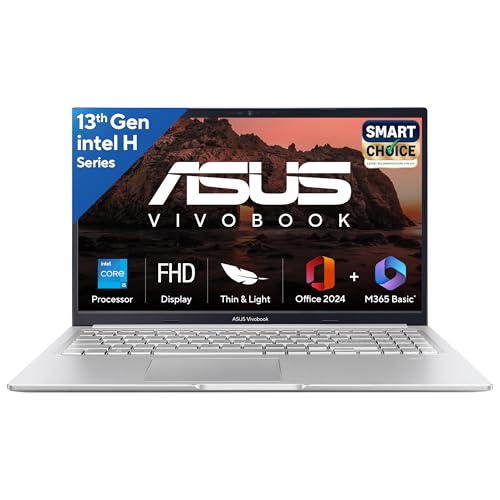
The ASUS Vivobook 15 with Core i5-13420H is a practical laptop for office users, college students, and home buyers who want fast day-to-day performance in a light chassis. It is a sensible fit for productivity work and media use.
Pros
- Core i5-13420H is strong for daily productivity
- 16GB RAM is enough for modern multitasking
- Lightweight design works well for travel and college
- Good set of ports for regular office use
Cons
- Intel UHD graphics are weak for gaming and heavy design work
- 60Hz panel feels basic compared to gaming laptops
- HDMI 1.4 is older than newer standards
- Battery size is average for a 15-inch laptop
The ASUS Vivobook 15 X1502VA-BQ835WS is a simple recommendation for buyers who need a no-nonsense laptop for everyday use. The Core i5-13420H is a capable H-series processor, which means this machine feels quicker than many low-power office laptops in app loading, spreadsheets, browser-heavy work, and general responsiveness. For students, remote workers, and family use, that extra CPU strength matters more than many people expect.
Because this laptop skips the dedicated GPU, it stays lighter and easier to carry than gaming options. At around 1.7kg, it is more suitable for trains, buses, office commutes, and campus use. The 16GB RAM and 512GB SSD setup is good for present-day needs, and the included Office Home 2024 package adds direct value for buyers who would otherwise spend separately on software. The privacy shutter on the webcam is a small but useful touch.
The limitations are clear too. Intel UHD graphics are fine for video playback, classes, office tasks, and basic image work, but not for modern gaming or heavy creative jobs. ASUS service support in India is decent in major areas, and Vivobook accessories are easy to source. If your goal is a reliable work-and-study machine with strong everyday speed, this model does the job without the extra heat and bulk of a gaming laptop.
Buying Guide
Choose your laptop by use first
Start with your real use case. If you play modern games, edit videos, work in 3D apps, or need GPU acceleration, choose a gaming laptop with dedicated NVIDIA graphics. If your day is mostly Office work, classes, coding, browsing, and streaming, a good productivity laptop with 16GB RAM is often the smarter buy. Many people spend extra on gaming hardware and then use the laptop for Excel, YouTube, and PDF files.
Processor matters more than flashy branding
Look at the exact CPU series, not only the brand name. Ryzen 7 7445HS and Core i7-13620H are strong chips for heavier workloads. Core i5-13420H is also a good option for productivity. Ryzen 7 5825U is older, but still fast for office and college tasks because of its 8-core design. H-series and HS-series processors usually give better sustained performance than low-power U-series chips, though they also draw more power and create more heat.
Pick the right graphics setup
A dedicated GPU changes the whole experience for gaming and creator work. RTX 4050 is a much better long-term choice than RTX 3050 if your budget allows. RTX 5060 sits at a higher level and suits demanding users. Integrated Radeon or Intel UHD graphics are enough for daily work, online classes, movies, and casual old games, but they are not meant for current AAA titles or serious GPU-heavy software.
Do not ignore the display
A laptop screen affects your experience every single day. For gaming, 144Hz refresh rate feels smoother and more responsive. For office and study use, a standard 60Hz panel is fine, but brightness and anti-glare coating still matter. In India, many users sit near windows, tube lights, or harsh indoor lighting. A 300 nits panel is more comfortable than a 250 nits one in those conditions. If you do photo or design work, color gamut also deserves attention.
RAM and SSD decide long-term comfort
In 2026, 16GB RAM should be your starting point for a mid-range laptop. It helps with multitasking, browser tabs, coding tools, and background apps. More RAM helps if you run virtual machines, edit large media files, or keep many heavy apps open. SSD size matters too. A 512GB drive fills fast once you install games, Adobe apps, project folders, and offline media. A 1TB SSD feels safer for long-term use.
Weight, battery, and charging affect daily life
A 2.2kg to 2.3kg gaming laptop feels fine on a desk, but not as friendly in daily travel. If you move around a lot for college or work, a 1.7kg class laptop is easier to carry. Battery size is another practical factor. Gaming laptops usually last less on battery than office laptops, especially with high-performance chips. In Indian conditions, where long commutes and occasional power cuts still happen, bigger batteries and fast charging are useful.
Check service support before buying
After-sales service matters more than many spec sheets suggest. HP usually has broad service coverage in India, which is reassuring for mainstream users. ASUS also has a decent presence, especially in cities and larger towns, and its popular laptop lines make accessories and parts easier to find. If you live outside a major metro, look up your nearest authorized service center before placing the order.
Feature Importance
| Feature | Importance |
|---|---|
| Processor performance | High |
| Dedicated GPU | High |
| RAM capacity | High |
| SSD storage | High |
| Display refresh rate | Medium |
| Display brightness | Medium |
| Battery capacity | Medium |
| Weight and portability | Medium |
| Upgrade options | High |
| Service network in India | High |