A 32-inch curved monitor feels like a big upgrade when you move from a small office screen or an old TV. You get more room for spreadsheets, timelines, browser tabs, games, and movies. The curved shape also helps on a screen this size, because the edges stay easier to view when you sit close. For many people in India, one big monitor works better than a dual-screen setup. Your desk stays cleaner and daily work feels less cramped.
When you choose a curved monitor, the main things to check are panel type, refresh rate, resolution, ports, brightness, eye-care modes, and stand adjustment. A Full HD panel looks fine for casual use on 32 inches, but text lovers and gamers who sit close often prefer QHD for better sharpness. Refresh rate matters too. A 75Hz or 100Hz screen feels smoother than a basic 60Hz panel, while 180Hz is meant for people who play fast games. HDMI count, wall-mount support, and speaker presence also matter more than most buyers expect.
In the Indian market, value for money matters more than fancy branding. Service support matters too, because a large monitor is not something you want to ship around often for repair. Heat, dust, and long daily usage are common realities in many homes and offices here, so brand support, panel reliability, and practical features matter a lot. Based on the products you shared, here are five 32-inch curved monitors worth checking out.
Zebronics ZEB-AC32FHD

This is a simple 32-inch curved monitor for office work, classes, movies, and casual gaming. It suits buyers who want a large screen with basic features and built-in speakers.
Pros
- Large 32-inch curved Full HD screen
- 75Hz refresh rate feels smoother than 60Hz
- Built-in speakers reduce extra clutter
- HDMI and VGA ports improve device support
Cons
- Full HD on 32 inches looks less sharp at close distance
- Brightness is modest for brightly lit rooms
- Built-in speakers are useful but not rich sounding
- Stand adjustments appear limited
The Zebronics ZEB-AC32FHD keeps things simple. You get a 32-inch curved panel with Full HD resolution, 16:9 aspect ratio, and 75Hz refresh rate. For office tasks, web browsing, YouTube, OTT content, and light gaming, this setup does the job without making the monitor feel sluggish. If you are moving from a small 22-inch or 24-inch display, the jump in screen area feels massive.
Its dual input setup with HDMI and VGA helps in Indian homes and small offices where older desktops still exist. That VGA port is still useful in many places, especially for older CPUs, CCTV setups, and backup systems. The built-in speakers are another practical touch. They are not meant for deep bass or cinema-grade sound, though they save desk space and work fine for classes, meetings, and casual video watching.
The weak point is pixel density. On a 32-inch screen, Full HD looks best when you sit a bit farther away. If you sit too close, text will not look as crisp as on a QHD panel. Even so, this Zebronics model has appeal for buyers who want a big curved screen without chasing gaming specs. Zebronics has decent reach in India in the affordable accessories and display segment, though service quality varies by city, so checking local support before purchase is a smart move.
LG 32MR50C

The LG 32MR50C is a balanced 32-inch curved monitor for work and entertainment. Its 100Hz refresh rate, eye-care features, and cleaner design make daily use more comfortable.
Pros
- 100Hz refresh rate gives smoother motion
- AMD FreeSync helps in casual gaming
- Flicker Safe and Reader Mode help during long sessions
- Dual HDMI ports offer better connectivity
Cons
- Full HD resolution is still limited for a 32-inch panel
- No height adjustment mentioned
- VA panel response is fine but not ideal for serious esports
- Color gamut is decent, not aimed at pro creators
LG has taken the safe and sensible route with the 32MR50C. This monitor targets users who split their time between work, study, movies, and some gaming. The 100Hz refresh rate is a nice step up from standard office displays. Scrolling feels cleaner, mouse movement looks more natural, and video playback gets a bit more fluid. For people who spend long hours in front of a screen, those small daily gains matter.
The screen uses a VA panel with Full HD resolution, 250 nits brightness, and wide viewing angles. LG also includes useful comfort features like Flicker Safe and Reader Mode. If your day includes Excel, PDFs, coding windows, online classes, or browsing late at night, these modes help reduce fatigue. You also get AMD FreeSync, Black Stabilizer, and Dynamic Action Sync, which make the monitor more friendly for story games and casual competitive titles.
What I like here is LG’s all-rounder approach. The 3-side borderless look keeps the monitor modern, and the two HDMI ports are handy if you switch between a PC and console or a laptop and streaming device. LG also has one of the more dependable service networks in India, especially in bigger cities. That gives extra peace of mind when you are buying a large display meant for daily use over many years.
Samsung S3 LS32D390GAWXXL
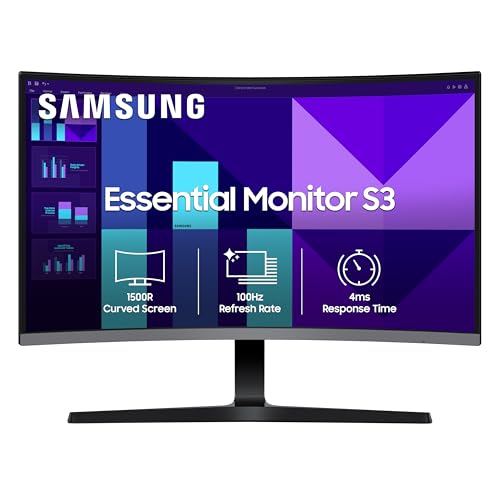
Samsung’s S3 curved monitor is a strong pick for users who want a trusted brand, 100Hz refresh rate, and a tighter 1500R curve for immersive viewing. It suits mixed use with some gaming on the side.
Pros
- 100Hz refresh rate with 4ms response time
- 1500R curve feels more immersive on a 32-inch screen
- Game Mode and Eye Saver Mode are useful extras
- 3-year manufacturer warranty adds confidence
Cons
- Full HD resolution limits text sharpness on a large panel
- Port selection is basic
- No mention of built-in speakers
- Stand ergonomics look modest
The Samsung S3 brings a few smart choices together. You get a 32-inch curved Full HD panel, 100Hz refresh rate, 4ms response time, and a 1500R curve. That tighter curve makes the screen feel a little more wrapped around your field of view than flatter curved designs. For movies, cricket streams, racing games, and long office sessions, the effect feels natural on a screen this large.
Samsung also adds practical software touches such as Game Mode, Eye Saver Mode, and reduced flicker support. These are the kind of features you start to value after weeks of use rather than on day one. Eye comfort matters if you work from home or study at night, and Game Mode helps improve visibility and response feel in fast scenes. The listed 95 percent sRGB coverage is a good sign for more pleasing colour output in daily use.
A big plus here is trust factor. Samsung has solid brand recall in India and a broad service network across metros and many tier-2 cities. The 3-year warranty is another point in its favour. If you want a monitor from a brand with good long-term confidence, and you are fine with Full HD on 32 inches, this model makes good sense.
LG UltraGear 32GS60QC

This is the performance pick of the group. With QHD resolution, 180Hz refresh rate, 1ms response time, and a 1000R curve, it suits gamers and power users who want a serious upgrade.
Pros
- QHD resolution looks much sharper on 32 inches
- 180Hz refresh rate is great for fast gaming
- 1ms response time improves motion clarity
- DisplayPort and dual HDMI give strong connectivity
Cons
- More demanding on your PC hardware
- No built-in speakers mentioned
- Tilt-only stand limits ergonomic flexibility
- VA panel tuning may still show some smearing in dark scenes
The LG UltraGear 32GS60QC sits in a different class from the other four monitors here. This one uses a 32-inch curved VA panel with 2560×1440 resolution, 180Hz refresh rate, 1ms response time, and a more aggressive 1000R curve. On a 32-inch screen, QHD is where text, game textures, and fine details start to look properly sharp. If you edit photos, manage large timelines, or play modern PC games, you will notice the upgrade quickly.
For gaming, LG has packed in the right set of features. AMD FreeSync helps reduce tearing, while Black Stabilizer, Crosshair, and Dynamic Action Sync improve gameplay feel in shooters and action titles. HDR10 support is also present, though you should treat this as a useful extra rather than a full HDR experience. The anti-glare coating helps in Indian rooms where overhead lights or daylight reflections often become a problem.
This monitor suits people who want one screen for both work and serious play. The high refresh rate is excellent, though your PC needs enough graphics power to make full use of it, especially at QHD. LG’s service support in India is one of the more reliable options in this category, and UltraGear products have built a good name among gamers. If your budget allows one meaningful jump, this is the model I would look at first.
Frontech Ultima MON-0081

The Frontech Ultima MON-0081 targets budget buyers who want a 32-inch curved screen with 100Hz refresh rate and a slim design. It works for basic productivity, streaming, and casual gaming.
Pros
- 100Hz refresh rate at an affordable level
- Slim bezel-light design looks clean
- VA panel usually offers good contrast for movies
- HDMI and VGA ports keep setup flexible
Cons
- Brand support is less proven than LG or Samsung
- Feature list is basic
- Full HD resolution is average for this screen size
- Detailed ergonomics and extra modes are not clearly listed
The Frontech Ultima MON-0081 focuses on size and simplicity. You get a 32-inch curved Full HD screen, 100Hz refresh rate, VA panel, and a thin design with minimal bezels. For someone who wants a bigger display for work calls, OTT content, YouTube, browsing, and entry-level gaming, this gives the core experience without too many extras.
The 100Hz refresh rate is the main attraction. A lot of budget buyers ignore refresh rate at first, then notice the difference once they use a smoother screen. For daily movement across apps and casual gameplay, the benefit is easy to feel. HDMI and VGA support also help when the monitor needs to connect to mixed old and new hardware, which is still common in India.
The main caution here is long-term confidence. Frontech is known in India for budget computer accessories, though its monitor reputation is not as settled as LG or Samsung. That does not make this a bad option, but I would pay extra attention to warranty terms, dead pixel policy, and local service access before buying. If your first target is a large curved display without stretching your wallet too far, this model deserves a look.
Buying Guide
Pick the right resolution for 32 inches
This is the first filter. A 32-inch screen is big, so resolution matters more here than on a 24-inch monitor. Full HD is fine for movies, office work from a slightly longer distance, and general home use. If you sit close to the screen, read a lot of text, edit photos, or want cleaner game visuals, QHD feels much better. On this list, the LG UltraGear 32GS60QC has a clear edge on sharpness.
Refresh rate changes daily experience
Many people think refresh rate matters only for gaming. That is not true. A 75Hz or 100Hz monitor feels smoother even when you scroll web pages, move windows, or work in documents. For casual users, 100Hz is a sweet spot. For fast competitive gaming, 180Hz is better if your PC is strong enough. If your laptop or desktop is old, paying for a high refresh monitor without enough graphics output makes less sense.
Check ports before you place the order
Ports cause avoidable headaches. Look at what your desktop, laptop, console, or streaming device uses. HDMI is standard now, but VGA still matters in older Indian office setups. Dual HDMI is useful when you switch between two sources often. DisplayPort is a big plus for high refresh gaming at higher resolutions. Also check whether the monitor has a headphone-out jack if you plan to plug in speakers or wired headphones.
Curve type and viewing distance matter
A curved screen works best when you sit centered and close enough to fill your field of view. On a 32-inch display, a stronger curve like 1000R or 1500R feels more immersive for gaming and movies. For spreadsheets or design work, some users prefer a gentler curve. If the monitor will be wall-mounted in a room where multiple people watch from different angles, the benefit of the curve becomes smaller.
Eye comfort is important for Indian homes and offices
Long work hours, tube lights, sunlight from side windows, and late-night study sessions all put strain on your eyes. Look for anti-glare coating, flicker reduction, and reader or eye-saver modes. These features sound small on paper, though they matter a lot if you spend six to ten hours in front of the display. Brightness also matters. In brighter rooms, a dim panel feels tiring to use.
Stand adjustment and wall mounting affect comfort
Many buyers focus on panel specs and ignore ergonomics. A 32-inch monitor takes real desk space, and poor height can lead to neck strain. Tilt adjustment is the bare minimum. Height adjustment is better, though many budget curved monitors skip it. Wall-mount support helps in tighter rooms and cleaner setups. Before buying, measure your desk depth too. A large curved screen placed too close can feel awkward.
Brand service and warranty should influence your choice
A monitor is a long-term purchase. If something goes wrong, after-sales support matters more than with a cheap keyboard or mouse. In India, LG and Samsung usually offer stronger service confidence across more cities. Budget brands may still offer good value, but support quality depends more on your location. Check warranty length, replacement process, and whether your city has an authorised service centre.
Feature Importance
| Feature | Importance |
|---|---|
| Resolution | High |
| Refresh Rate | High |
| Panel Type | High |
| Ports and Connectivity | High |
| Eye-care Features | High |
| Stand Ergonomics | Medium |
| Curvature | Medium |
| Built-in Speakers | Low |
| Brand Service Network | High |
| Wall Mount Support | Medium |