


Quick answer: my top pick here is HP 15 fc0761AU Ryzen 7. This HP 15 offers a balanced package for office work, study, coding, and home use. Also in this guide: Lenovo V15 Ryzen 7 7730U, Dell 15 Ryzen 7 7730U, ASUS TUF A15 FA506NCQ-HN006W, Lenovo V15 Ryzen 7 7730U Grey.
A Ryzen 7 laptop suits buyers who need strong everyday speed without moving straight to a high-end workstation. These laptops handle office work, coding, many browser tabs, light photo work, video calls, and entry-level gaming with ease. The five models here pair Ryzen 7 processors with 16GB memory and 512GB SSD storage, giving you a useful starting point for work and study in India.
Your choice should depend on more than processor branding. Check the screen refresh rate, panel quality, graphics hardware, upgrade options, battery size, port selection, keyboard, weight, and warranty access. Indian buyers should also consider heat, dust, power cuts, travel needs, and the availability of authorised service centres. The listed models cover a budget from ₹59,490 to ₹74,990, so your use case matters more than a small difference in specification.
HP 15 fc0761AU Ryzen 7

This HP 15 offers a balanced package for office work, study, coding, and home use. A 1080p webcam with a privacy shutter and a backlit keyboard add value for hybrid work.
Pros
- Ryzen 7 7730U with 16GB RAM and a 512GB PCIe Gen4 SSD
- 1080p webcam with privacy shutter
- Backlit keyboard with a numeric keypad
- Wi-Fi 6, Bluetooth 5.4, and fast charging support
Cons
- The 250-nit display suits indoor use better than bright outdoor spaces
- The USB-C port handles data transfer only
- Single 16GB memory module limits dual-channel memory performance
- 41Wh battery is smaller than some competing options
The HP 15 fc0761AU focuses on the needs of students, office users, and home professionals. The Ryzen 7 7730U uses eight cores and sixteen threads, while 16GB DDR4 memory keeps large spreadsheets, browser tabs, video calls, and document work comfortable. The 512GB PCIe Gen4 SSD gives Windows 11 and applications quick load times. Office Home 2024 and a one-year Microsoft 365 Basic plan add useful software value for buyers who want a ready-to-use machine.
Its 15.6-inch Full HD anti-glare screen has narrow bezels, though the 250-nit brightness and 45% NTSC coverage suit indoor desks more than colour-sensitive work. The 1080p camera helps during meetings, and the privacy shutter offers a simple layer of control. HP has a broad service presence across Indian cities, with online support and warranty registration through the invoice. Check local centre access before purchase, especially in smaller towns.
Lenovo V15 Ryzen 7 7730U

This Lenovo V15 is a practical office and study laptop with a roomy 15.6-inch screen, 180-degree hinge, and bundled lifetime Office licence. Its thin body works well for desk-to-classroom travel.
Pros
- Ryzen 7 7730U, 16GB DDR4 RAM, and 512GB SSD
- 180-degree hinge for flexible desk use
- Rapid Charge support with up to 80% charge in one hour
- Thin design with a numeric keypad
Cons
- 250-nit screen is modest for outdoor use
- 38Wh battery is relatively small
- Integrated graphics suit casual games rather than demanding titles
- The listed configuration offers fewer clearly stated premium extras
The Lenovo V15 targets buyers who value dependable office performance and a familiar large-screen layout. Its Ryzen 7 7730U handles spreadsheets, accounting software, programming tools, presentations, and regular multitasking well. The 16GB RAM and 512GB SSD reduce the need for an immediate upgrade. Windows 11 Home and lifetime validity for the bundled Microsoft Office package also help students and small businesses control software costs.
A 180-degree hinge helps during group work, quick presentations, or comfortable screen positioning. Lenovo lists battery life of up to 8.7 hours under MobileMark testing, though real use in Indian heat, video calls, and high brightness will produce lower figures. Lenovo has a wide Indian service network and useful online driver support. Before ordering, check the service location near your home and confirm the warranty terms for this exact configuration.
Dell 15 Ryzen 7 7730U
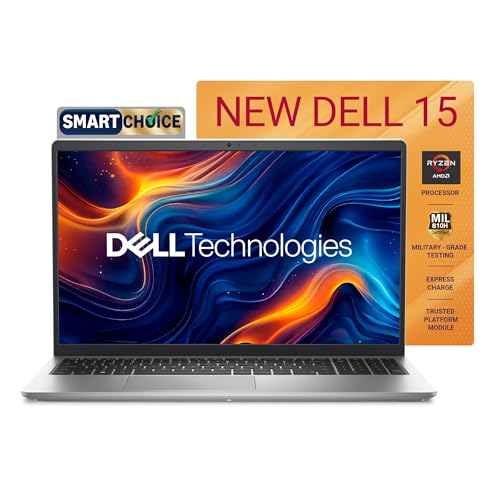
The Dell 15 stands out with a 120Hz display at a lower entry point than the other general-purpose models here. It suits office users who also want smoother scrolling and casual gaming.
Pros
- 120Hz Full HD WVA display
- Ryzen 7 7730U with 16GB RAM and 512GB SSD
- Office Home and Student 2024 included
- SD card slot, HDMI, USB-C, and two USB-A ports
Cons
- The 250-nit panel is not ideal for strong sunlight
- USB-C is listed for data use and lacks broad expansion features
- Standard keyboard has fewer comfort extras
- Memory uses one 16GB module
Dell’s 15-inch model gives everyday users a useful screen advantage. The 120Hz refresh rate makes scrolling, window movement, and supported games look smoother than a standard 60Hz panel. Its Ryzen 7 7730U, 16GB DDR4 memory, and 512GB SSD form a sensible combination for office work, coding, online classes, and moderate creative tasks. Integrated Radeon graphics handle casual games, media playback, and light editing rather than demanding modern games.
The port selection covers common home and office needs, including HDMI, an SD card slot, USB-A, USB-C, and a headset jack. Microsoft Office Home and Student 2024, Windows 11, and a one-year McAfee subscription add practical value. Dell has a strong service and spare-parts network in India, with remote diagnostics through its support channels. Confirm the warranty duration and doorstep service terms for your pin code before placing an order.
ASUS TUF A15 FA506NCQ-HN006W
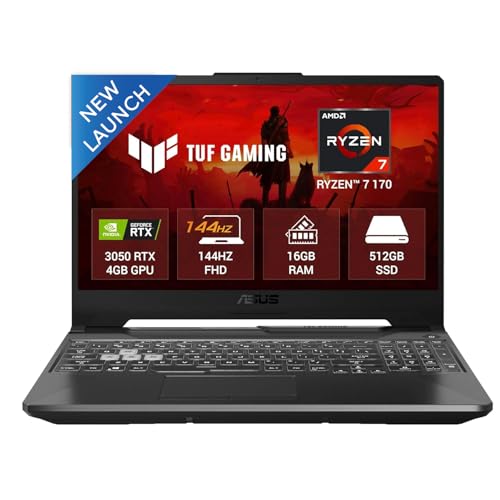
This ASUS TUF A15 is the gaming pick in the group. Its RTX 3050 graphics card, 144Hz screen, DDR5 memory, and wide port selection suit gaming, 3D work, and GPU-assisted applications.
Pros
- Dedicated RTX 3050 4GB graphics with up to 75W Dynamic Boost
- 144Hz anti-glare Full HD display
- 16GB DDR5 RAM with upgrade support
- USB-C DisplayPort, HDMI 2.1, LAN, and three USB-A ports
Cons
- Weighs 2.3kg before adding the charger
- 720p webcam is basic for frequent meetings
- 48Wh battery is modest for a gaming laptop
- The 250-nit display has limited outdoor brightness
The ASUS TUF A15 changes the buying decision from simple office speed to graphics performance. Its Ryzen 7 170 processor, 16GB DDR5 RAM, and RTX 3050 GPU give the laptop a clear edge for esports titles, older AAA games, 3D software, and GPU-assisted editing. The 144Hz screen suits fast games, while the anti-glare coating helps in rooms with overhead lighting. The RTX 3050 has 4GB GDDR6 memory, so newer demanding games need sensible texture and quality settings.
The sturdy TUF format brings extra weight, yet the port selection is strong for a desktop replacement. A wired LAN port helps reduce latency, and USB-C DisplayPort supports an external monitor setup. ASUS has broad Indian service coverage, with authorised centres in many major cities. Ask about service access in your area and use a cooling stand during long gaming sessions, especially in hot summer rooms. Keep the air vents clear of dust for stable sustained performance.
Lenovo V15 Ryzen 7 7730U Grey

This second Lenovo V15 configuration offers the same core processor and memory class with a more complete port list. A privacy shutter, spill-resistant keyboard, USB-C Power Delivery, and DisplayPort support suit work from home and office use.
Pros
- Ryzen 7 7730U, 16GB DDR4 RAM, and 512GB SSD
- USB-C supports Power Delivery and DisplayPort 1.2
- Privacy shutter and spill-resistant keyboard
- RJ-45 Ethernet port and numeric keypad
Cons
- Display brightness is limited to 250 nits
- Integrated Radeon graphics are meant for light graphics work
- The battery capacity is not stated in the supplied listing
- No bundled Office licence is stated in the supplied listing
This V15 configuration works well for buyers who want practical connectivity. The USB-C port supports data transfer, Power Delivery 3.0, and DisplayPort 1.2, giving you more flexibility with docks and compatible monitors than the first Lenovo configuration. An Ethernet port helps in offices and homes with unstable Wi-Fi. The Ryzen 7 7730U, 16GB RAM, and 512GB SSD handle daily workloads with little fuss.
Lenovo adds useful details for regular work use, including a 720p camera with privacy shutter, dual microphones, a spill-resistant keyboard, and a numeric keypad. These touches matter during online classes, billing work, and long typing sessions. Lenovo’s service network in India is broad, though response quality differs by city. Save your invoice and verify the serial number after delivery so warranty support starts without delay.
Buying Guide
Set a sensible budget
The supplied listings span ₹59,490 to ₹74,990. The Dell model gives the lowest entry point and adds a 120Hz screen, while the ASUS model asks for more because of its RTX 3050 graphics and gaming hardware. HP and Lenovo sit in the mainstream productivity group. Keep part of your budget for a laptop stand, surge protector, mouse, or extended warranty if your work depends on the machine.
Pick the right processor and memory
Ryzen 7 7730U models use eight cores and sixteen threads, which suits office work, coding, study, and moderate editing. The ASUS model uses a newer listed Ryzen 7 170 configuration with DDR5 memory and a dedicated GPU. Sixteen gigabytes of RAM is a good starting point in 2025. A single memory module works, though two matched modules often improve integrated graphics performance.
Choose graphics based on your work
Integrated Radeon graphics suit streaming, presentations, light photo edits, and casual games. The ASUS TUF A15 is the only model here with an RTX 3050, so choose it for gaming, 3D applications, or software that benefits from a dedicated GPU. Check game requirements before purchase because 4GB VRAM needs sensible graphics settings in newer titles.
Check the screen before ordering
All five laptops offer a 15.6-inch Full HD anti-glare panel with 250-nit brightness. This works well in an indoor room, classroom, or office. Dell adds a 120Hz refresh rate for smoother motion. Buyers doing colour-sensitive design work should look for a wider colour gamut and higher brightness instead of relying on resolution alone.
Review ports and desk setup
Port details differ between models. The second Lenovo V15 configuration lists USB-C Power Delivery and DisplayPort, while the HP and Dell listings specify data-focused USB-C ports. ASUS offers the widest set, including LAN, HDMI 2.1, USB-C DisplayPort, and three USB-A ports. Count your accessories before buying, especially if you use an external monitor, wired network, printer, or SD card.
Plan for Indian heat and dust
Office laptops with integrated graphics usually create less heat during daily work. The ASUS gaming model needs more airflow during long sessions. Keep vents away from beds and cushions, clean dust from the intake area, and use a stand on hot days. Avoid leaving any laptop inside a parked car, since cabin heat harms batteries and screen parts.
Check warranty and service access
HP, Dell, Lenovo, and ASUS have established service channels in India, but centre access differs by pin code. Confirm the warranty period, doorstep terms, accidental damage coverage, and paid repair rates. Record the serial number, keep the invoice, and test the screen, keyboard, ports, camera, Wi-Fi, and battery during the return window.


