


A good mechanical keyboard changes your daily computer use more than most people expect. Whether you play late-night Valorant, type for office work, edit spreadsheets, or switch between a laptop and tablet, the right keyboard makes your desk feel better in minutes. Better switches, cleaner key travel, faster response, and solid wireless support matter a lot when you use a keyboard for hours every day.
For Indian buyers, the buying decision is not only about looks or RGB. You need to think about layout size, switch type, wireless stability, battery life, hot-swap support, noise level, and brand support after purchase. Heat, dust, and long daily use also matter here, especially if your room is not always air-conditioned. A compact keyboard feels great on smaller desks, but some users still need arrow keys, function access, or a volume knob.
I have picked five models from your list that cover different needs, from compact 68-key options to fuller gaming-focused boards with knobs, software support, and better acoustics. If your budget is tight, value for money matters more than fancy claims. The sweet spot in India right now is a keyboard that gives you stable wireless modes, decent switches, and service support you can trust without making your setup too expensive.
EvoFox Katana S Mini

A compact 68-key tri-mode mechanical keyboard for gamers and casual users who want wireless freedom, hot-swappable switches, and a desk-friendly size.
Pros
- Tri-mode support with Bluetooth, 2.4GHz, and wired connection
- Hot-swappable red switches add flexibility for future upgrades
- 1000Hz polling rate in wired and 2.4GHz modes suits gaming
- Lightweight 68-key layout fits small desks well
Cons
- Compact layout needs time to learn for first-time users
- ABS body feels less premium than heavier keyboards
- Rainbow lighting is less customizable than per-key RGB
- Smaller battery size than some larger rivals
The EvoFox Katana S Mini is built for people who want a neat desk and less cable clutter. Its 68-key layout keeps the arrow keys while cutting extra bulk, so you get a smaller keyboard without going too extreme. For students, hostel users, or anyone working on a compact table, this size feels practical. The tri-mode connection also makes daily use easier. You can move between a laptop, tablet, and desktop without keeping multiple keyboards around.
Its Jixian red switches focus on smooth keypresses and lower noise, which works well for both gaming and regular typing. Hot-swap support is a big plus in this segment because you are not locked into one switch feel forever. The 1000Hz polling rate in wired and 2.4GHz mode gives quicker input response, which matters more in competitive games than many people think. All-key anti-ghosting also helps when your key combinations get hectic during matches.
For Indian users, this board makes sense because it keeps things simple. You get onboard shortcuts, rechargeable wireless use, and enough lighting effects for a fun setup. EvoFox has built a decent name in the affordable gaming accessories space, and service reach is usually better than random no-name imports sold online. If you want a compact wireless mechanical keyboard without getting into expensive enthusiast gear, this one is a sensible starting point.
EvoFox Katana X2 TKL

A tenkeyless wireless gaming keyboard with silent red switches, a large battery, and a volume knob, suited for buyers who want gaming speed with a more usable layout.
Pros
- TKL layout offers more keys without taking too much desk space
- Silent pre-lubed Huano red switches suit shared rooms
- 4000mAh battery is strong for wireless use
- Dedicated volume knob improves daily convenience
Cons
- No numpad for users who work with heavy data entry
- Larger size than 68-key boards reduces portability
- Backlighting is onboard but not deeply software driven
- Silent switches feel less tactile for users who like clicky feedback
The EvoFox Katana X2 TKL sits in a sweet spot for many buyers. A tenkeyless layout gives you proper spacing, function row access, and a more familiar typing feel than ultra-compact boards. At the same time, you still save desk space compared to a full-size keyboard. If you play shooters and want more room for mouse movement, this layout works well. The added volume knob is one of those small touches you start using every day once it is there.
This model also stands out because of its silent Huano red switches and 4000mAh battery. The quieter switch profile makes a difference if you share a room, work near family, or attend long office calls. Pre-lubed switches also help the keyboard feel smoother out of the box. On the gaming side, the 1000Hz polling rate keeps response quick in both wired and wireless use, so you are not forced to plug in every time you want better speed.
For Indian homes, noise control and battery life matter a lot, and this keyboard handles both points well. Fast Type-C charging is useful during long work weeks or gaming weekends. EvoFox also has better recall value in the budget gaming accessory market than many sellers who vanish after a few months. If you want one keyboard for work, play, and regular media control, the Katana X2 TKL is one of the most rounded picks here.
EvoFox Katana X2 FS
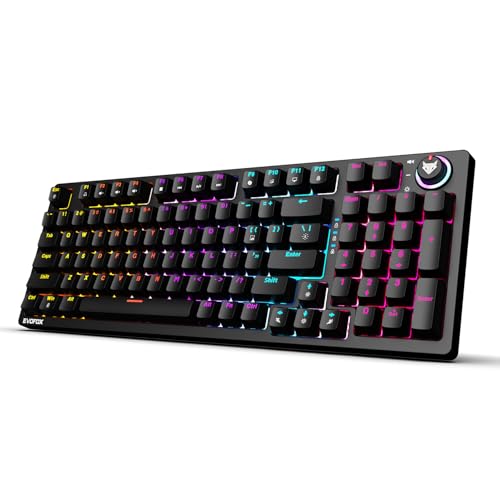
A full-size wired mechanical gaming keyboard with clicky blue switches, hot-swappable support, and a volume knob, made for buyers who want loud tactile feedback and a familiar layout.
Pros
- Full-size layout is easy for most users to adapt to
- Clicky blue switches give sharp tactile feedback
- 3-pin hot-swap support adds long-term flexibility
- Dedicated knob and shortcut keys improve convenience
Cons
- Blue switches are noisy for shared spaces
- Wired-only design offers less desk freedom
- Larger footprint needs more desk space
- Backlighting options are fewer than some rivals
The EvoFox Katana X2 FS is for people who enjoy the classic mechanical keyboard feel. The clicky blue switches give a distinct bump and sound on each press, which many typists still love. If you write a lot, enjoy strong tactile feedback, or simply want a keyboard that feels lively under the fingers, this one has a clear identity. The full-size layout also keeps things easy. You get the number pad, familiar spacing, and less adjustment time.
Its multi-function knob and shortcut keys add practical value beyond gaming. Volume control, brightness changes, screenshot access, and game bar shortcuts are useful in daily use, not only during matches. The 3-pin replaceable switch support is another strong point because it adds repair and customization potential later. If one switch starts acting up after heavy use, you have more options than with a fixed board.
For Indian users buying their first mechanical keyboard, this model feels approachable because the layout is familiar and the feature set is straightforward. The main thing to know is the noise. Blue switches are fun, but they are not roommate-friendly. EvoFox service presence again helps here, since after-sales support is easier to trust than generic imported wired boards. If you want a keyboard with strong typing character and no learning curve in layout, this one fits well.
Portronics Hydra 10

A compact wireless mechanical keyboard with Bluetooth and 2.4GHz support, red switches, and broad device compatibility, aimed at multi-device users and casual gamers.
Pros
- Works with PCs, laptops, tablets, and phones
- Supports up to four paired devices for easy switching
- Compact TKL-style 68-key body suits travel and small desks
- Type-C charging with wired-use option is practical
Cons
- Build and switch feel are more basic than premium boards
- Battery claims vary by usage and lighting mode
- Compact layout reduces dedicated key access
- Brand focuses more on mass-market accessories than enthusiast keyboards
The Portronics Hydra 10 is a simple, flexible keyboard for buyers who move between devices all day. If your setup includes a work laptop, home PC, and maybe a tablet, the easy switching feature makes life smoother. Bluetooth and 2.4GHz support give you freedom, and the keyboard is light enough to carry without turning your bag into a gym session. Its compact body also suits Indian study tables and office corners where every inch matters.
Red switches keep the typing feel smooth and lighter, which is good for long hours of use. Anti-ghosting support gives it enough credibility for gaming too, especially for casual and mid-level players who want a mechanical feel without getting into enthusiast-level boards. The lighting options are decent for the segment, and wired use while charging is a useful touch. That matters during busy days when you do not want to stop and wait for a battery top-up.
Portronics has one clear advantage in India, brand familiarity and wide availability. Many buyers feel more comfortable with a brand they have already seen across local online stores and electronics listings. Service support is usually easier to access than obscure imports, though the keyboard itself is more mainstream than hobbyist-focused. If you want a compact wireless mechanical keyboard for mixed work and entertainment, the Hydra 10 is an easy option to shortlist.
EvoFox Ronin

A feature-rich tri-mode wireless keyboard with gasket mount design, sound dampening, hot-swappable red switches, and software support for buyers who want a more refined experience.
Pros
- Gasket mount and 9-layer structure improve typing feel and sound
- Hot-swappable silent red switches add customization freedom
- Tri-mode support with up to five devices is highly versatile
- Per-key RGB and software support offer deeper control
Cons
- Windows software focus limits customization on other platforms
- Feature-rich design may feel excessive for casual buyers
- White finish needs more regular cleaning in dusty rooms
- Learning macros and software settings takes some time
The EvoFox Ronin is the most enthusiast-style keyboard in this list. Its gasket mount build and layered internal structure aim to improve sound and soften the typing feel, which makes a real difference if you spend long hours at your desk. This is the kind of keyboard you notice even during ordinary tasks like mail, documents, or chat. The board feels more thought-out than entry-level mechanical options, especially for buyers who care about acoustics and switch feel.
The silent Outemu red switches, hot-swap support, and tri-mode connectivity make it flexible on many fronts. You can use it wirelessly with multiple devices, shift to 2.4GHz for gaming, or plug in with the detachable Type-C cable when needed. Per-key RGB and onboard memory also add depth for users who like custom profiles and macros. The 1000Hz polling rate keeps response sharp enough for serious gaming sessions too.
For Indian buyers, the Ronin has one strong appeal, it gives you many enthusiast-style features without pushing you into imported custom keyboard territory. The Windows software support is useful for people who like control over keys and lighting, and the volume controller adds everyday comfort. EvoFox also has a growing image in gaming accessories, with service support more reachable than boutique brands. If you want a keyboard that feels more premium in sound, structure, and tuning options, this is the most advanced pick in this list.
Buying Guide
1. Pick the right layout first
Layout changes your daily experience more than RGB or switch marketing. A 68-key board saves space and looks clean, but you will rely more on function layers. A TKL board keeps the function row and feels easier for most users. A full-size board suits office work, number-heavy tasks, and buyers who do not want any adjustment period. Before buying, check your desk size and think about how often you use arrow keys, F keys, and numpad input.
2. Choose switches based on your room and work style
Red switches suit most people because they feel smooth and stay quieter. They work well for gaming and long typing sessions. Blue switches give stronger feedback and a click sound, which some users love, but they are loud. In Indian homes where you often share a room or work near family, noise becomes a real issue. Silent or red switch boards are usually the safer pick for mixed use.
3. Wireless mode matters more than brands claim
If you are buying a wireless mechanical keyboard, look at connection types carefully. Bluetooth is useful for tablets, phones, and casual use. A 2.4GHz dongle is better for gaming because response stays quicker and more stable. Wired mode is still useful when the battery runs low or when you want zero charging worries. Tri-mode keyboards give the best flexibility if you switch devices often.
4. Battery life depends on lighting and usage
Big battery numbers look nice on paper, but your real backup depends on RGB brightness, connection mode, and daily hours of use. If you keep lighting on all the time, expect shorter runtime. A keyboard with Type-C charging and wired-use support is safer for Indian users dealing with long workdays, gaming weekends, or sudden power cuts. Fast charging also makes a difference if you forget to top up regularly.
5. Hot-swap support is worth paying attention to
A hot-swappable keyboard lets you replace switches without soldering. This is useful if a key starts failing, if you want to change the switch feel later, or if you like trying different switch types. In India, this matters because spare parts and repair options are not always simple for niche keyboards. Hot-swap support gives you more long-term flexibility and helps your keyboard stay useful for longer.
6. Build quality and acoustics affect long-term comfort
Many buyers focus only on specs, but the case material, internal dampening, feet grip, and plate design change how a keyboard feels every day. A better-built keyboard sounds less hollow, moves less on the desk, and feels more stable during long sessions. Dust is also a factor in Indian conditions, so dustproof switches or easier cleaning help. If your room gets warm and dusty often, build quality becomes more important over time.
7. Check software, shortcuts, and daily convenience
Some keyboards work fully from onboard shortcuts, while others depend on software for macros, lighting, and remapping. If you want plug-and-play use across many devices, onboard controls are easier. If you like custom keybinds and profile management, software support matters. Small extras like a volume knob, screenshot key, or media shortcuts sound minor, but you end up using them daily.
8. After-sales support in India should not be ignored
Mechanical keyboards are more durable than membrane boards, but switches, batteries, dongles, and cables still fail sometimes. Buying from a brand with known presence in India gives peace of mind. You should check warranty terms, seller reliability, and ease of getting replacement help. A keyboard with decent service support often gives better value than a feature-loaded model from a seller you cannot reach later.
Feature Importance
| Feature | Importance |
|---|---|
| Layout size | High |
| Switch type | High |
| Wireless connectivity options | High |
| Battery life | High |
| Polling rate | Medium |
| Hot-swap support | Medium |
| Build quality | High |
| Software and macro support | Medium |
| Backlighting | Low |
| Warranty and service in India | High |


